 NexAIX-官方博客
If you're working on a multi-file refactoring task, an Agent workflow that needs over a dozen consecutive tool calls to converge, or a technical spec of hundreds of thousands of tokens requiring cross-chapter comparison, Grok 4.5 deserves a spot on your shortlist. But if you're only doing single-step tasks like intent classification, short text rewriting, or structured extraction, its reasoning overhead will cost you latency with no return.
Let's clarify the selection criteria first, then cover how to integrate, tune, and verify it.
What Tasks Suit It
Grok 4.5 is a closed-source flagship MoE model jointly released by xAI and Cursor. Its training data emphasizes real code sessions and STEM knowledge, officially positioned for engineering reasoning and Agent workflows. On benchmarks like SWE-bench and Terminal Bench that closely mirror real development, it matches or surpasses previous generations.
From an engineering perspective, three characteristics directly affect your choice:
High single-step resolution, fewer loops. One point officially emphasized is reducing meaningless repetitive calls. In Agent scenarios, this matters more than single-call latency—the difference in total time and cost between converging in 4 rounds versus 12 rounds is far greater than the few extra seconds of thinking per round. So when evaluating it, don't just look at first-token latency; look at the total number of rounds to complete an entire task end-to-end.
Native 500K context. You can directly stuff an entire repository's relevant directories, complete API specs, or several long reports together for cross-step analysis without a preliminary retrieval slicing round. Note this is the model-side capability; front-end platforms may not open it up to this number—Cursor's initial integration window is 256K. Your actual usable limit when calling the API depends on the calling platform's model page specifications.
Generation rate around 80 TPS, but with a pre-thinking phase. Streaming token output is fast, but the issue is before the first token: when high reasoning tiers are enabled, the model consumes a thinking period first. This is the main conflict in the timeout configuration section later.
Conversely, when not to choose it: high-concurrency short requests, real-time completion sensitive to first-token latency, and tasks where correctness is obvious at a glance and doesn't require reasoning. For these scenarios, lightweight models offer significantly better cost-performance.
First Call: Change One Line of base_url
Grok 4.5 follows the standard Chat Completions protocol, POST /v1/chat/completions, and the request body and response structure match the OpenAI format. This means if you just change base_url and api_key in your existing code, and swap the model name to the corresponding identifier, it will work.
from openai import OpenAI

client = OpenAI(
    api_key="你的 Key",
    base_url="https://api.nexaix.net/v1",
    timeout=600.0,  # 见下文超时说明
)

resp = client.chat.completions.create(
    model="grok-4.5",
    messages=[
        {"role": "system", "content": "你是资深后端工程师,只输出可运行代码和必要说明。"},
        {"role": "user", "content": "把这段同步 HTTP 客户端改成带连接池的异步版本,保留原有重试语义。"},
    ],
    stream=True,
)

for chunk in resp:
    delta = chunk.choices[0].delta
    if delta.content:
        print(delta.content, end="", flush=True)
There's a pitfall with model identifiers: different platforms may use different aliases for the same model, with inconsistent suffixes like -reasoning or -latest. Hardcoding them can easily cause 404s when switching channels. Before integration, check the model page for the exact call name, context limit, and rate quota. NexAIX's model list indicates each model's supply type on its page—open-weight models deployed on owned compute clusters, closed-source models via official vendor authorization channels. Grok 4.5 falls into the latter. The endpoint is OpenAI-compatible https://api.nexaix.net/v1; migration only requires changing the base_url line, leaving all other code untouched.
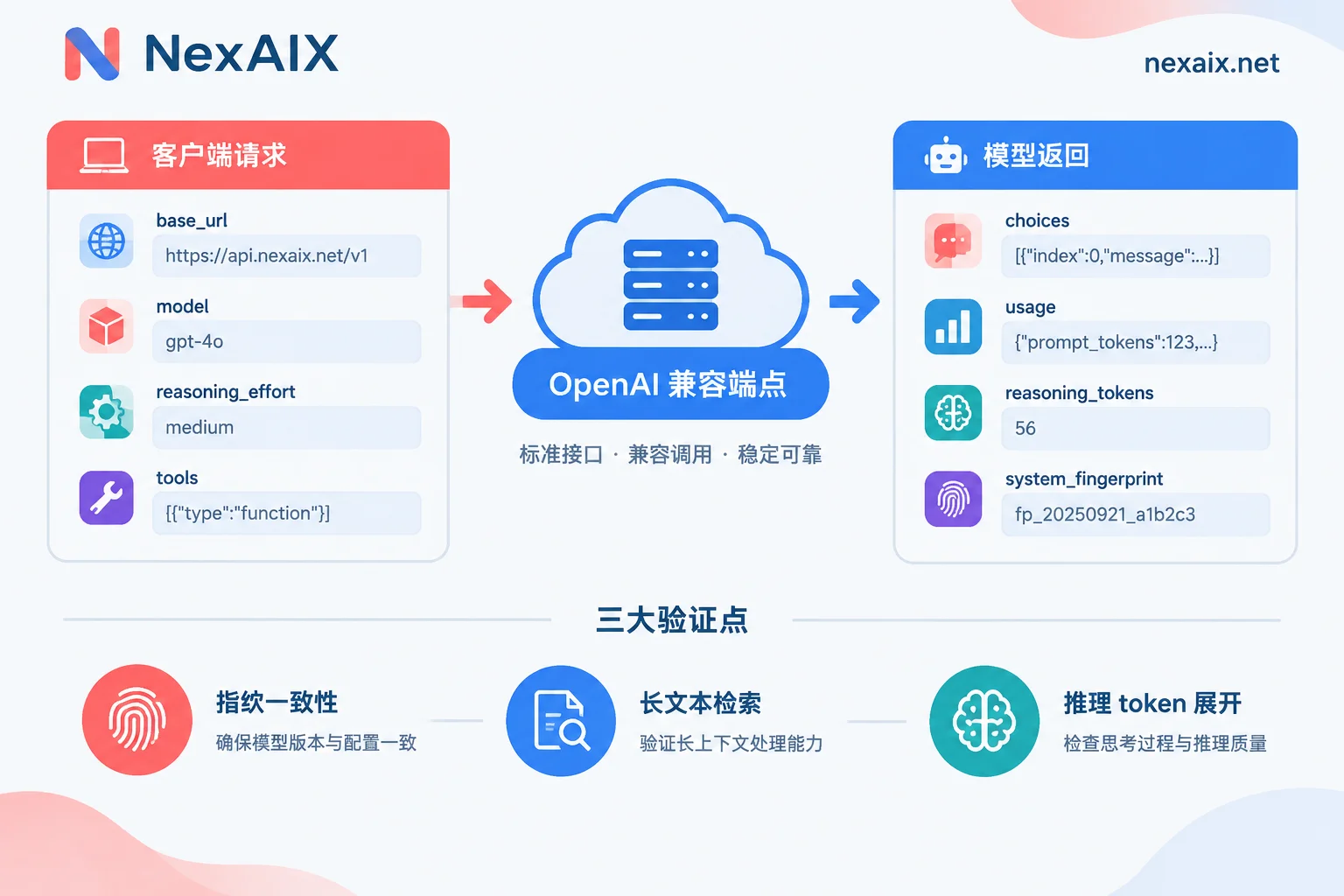
Reasoning Tiers, Tool Calling, and Return Fields
reasoning_effort is the most worthwhile parameter to tune on this model, typically with low/medium/high tiers. The decision criteria are straightforward:
- Tasks with clear answers and one-step resolution (format conversion, single-function rewrite) → low, minimize latency.
- Tasks requiring weighing multiple approaches with cross-file dependencies → medium, the default for most coding tasks.
- Complex algorithm design, long-chain derivation, self-verification scenarios → high, accept longer first-token waits.
Don't default to high across the board. Reasoning tokens are billable, and high tiers don't necessarily yield better answers on simple tasks—just longer thinking. A sensible approach is to tier by request type, mapping task tags to different effort levels at the gateway layer.
Tool calling uses the native tools and tool_choice fields, with a format consistent with OpenAI Function Calling:
tools = [{
    "type": "function",
    "function": {
        "name": "run_tests",
        "description": "在沙箱中运行指定测试文件并返回结果",
        "parameters": {
            "type": "object",
            "properties": {"path": {"type": "string"}},
            "required": ["path"],
        },
    },
}]

resp = client.chat.completions.create(
    model="grok-4.5",
    messages=messages,
    tools=tools,
    tool_choice="auto",
    reasoning_effort="medium",
)
Structured outputs are also supported. For scenarios requiring stable JSON, prefer using them over repeatedly instructing "return only JSON" in the prompt.
Return fields—besides the usual choices and usage, pay attention to usage.completion_tokens_details.reasoning_tokens. This is the number of tokens consumed by the reasoning portion, both a cost item and a key metric for later downgrade verification. When doing cost accounting, track it separately from completion_tokens so you can see which task types are burning reasoning budget.
If your Agent framework needs to pass reasoning chains back upstream for display or auditing, note that conventions for this field vary across models. For details, refer to Handling of reasoning chain return and reasoning tiers.
Timeouts, Truncation, and First-Token Latency
This is the most common pitfall when deploying Grok 4.5, typically manifesting as 504s or responses mysteriously cutting off.
Client timeouts need to be relaxed. Default SDK timeouts often sit around 60 seconds, but high-tier reasoning plus long context can exceed that during the thinking phase alone. Non-streaming calls are especially risky—no data flows on the connection during that entire period. Set timeouts to the minute level and distinguish between connection timeout and read timeout.
Intermediate buffering kills streaming. If you have Nginx or a similar proxy in front of your service, default response buffering will accumulate SSE into a block before flushing, making first-token latency look as bad as non-streaming. You need to disable proxy buffering for the relevant path and ensure no ultra-short gateway timeout is applied to long reasoning requests. For streaming link troubleshooting details, see Common causes of SSE parsing and proxy stalls.
Always enable stream for interactive scenarios. Even if the model doesn't emit tokens during its thinking phase, a streaming connection lets you detect anomalies earlier rather than waiting until timeout to learn of failure. Also, give the thinking phase a clear status in the UI—don't leave users staring at a blank screen.
Distinguish two sources of output truncation. One is max_tokens set too small, where finish_reason will be length; the other is a gateway or proxy cutting the stream midway, usually without a normal finish event. The former is a parameter tweak, the latter a link check—completely different handling.
Cost Control for Long Context and Agent Loops
Being able to use a 500K window doesn't mean you should max it out every time. After multi-round Agent runs, context balloons rapidly with tool return results, and once it crosses a certain threshold, both latency and cost rise noticeably. A few practically effective practices:
- Trim tool results. For content like test outputs, logs, and API returns, keep only the parts needed for judgment before feeding back—don't stuff entire blocks back in.
- Leverage prompt caching. Place system prompts, project specs, and long-term stable code context at the front of the message sequence and keep them byte-stable. The longer the reusable prefix, the greater the benefit on repeated calls. Any tiny change (even adding a timestamp) invalidates the cache.
- Set dual thresholds for rounds and context. Add a hard cap in the Agent loop; when exceeded, force-summarize and compress the current state before continuing, preventing a runaway task from pushing context to extreme lengths.
Long-range task context management strategies share principles with tuning approaches for long-context models; you can reference them to build your own compression logic.
Rate Limiting and Retries
Settle this before production—much easier than patching after problems arise.
- For 429s, read
Retry-Afterfirst; if present, wait accordingly, otherwise use exponential backoff with jitter. For how long to wait, refer to judging backoff duration. - 5xx and network errors are retryable; 400-class parameter errors and context overflow are pointless to retry—throw them directly.
- After a streaming request interruption, don't blindly restart from scratch. Long reasoning tasks are costly to rerun; first determine if the received content can be continued. For the complete decision table, see which errors to retry and what to do with streaming interruptions.
- Split keys by purpose—separate production traffic from batch jobs and internal debugging so one saturated link doesn't drag down another. NexAIX isolates by API key, each with independent quotas, permissions, and usage billing; quotas and rate limits are publicly visible on model pages.
How to Verify You're Actually Getting Grok 4.5
With closed-source models, whether via official channels or intermediaries, you can't see the weights directly—only infer from behavioral characteristics. Three methods can be combined:
1. Fingerprint consistency. Record system_fingerprint from the response object, and issue the same request at different times and with different keys. Under the same model version, this value should be stable; if it changes frequently without any announcement, or differs across keys, it's worth questioning.
2. Long-context boundary retrieval. Construct a text near the platform's advertised limit, embed an unrelated fact (needle in a haystack) at the beginning, middle, and end, then query each separately. Services with cut context will either fail outright or give irrelevant answers beyond the actual window. This is the most direct way to test for "context cutting"—write it as a script and run it periodically.
3. Reasoning token expansion behavior. Give a problem that genuinely requires reasoning—a complex Rust lifetime issue, an algorithm implementation with boundary traps—and observe the magnitude of reasoning_tokens. The native model will expand a substantial reasoning process at high tier; if silently routed to a lightweight model, this number will be noticeably low or even zero, with output quality declining simultaneously. Fixing the same set of problems for regression is far more reliable than subjectively feeling "it seems dumber today."
The premise for these three points is that the provider is willing to lay out the rules. NexAIX's approach is to publicly disclose commitments and corresponding verification methods: no swapping to smaller models, no precision reduction, no context cutting, public quotas and rate limits, no logging of conversation content, and release upon request completion. For more general identification approaches, you can reference downgrade detection methods for intermediary links to build your own periodic inspection.
Final Checklist Before Integration
- Confirm model alias, context limit, and rate quota from the model page—don't hardcode guessed values.
- Set client timeouts for the worst case at high tier and disable proxy buffering.
- Tier reasoning_effort by task type—don't default to high for everything.
- Track
reasoning_tokensseparately and put it into monitoring. - Get the 429/5xx retry strategy and streaming interruption handling working before launch.
- Keep long-text retrieval scripts and fixed reasoning problems for regression and periodic verification.
Start with the free test credits from registration, run a round with the three to five most typical real requests from your business, compare total rounds, end-to-end duration, and reasoning token consumption, then decide whether to put it on the main pipeline. Benchmark scores only tell you roughly what level it's at—whether it can solve your specific task still needs your own data to speak.




Comments(0)