 NexAIX-官方博客
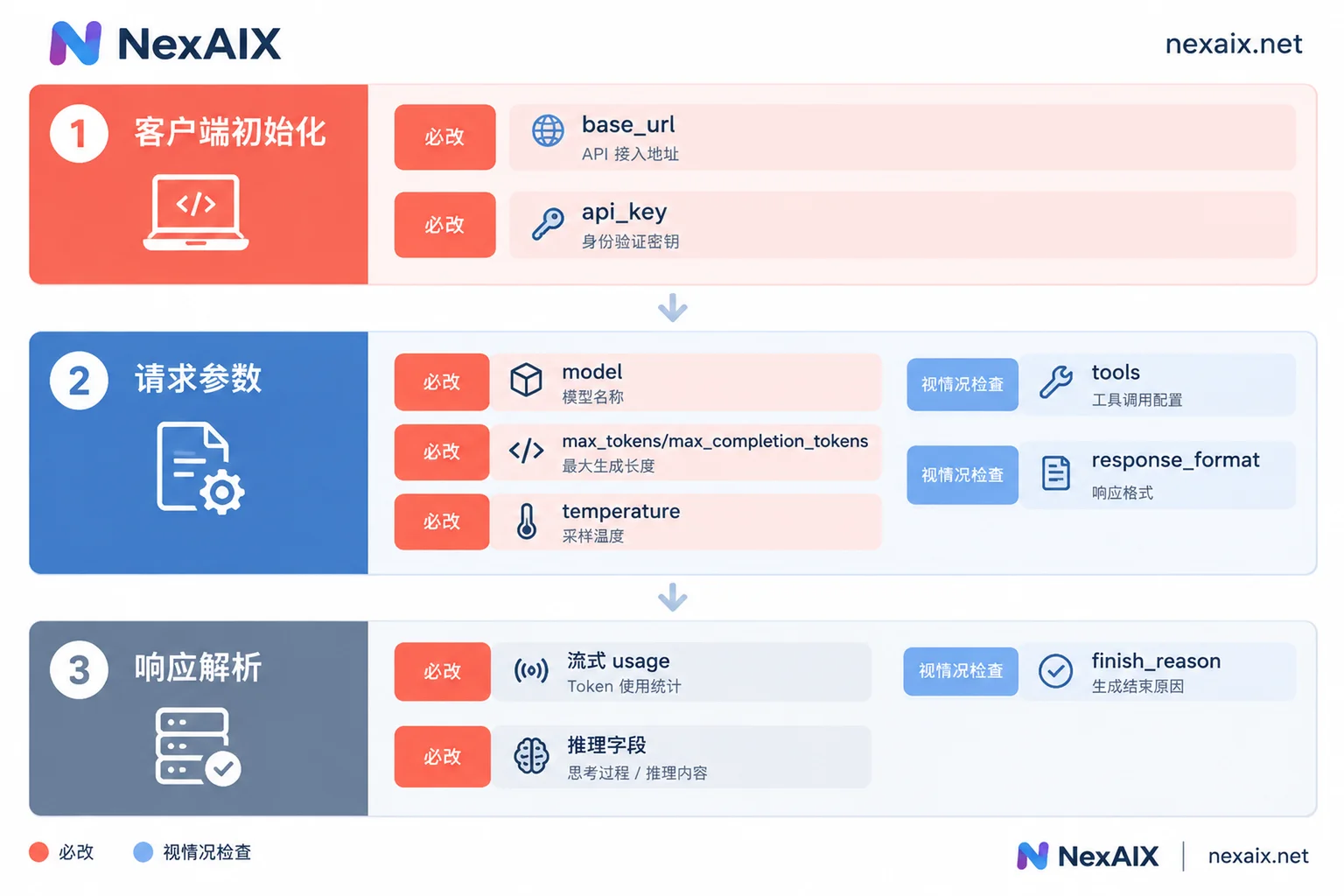
Bottom line first: if both the old and new sides use the OpenAI-compatible protocol (via the OpenAI SDK or by calling /v1/chat/completions directly), only three things must change: base_url and api_key during client initialization, and model in the request. The messages list, role, and content structure generally do not need to change.
That said, whether you can ship right after changing these three depends on whether your code uses the following four categories:
- Output length parameter:
max_tokensormax_completion_tokens - Sampling parameters:
temperature,top_p,presence_penalty, etc. usagestatistics and reasoning fields in streaming output- Tool calling (
tools/tool_choice) and structured output (response_format)
If none of these four are used, the three config changes should be enough to run. If they are used, go through the following checks in order.
First, confirm: are you still on a compatible protocol after migration?
This determines how much work is involved.
- Both old and new are OpenAI-compatible Chat Completions: This is the case discussed in this article; changes are concentrated in config and parameters.
- The code uses the Responses API: First confirm the target endpoint supports this API path. If it does not, either change the call back to Chat Completions or keep using the original service. The two APIs have different request and response structures, so it is not just a matter of changing a URL.
- Switching from a compatible protocol to a vendor's native SDK: Both the message format and return structure may change, effectively rewriting the call layer. It is advisable to add your own wrapper layer between business code and the SDK so future model switches only touch that layer.
Step 1: Change three configs and pull them out of the code
In many projects, the most time-consuming part of migration is that model names and endpoints are scattered across dozens of files. Use this migration as an opportunity to read all three values from environment variables:
import os
from openai import OpenAI

client = OpenAI(
    base_url=os.environ["LLM_BASE_URL"],  # 新端点地址,通常带 /v1
    api_key=os.environ["LLM_API_KEY"],
)
MODEL = os.environ["LLM_MODEL"]

resp = client.chat.completions.create(
    model=MODEL,
    messages=[{"role": "user", "content": "你好"}],
)
After this, switching models and rolling back only require config changes, not redeployments. Node.js and LangChain follow similar patterns with slightly different entry parameter names; see Calling AI APIs with Python and How to change a custom base_url in LangChain. Whether the URL should include /v1 and how to debug a 404 after the change are covered in How to use OpenAI-compatible APIs.
If the target is NexAIX, the endpoint is https://api.nexaix.net/v1, which provides an OpenAI-compatible API. Replace base_url with this address and fill in the new key. model should be the exact model name on the platform, not the old platform's naming. Available models and names are listed in the model catalog. Each model page indicates how it is served: open-weight models are deployed on owned compute, while closed-source models go through the vendor's official authorized channels. The parameter support you need to verify in the following steps is also listed on the relevant model page.
Step 2: Check the output length parameter
This is the most common source of 400 errors after switching models.
Traditional Chat Completions uses max_tokens to limit output length. OpenAI's o-series reasoning models and some newer models require max_completion_tokens instead; passing the old parameter errors out directly. The rename is because reasoning models generate hidden thinking content (reasoning tokens) that also consumes quota.
So there are two things to handle:
- Decide which parameter name to pass based on the model type.
- When setting a limit for reasoning models, leave headroom for the thinking process. If the limit is too tight, thinking may be cut off before it finishes, resulting in very short or even empty visible output.
Step 3: Do not hardcode sampling parameters
Different models support different ranges for sampling parameters. Some models accept temperature only from 0 to 1, others from 0 to 2. Deep reasoning models usually fix temperature, top_p, and presence_penalty, or simply do not accept them.
If old code hardcodes values like temperature=1.5 in every request, switching to a reasoning model may cause errors. A safer approach is to construct parameters centrally and decide what to pass based on the model:
# 按目标模型的文档填写,不要凭模型名猜
REASONING_MODELS = {"<推理模型名>"}

def build_params(model: str, max_out: int, temperature=None) -> dict:
    params = {}
    if model in REASONING_MODELS:
        params["max_completion_tokens"] = max_out
        # 推理模型通常不接受或固定采样参数,这里直接不传
    else:
        params["max_tokens"] = max_out
        if temperature is not None:
            params["temperature"] = temperature
    return params

resp = client.chat.completions.create(
    model=MODEL,
    messages=messages,
    **build_params(MODEL, 2048, temperature=0.7),
)
Step 4: usage and reasoning fields in streaming output
With stream=True enabled, usage (token consumption) is not necessarily returned automatically. If monitoring, billing, or quota code relies on it, you can easily end up with "requests work but all stats are empty" after migration. Per OpenAI's convention, you need to request it explicitly:
stream = client.chat.completions.create(
    model=MODEL,
    messages=messages,
    stream=True,
    stream_options={"include_usage": True},
)

usage = None
for chunk in stream:
    if chunk.choices:  # 携带 usage 的最后一个 chunk,choices 可能为空
        delta = chunk.choices[0].delta
        if delta.content:
            print(delta.content, end="")
    if getattr(chunk, "usage", None):
        usage = chunk.usage
Two things to note:
- Compatibility layers do not always support
stream_options. Some ignore it, and some may error. Run an actual test against the target endpoint. - Reasoning models' thinking process fields and reasoning token statistics are returned differently across implementations. Parsing code should tolerate missing fields and not break the entire stream because one field is absent.
Step 5: Tool calling and structured output
If the code relies on tools, tool_choice, or response_format (JSON Mode / Structured Outputs), first confirm the target model natively supports these parameters. Do not assume that "compatible API means support."
If the target model only supports plain text chat, you need a fallback at the business layer: specify the output format in the prompt, then extract results with regex or a JSON parser, and retry or error out if parsing fails. This is more fragile than native support; for high-frequency or strict-format scenarios, it is better to choose a model that supports tool calling.
How to verify before launch
Running successfully does not mean it is ready to ship. Prepare a set of representative real inputs, run them on both the old and new sides, and compare the following:
- Error rate: Focus on 400s, mostly caused by parameter names or values not being accepted. For error code meanings, see How to read AI API error codes.
- finish_reason: If
lengthappears frequently, the length limit is too low—especially important for reasoning models. - JSON parsing success rate and tool calling success rate: When the business depends on structured results, these matter more than the answer content itself.
- Whether usage is returned correctly: Check both streaming and non-streaming.
- Answer quality: Prompts tuned for the old model may perform differently on the new one; manually spot-check a portion of results for critical paths.
After verification passes, use the extracted config values for a canary release: route a portion of traffic to the new model, observe for a while, then switch fully. If issues arise, changing the config back rolls it back. If you want to run this regression test suite on the new endpoint, you can register for test credits first; see "Docs" in the official website navigation for onboarding steps.




Comments(0)