 NexAIX-官方博客
If your production environment has suddenly started throwing 404 Not Found errors frequently, and your code still references moonshot-v1-8k, moonshot-v1-128k, or kimi-k2.5, the reason is simple: Moonshot officially retired the entire moonshot-v1 series and the kimi-k2.5 model on August 31, 2026.
Meanwhile, Kimi's model matrix has fully evolved toward open-source weights and ultra-large-scale MoE architectures—from the 256K-balanced Kimi K2.6, the coding-focused Kimi K2.7 Code with mandatory thinking mode, to the flagship Kimi K3 with 2.8 trillion parameters, 1M (one million) token context, and native visual understanding. All model weights are now openly available.
Facing legacy model retirements, major architectural changes, and stringent production requirements for concurrency quotas and data privacy, how can development teams quickly achieve smooth migration and selection? This article covers model comparison, API migration configuration, pitfalls in long-context and tool calling, and how to use NexAIX's self-owned compute cluster for high-throughput, full-performance Kimi API calls.
1. How to Choose Among Current Kimi API Core Models: K3, K2.6, and K2.7 Code Comparison
Before replacing the model field in your code, you need to understand the positioning differences among current Kimi flagship models. Blindly switching all lightweight tasks previously running on moonshot-v1 to the flagship K3 will significantly increase costs; conversely, assigning complex cross-file long-range refactoring to a general model may waste the engineering benefits of the new models in Agent scenarios.
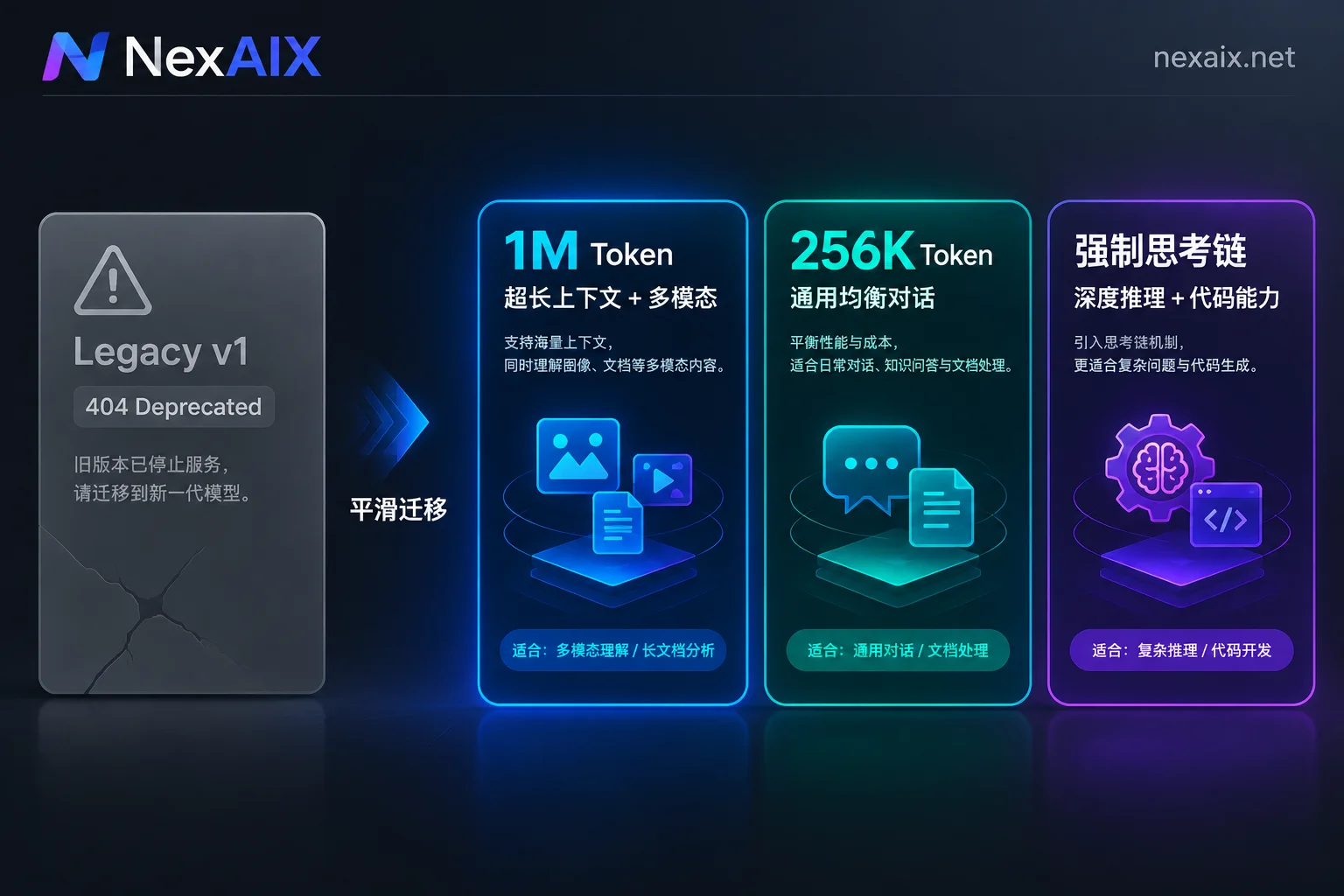
Here is an engineering selection comparison of the three current main models:
| Model Series | Core Positioning & Architecture | Context Window | Modality & Feature Support | Suitable Production Scenarios |
|---|---|---|---|---|
| Kimi K3 | 2.8T total parameter open-source flagship (896 experts, 16 activated), based on KDA hybrid linear attention and Attention Residuals | 1M tokens | Text + native visual understanding, tool calling, long-range reasoning | Ultra-large codebase refactoring, front-end/game development with UI screenshots, deep analysis of million-word research papers and financial reports |
| Kimi K2.6 | 1T-class MoE general-purpose model, balancing response speed and overall reasoning cost | 256K tokens | Text + visual input, switchable thinking/non-thinking modes, Tool Calling | Direct replacement for moonshot-v1 workloads, daily chat assistants, enterprise knowledge base RAG, routine document summarization and structured extraction |
| Kimi K2.7 Code | Coding-specialized model built for software engineering and Agents | 256K tokens | Mandatory thinking mode (cannot be disabled), deep terminal and tool collaboration | IDE plugins like Cline / Claude Code, automated unit test generation, multi-step compilation troubleshooting pipelines |
Practical selection recommendations:
- Emergency replacement for legacy workloads: If you previously used
moonshot-v1-8k/32k/128kfor routine text summarization, customer service Q&A, or RAG retrieval, choose K2.6 first—context expands directly to 256K, and the unit price is far lower than the flagship model. - Development efficiency and Code Agent: If you're equipping development teams with coding assistants or building automated bug-fixing pipelines, choose K2.7 Code. Note that this model is always in Thinking Mode, so handle the chain-of-thought content when parsing responses. For a deeper comparison of its chain-of-thought with other Chinese models, see our previous article "DeepSeek vs. Kimi API: Context, Multimodal, Chain-of-Thought Return, and Migration Configuration".
- Complex long-range tasks and multimodal engineering: When a single context approaches one million tokens, or when you need to write code while looking at design mockups/error screenshots, go straight to Kimi K3.
2. Official Direct Connection, Self-Built Compute, or Self-Owned Compute API?
Since the Kimi K2 and K3 series have released open-source weights, technical teams typically face three paths when integrating the Kimi API:
- Renting GPUs to deploy open-source weights yourself: The K2 series has 1T total parameters, and K3 reaches 2.8T. Even with FP8 or more aggressive quantization, running full 256K to 1M long contexts in production with high concurrency requires multiple high-end multi-GPU H200/A100 nodes and coordinated operations. Unless your team has extremely high concurrency at full load year-round, the idle loss and operational troubleshooting costs of self-built clusters are extremely high (for detailed cost analysis, see "How to Choose an Open-Source Large Model API: Pitfalls from Self-Built Clusters, Low-Cost Resale, to Production-Grade Hybrid Calls").
- Single-point direct connection and quota tier limits: Under traditional open platform systems, free trial credits for new accounts often cannot directly unlock flagship models like K3, and account concurrency, RPM (requests per minute), TPM (tokens per minute) are strongly tied to cumulative recharge tiers. Moreover, if your team also uses Claude, GPT-5.6, or DeepSeek, maintaining multiple billing systems, multiple bills, and multiple keys adds significant engineering burden.
- Calling Kimi deployed on self-owned compute via NexAIX:
In the NexAIX Model Marketplace, open-source weight models like Kimi are deployed on self-owned compute—we deploy official open-source weights directly on our own GPU clusters in self-built and leased data centers, operate them independently, and never resell uncontrollable third-party account pools. On each model's detail page, you can clearly see the context window, maximum output, inference precision (e.g., BF16, FP8), and open-source license.
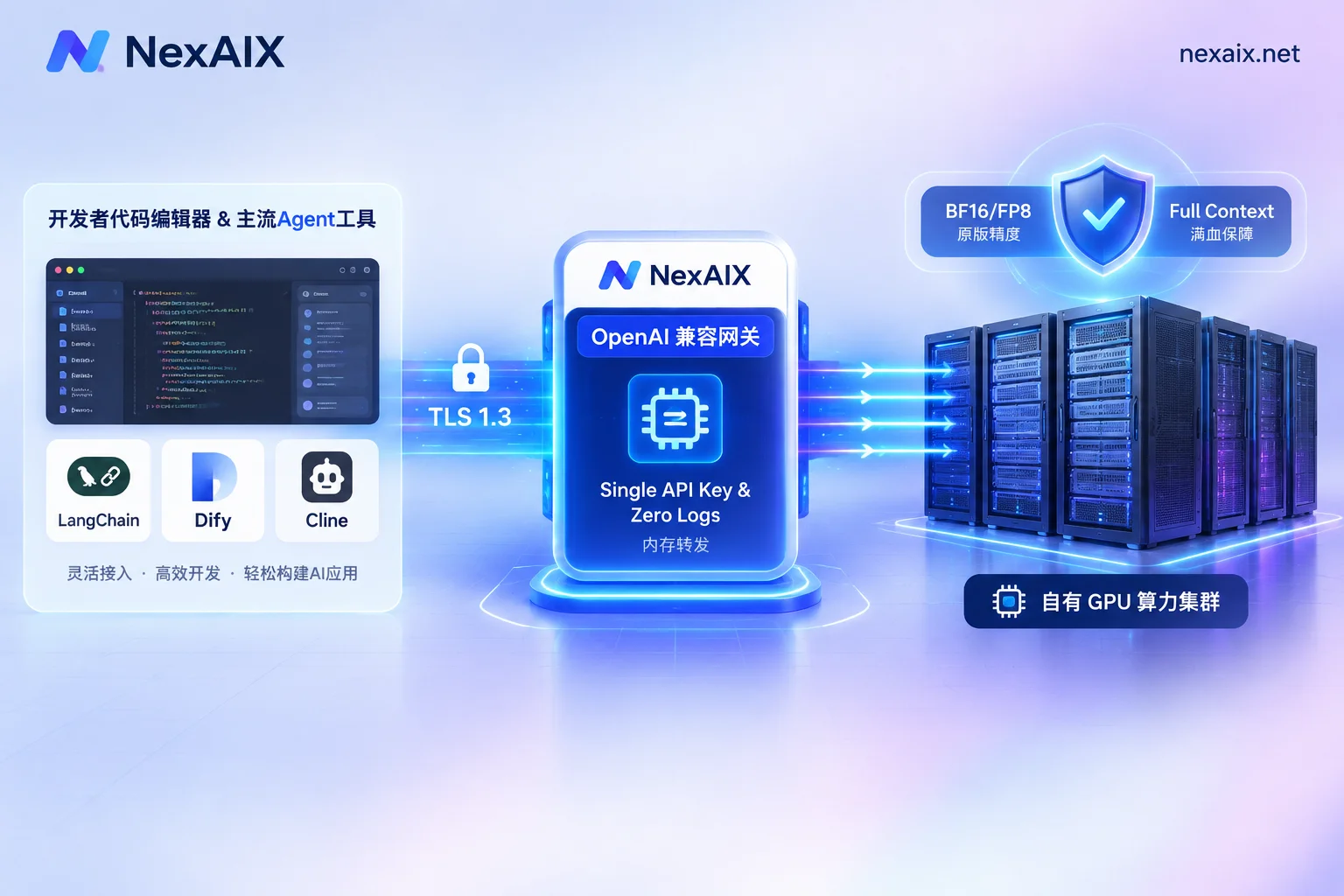
More importantly, through NexAIX's unified endpoint, you can use the same API Key to call Kimi, DeepSeek, GLM, Qwen deployed on self-owned compute, as well as closed-source models like Claude, GPT-5.6, Gemini through officially authorized channels (contractual, auditable, no account pools or reverse protocols). For the essential differences between these two compliant supply methods and low-cost reverse/account pool relays on the market, see "Transparent Supply and Self-Check Guide".
3. Three Steps to Migrate and Integrate the Kimi API (OpenAI-Compatible Specification)
NexAIX strictly implements the OpenAI Chat Completions specification, supporting streaming, function/tool calling, and multi-turn conversations. Migrating your existing project usually requires only changing three places: base_url, api_key, and model (for a complete code modification checklist, see "What Code Changes Are Needed When Switching Large Model APIs: Three Must-Change Configurations Plus Four Types of Parameter Compatibility Checks").
Note the difference between model page URL and request ID: When browsing a single model detail page on NexAIX, the slug in the URL replaces dots (.) in the model ID with hyphens (-), e.g., visithttps://nexaix.net/models/glm-5-2/to view specifications and three-step integration code; however, when actually making API requests, themodelfield should still contain the standard model ID (for specific Kimi model IDs and specifications on sale, refer to the official model list).
1. Python SDK Integration Example (Streaming)
For projects already using the openai official SDK, simply point base_url to https://api.nexaix.net/v1:
import os
from openai import OpenAI

# 1. 初始化客户端,仅需替换 base_url 和 api_key
client = OpenAI(
    api_key=os.environ.get("NEXAIX_API_KEY"),
    base_url="https://api.nexaix.net/v1"
)

# 2. 发起请求(具体模型 ID 请以 https://nexaix.net/models/ 模型页标注为准)
response = client.chat.completions.create(
    model="kimi-k3",  # 或切换为 kimi-k2.6 / kimi-k2.7-code 等已开通模型
    messages=[
        {"role": "system", "content": "你是一位资深系统架构师,擅长代码审查与性能优化。"},
        {"role": "user", "content": "请分析在高并发场景下使用分布式锁的常见死锁隐患及排查步骤。"}
    ],
    temperature=0.6,
    max_tokens=4096,
    stream=True
)

# 3. 处理流式响应
for chunk in response:
    if chunk.choices and chunk.choices[0].delta.content:
        print(chunk.choices[0].delta.content, end="", flush=True)
2. Notes on Multimodal Visual Input Calls
With the retirement of the legacy -vision-preview model and the evolution of document parsing logic, Kimi K3 and K2.6 natively support visual understanding. When calling multimodal-capable Kimi models via NexAIX (first confirm on the model page that "input modality" includes images), there is no need for proprietary file upload OCR interfaces—simply pass image_url or Base64 encoding in the standard OpenAI multimodal format (for video, pass a sequence of extracted frames):
response = client.chat.completions.create(
    model="kimi-k3",
    messages=[
        {
            "role": "user",
            "content": [
                {"type": "text", "text": "请根据这张报错截图和架构图,定位可能出问题的微服务节点:"},
                {
                    "type": "image_url",
                    "image_url": {
                        "url": "data:image/png;base64,iVBORw0KGgoAAAANSUhEUgAAAAUA..."
                    }
                }
            ]
        }
    ]
)
3. Zero-Code Integration with Ecosystem Clients and Agent Frameworks
Beyond direct code integration, any development framework or desktop tool supporting custom OpenAI base_url can seamlessly connect. Whether you orchestrate complex workflows with LangChain, LlamaIndex, Vercel AI SDK, build enterprise applications in Dify, or use Cline, Cherry Studio, NextChat, OneAPI daily, just fill in https://api.nexaix.net/v1 and your Key.
If you encounter path concatenation errors when configuring specific tools, refer to these step-by-step troubleshooting guides:
- How to Configure Custom Model API in Cline: Base URL, Key, and Model Parameters for OpenAI Compatible
- Adding OpenAI-Compatible Models in Dify: How to Fill base_url, Whether to Include /v1, and How to Debug Save Failures
- How to Add Custom Large Models in Cherry Studio: Provider, API Address, Model ID, and Error Troubleshooting
4. Three Engineering Safeguards for Production Kimi API Calls
When introducing Kimi K3 or K2.7 Code into core business (especially for internal codebases, financial contract review, or long-range Agent tasks), technical leads often worry about three things: relay providers secretly degrading/truncating, leakage of core code and business data, and requests hanging under high concurrency.
At NexAIX, we address these concerns with clear engineering mechanisms and verifiable self-check methods:
1. Full Performance, No Degradation: Parameters Passed Through As-Is, with Four-Step Self-Check
Some non-compliant channels, to reduce inference costs for giant MoE models, silently route requests to smaller low-spec models, force lower quantization precision, secretly truncate 1M/256K context windows, or even inject hidden system prompts to limit output length.
NexAIX adheres to the no-degradation principle: the model field in the response is the actual model executed; we do not switch to smaller models, reduce precision, truncate context or max output, or inject any hidden system prompts, and your temperature, top_p, max_tokens are passed through to inference nodes as-is.
You can verify at any time using our four public methods: fixed prompt with random seed retesting, checking the model field in the response, context stress testing near the upper limit, and asking the model to repeat all received messages (for detailed steps, see "How to Confirm Whether an API Returns the Original Model: Four Verifiable Check Methods").
2. Zero Log Retention: In-Memory Forwarding, Protecting Core Code and Documents
When using Kimi K2.7 Code to assist with business code or Kimi K3 to analyze million-word unpublished business documents, data privacy is non-negotiable.
Open-source weight models running on NexAIX's self-owned compute cluster strictly follow a no-conversation-logging policy:
- Your
promptandcompletionare forwarded only in memory and released immediately after the request ends—never written to disk; - The system retains only metadata for billing and troubleshooting (request ID, model name, token count, timestamp, status code);
- User data is never used for model training or shared with any third party for training; end-to-end transmission from client to inference node is encrypted with TLS 1.3.
We also support per-key isolation: each API Key has independent quotas, permissions, and per-model usage billing. You can assign dedicated Keys to different project teams or CI/CD pipelines; if a Key is accidentally leaked, it can be revoked individually without affecting other services. Every call returns a unique request ID, so for online troubleshooting, just contact us with the request ID for quick diagnosis.
3. Transparent Throughput and Rate-Limiting Policies: No Silent Degradation
When handling ultra-long context requests of 256K or even 1M, note a physical reality: time to first token (TTFT) and cost increase with input length. Therefore, always enable streaming (stream=True) in production to avoid gateway timeouts caused by waiting for full generation (for timeout troubleshooting, see "How to Solve AI API Timeouts: From 504, 524 to APITimeoutError, Segment-by-Segment Troubleshooting").
For capacity and concurrency management, NexAIX open-source models run entirely on self-owned GPU clusters. Each Key has clear RPM, TPM, and concurrency limits (higher quotas can be requested anytime; we respond after evaluating actual capacity). When the cluster reaches extreme peak load, the system immediately returns a standard 429 Too Many Requests status code with a Retry-After response header—it never hangs connections indefinitely, nor secretly routes your requests to cheaper models to mask full load. This allows your engineering team to decide independently whether to implement exponential backoff retries, queue in a message queue, or switch to a backup model at the business logic layer (for more rate-limiting policies, see "High Throughput and Rate Limiting").
5. Get Test Credits Now and Start Your Smooth Upgrade
Whether you urgently need to fix 404 errors caused by the moonshot-v1 retirement, or plan to evaluate Kimi K3's million-token long text and K2.7 Code's coding Agent capabilities within your team, you no longer need to deal with cumbersome enterprise qualification reviews or high self-built compute barriers.
- Quick Start: Go directly to the NexAIX Console and register with your email—test credits are granted upon registration. No enterprise verification needed to generate API Keys, view real-time call logs, and export per-model usage details.
- Enterprise Compliance and Customization: For teams and enterprises with strict financial and compliance requirements, we have full legal qualifications, support contracts and invoicing, and can sign formal Service Level Agreements (SLA) and Data Processing Agreements (DPA). If you need specific open-source weight models not listed, or want to discuss dedicated resource pools or private deployment, please email [email protected] with the required models and estimated usage; our compute engineering team will respond with scheduling after evaluation.




Comments(0)