 NexAIX-官方博客
In LangChain, changing to a custom base_url only requires modifying the model object's initialization parameters; chains, agents, and prompts don't need to change:
- Python (langchain-openai): pass
base_url="https://你的端点/v1"toChatOpenAI,OpenAI, orOpenAIEmbeddings - JS / TS (@langchain/openai): set it inside
configuration: { baseURL: "https://你的端点/v1" }
The address must end with /v1, not /chat/completions. Most integration issues stem from this address or from environment variables overriding each other. Below we cover the syntax, priority, address format, streaming stats, and protocol boundaries in order.
Python: Pass base_url directly
After installing langchain-openai, the clearest approach is to pass both the address and key during construction:
import os
from langchain_openai import ChatOpenAI

llm = ChatOpenAI(
    model="模型ID",                       # 用端点方提供的模型 ID
    base_url="https://api.nexaix.net/v1",
    api_key=os.environ["NEXAIX_API_KEY"],
)

print(llm.invoke("用一句话回答:1+1 等于几?").content)
base_url and the older parameter name openai_api_base are the same thing. Writing openai_api_base=... in old projects also works; there's no need to rename just for this migration. If your langchain-openai version is older, the constructor parameter names may differ from here; refer to the docs for your version.
Embeddings work the same way:
from langchain_openai import OpenAIEmbeddings

emb = OpenAIEmbeddings(
    model="embedding模型ID",
    base_url="https://api.nexaix.net/v1",
    api_key=os.environ["NEXAIX_API_KEY"],
)
This assumes the endpoint actually provides the embedding model you need. Chat and embedding models often need separate confirmation; a correct address doesn't guarantee both types are available.
If you use the generic initializer init_chat_model, base_url is also passed as a keyword argument:
from langchain.chat_models import init_chat_model

llm = init_chat_model(
    "模型ID",
    model_provider="openai",
    base_url="https://api.nexaix.net/v1",
    api_key=os.environ["NEXAIX_API_KEY"],
)
model_provider="openai" means to call using the OpenAI protocol, regardless of which provider supplies the model. This is how you connect to any OpenAI-compatible endpoint.
Example: NexAIX
For NexAIX, always use https://api.nexaix.net/v1 as the address, the key generated in the console, and the model ID listed on the model page for model. The rest of the code remains unchanged. The model list is subject to change; each model's page indicates whether it's an open-weight self-hosted deployment or a closed-source officially licensed channel. Before coding, check the model list to confirm the model ID. If you don't have a key yet, register via "Get API Key" on the official site; registration includes free trial credits so you can run the minimal example above.
Don't want to change code? Use environment variables, but know the priority
Instead of hardcoding the address, you can switch via environment variables. LangChain determines base_url in the following order; once a value is found, later ones are ignored:
- Explicitly passed
base_url(oropenai_api_base) in code - Environment variable
OPENAI_API_BASE, read by LangChain during initialization - Environment variable
OPENAI_BASE_URL, read by the underlying official OpenAI SDK
export OPENAI_API_KEY="你的Key"
export OPENAI_BASE_URL="https://api.nexaix.net/v1"
This order causes a common issue: you set OPENAI_BASE_URL but requests still go elsewhere. Usually it's because there's a leftover OPENAI_API_BASE in the machine, in the .env file, or in CI config, which has higher priority and overrides your new value. To troubleshoot, print both variables:
import os
print(os.getenv("OPENAI_API_BASE"), os.getenv("OPENAI_BASE_URL"))
Both approaches have their use cases:
- Explicit parameter: suitable for production code; reading the code shows where requests go, unaffected by leftover variables in the deployment environment.
- Environment variables: suitable for switching endpoints across dev, test, and production with the same codebase.
Pick one; don't use both. The OPENAI_API_KEY in environment variables must also change with the address. Using a custom address with an official key, or vice versa, returns 401. For how to store and distribute keys across environments, see How to Get, Store, and Distribute AI API Keys.
base_url must include /v1, but not /chat/completions
The OpenAI SDK and LangChain automatically append subpaths like /chat/completions and /embeddings to base_url. So only fill up to the version prefix:
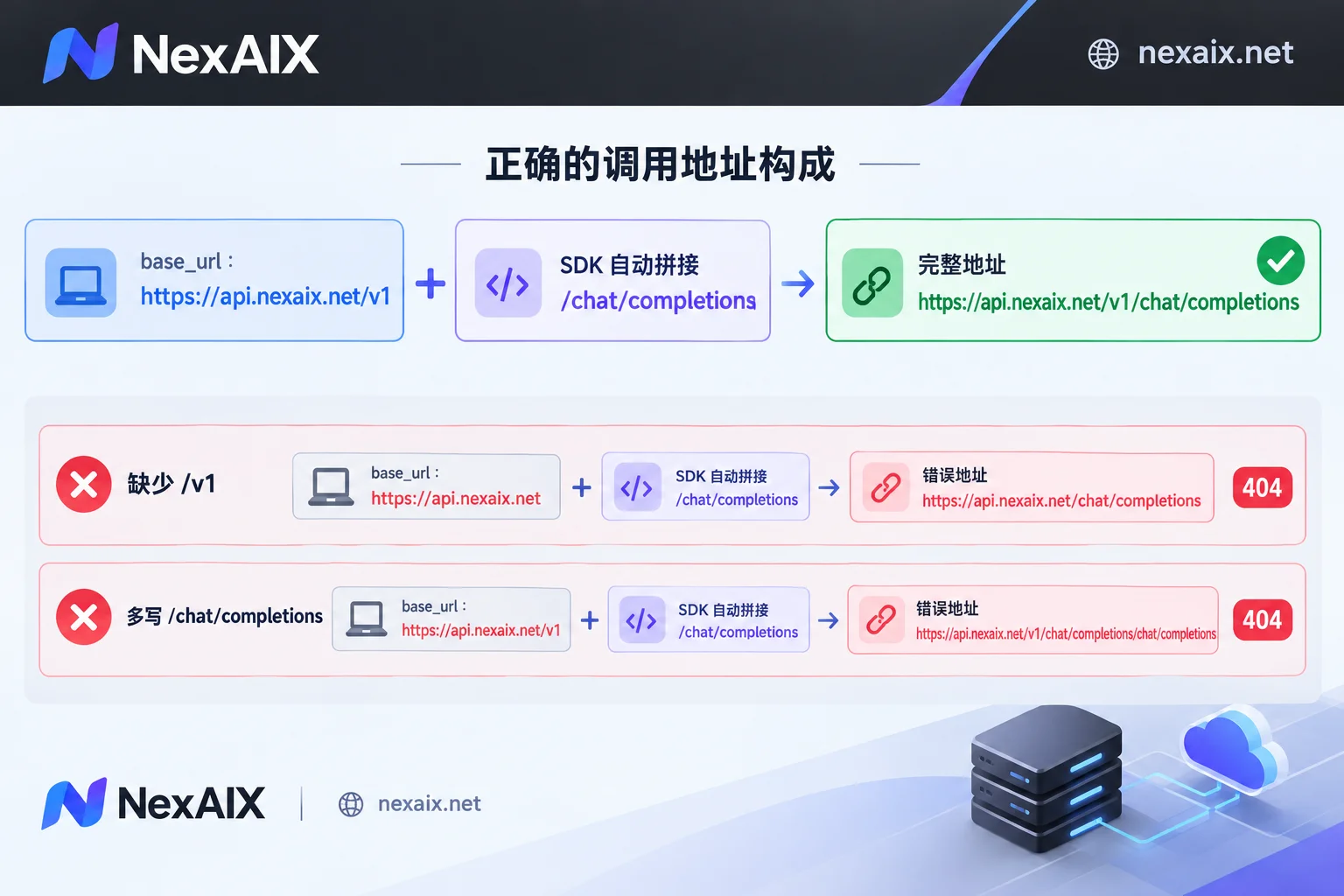
| Your base_url | Actual request URL | Result |
|---|---|---|
https://api.nexaix.net/v1 | .../v1/chat/completions | Correct |
https://api.nexaix.net | .../chat/completions | 404 |
https://api.nexaix.net/v1/chat/completions | .../v1/chat/completions/chat/completions | 404 |
When you hit a 404, first assemble the actual full URL the SDK requests and compare—most issues become obvious at a glance. A trailing slash usually doesn't cause errors, but omitting it is more consistent. Tools like Dify and One API handle /v1 differently; don't copy directly. Refer to the explanation in Adding OpenAI-compatible models in Dify.
JS / TS: Address goes in configuration
For @langchain/openai, the address isn't a top-level parameter but a client configuration option, placed in configuration.baseURL:
import { ChatOpenAI } from "@langchain/openai";

const llm = new ChatOpenAI({
  model: "模型ID",
  apiKey: process.env.NEXAIX_API_KEY,
  configuration: {
    baseURL: "https://api.nexaix.net/v1",
  },
});

const res = await llm.invoke("用一句话回答:1+1 等于几?");
console.log(res.content);
Two common mistakes: the parameter name is baseURL with URL all uppercase, not Python's base_url; and it must be inside the configuration object. If misplaced, requests silently go to the default address, and the error usually appears as an invalid key. If you also use the openai SDK directly in Node, see Calling AI APIs from Node.js.
After changing the address, streaming token usage becomes empty
This is LangChain's default behavior, not an endpoint issue. Many non-official endpoints don't include token usage in streaming responses, so when LangChain detects a custom address (e.g., reads OPENAI_BASE_URL), it disables streaming usage stats by default (stream_usage).
If your service supports usage in streaming responses, enable it manually:
llm = ChatOpenAI(
    model="模型ID",
    base_url="https://api.nexaix.net/v1",
    api_key=os.environ["NEXAIX_API_KEY"],
    stream_options={"include_usage": True},
)
This parameter may vary slightly across versions; refer to your version's docs. If usage is still empty after enabling, the endpoint doesn't return usage in streaming. In that case, to track costs, use non-streaming calls to get usage or check the provider's console for per-key usage.
ChatOpenAI only handles fields in the standard OpenAI protocol
ChatOpenAI parses responses according to the official OpenAI API protocol. Non-standard fields returned by third-party models, such as reasoning_content from some thinking models, aren't automatically extracted. The symptom: request succeeds and content is present, but reasoning content is missing.
If you only need the final answer, no action needed. If your business requires chain-of-thought fields, switch to the LangChain integration package for that model provider, or write an adapter to parse raw responses. No matter how correct the address, ChatOpenAI won't parse these fields for you.
Verify in this order after changes
- Run the minimal example: send a short question using the
invokeabove; if you get a response, the address, key, and model ID are all correct. - 404: check if
/v1is missing or/chat/completionsis extra; if using environment variables, ensure no leftoverOPENAI_API_BASE. - 401: check if the key and address belong to the same provider; in JS, check if
baseURLis insideconfiguration. - Model not found:
modelmust exactly match the model ID provided by the service, including case and hyphens. - No usage in streaming and missing reasoning content: refer to the respective sections above.
For error codes beyond these, such as 429 rate limiting and 5xx, see How to Read AI API Error Codes. Once the minimal example works, pass the same llm object to your existing chain or agent; no other code changes needed.




Comments(0)