 NexAIX-官方博客
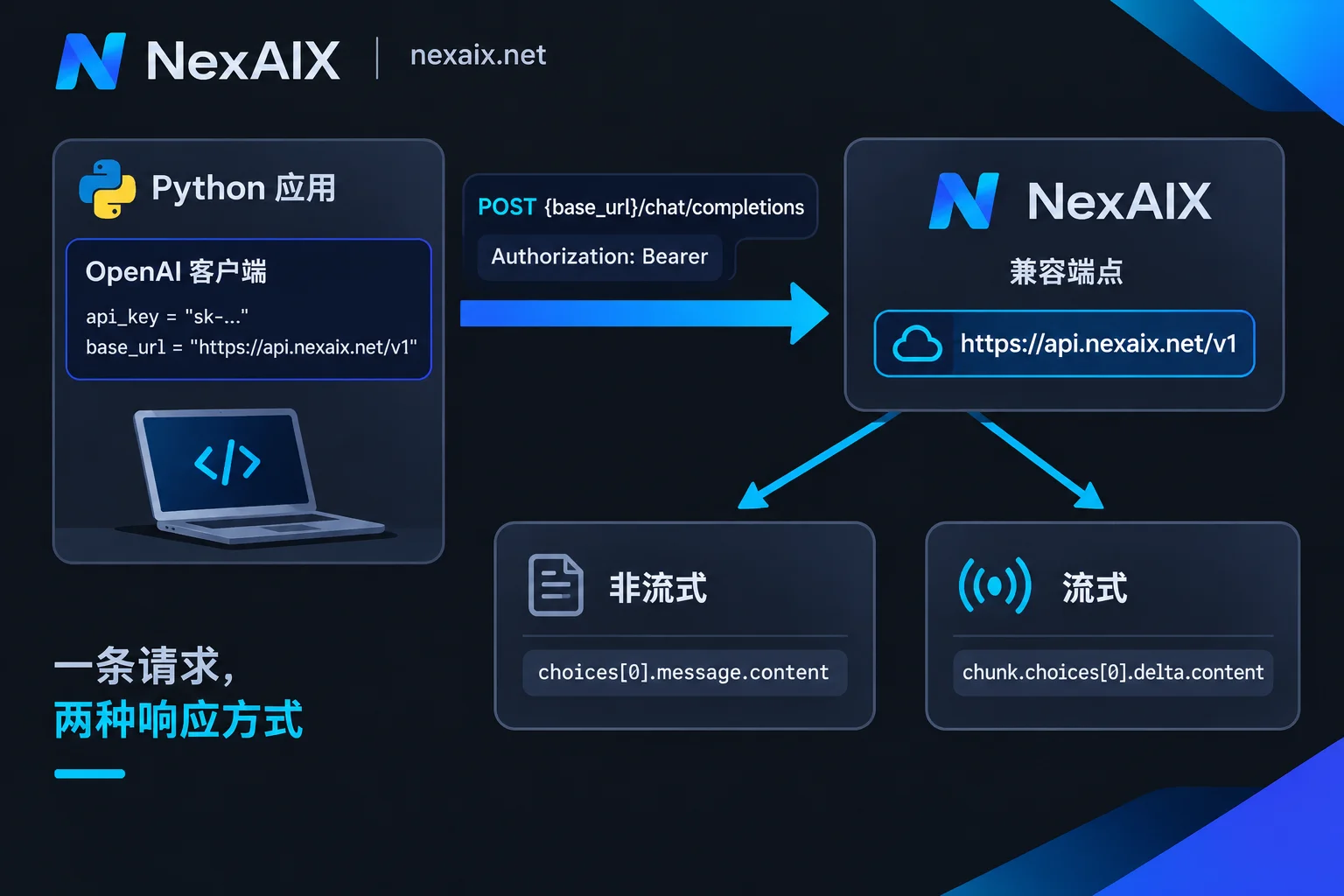
If the model interface you call is compatible with the OpenAI specification, connecting from Python usually requires just three things: install the openai SDK, pass api_key and base_url when creating the client, then call client.chat.completions.create. Switching to another provider's compatible endpoint typically requires no changes to your business logic—only base_url, the key, and the model name change.
Below, we follow the actual coding order: first get one request working, then add streaming output, and finally add the timeouts and retries needed for production.
1. Install the SDK, Put the Key in an Environment Variable
pip install --upgrade openaiThe code in this article is based on SDK version 1.0 and above. If you see module-level calls like openai.ChatCompletion.create(...) in old code, that is the 0.x style, which is no longer supported in new versions; you need to switch to the client instance style below.
Do not hardcode the key. First set an environment variable in the terminal:
export AI_API_KEY="你的 Key"
export AI_BASE_URL="https://api.nexaix.net/v1"
For which key to use in local development, testing, and production, and how to store keys, see How to Get, Store, and Separate AI API Keys.
2. Initialize the Client: Change Only base_url
import os
from openai import OpenAI

client = OpenAI(
    api_key=os.environ["AI_API_KEY"],
    base_url=os.environ["AI_BASE_URL"],
)
base_url determines where requests are sent. If omitted, the SDK requests the official OpenAI address; after passing another compatible endpoint, all subsequent chat completion requests from this client go to that endpoint.
Taking NexAIX as an example, the endpoint is https://api.nexaix.net/v1. Migrating from another OpenAI-compatible service, the code change is just this one line plus the key. Also confirm the model name: model ID conventions vary by provider; directly reusing the old service's name commonly results in a 404 or a model-not-found error. Available model IDs can be found in the NexAIX Model List. Each model page indicates the supply method: open-weight models are deployed on proprietary compute, while closed-source models go through the vendor's official licensing channel. Specifications such as context length are subject to the corresponding model page.
Two common pitfalls:
base_urlgenerally must include/v1, and do not add/chat/completionsat the end—the SDK appends that path itself.- If an
OPENAI_BASE_URLremains in the environment variables and nobase_urlis explicitly passed, requests may go to an unexpected address. When troubleshooting, print the client configuration first and take a look.
3. Make a Chat Completion Request
resp = client.chat.completions.create(
    model="你在模型页查到的模型 ID",
    messages=[
        {"role": "system", "content": "你是一个简洁的技术助手。"},
        {"role": "user", "content": "用一句话解释什么是 HTTP 429。"},
    ],
)

print(resp.choices[0].message.content)
messages is an ordered conversation history. There are three role: system to set behavior, user for user input, and assistant for the model's previous reply. For multi-turn conversations, send the history plus the new question each time. The API itself does not remember context for you.
After getting it running, it is worth checking two fields:
resp.choices[0].finish_reason: a value oflengthmeans the output was truncated by the length limit, not that the model finished on its own.resp.usage: the input and output token counts for this request, used to estimate cost and troubleshoot overly long context.
If the answer cuts off midway, or accumulating history causes errors, refer to the output limit and window calculation methods in Model Context Window Comparison.
4. Streaming Output: Display as It Generates
When building a chat interface or generating long text, waiting for the complete result makes users wait a long time. With stream=True, the SDK returns an iterable stream:
stream = client.chat.completions.create(
    model="你在模型页查到的模型 ID",
    messages=[{"role": "user", "content": "写一段 100 字的产品介绍。"}],
    stream=True,
)

for chunk in stream:
    if not chunk.choices:  # 有些块不带 choices,比如末尾的用量统计
        continue
    delta = chunk.choices[0].delta

    # 部分推理模型会把思考过程放在单独的字段里
    reasoning = getattr(delta, "reasoning_content", None)
    if reasoning:
        print(reasoning, end="", flush=True)

    if delta.content:
        print(delta.content, end="", flush=True)
Three things to note:
- The
delta.contentin each chunk is just a fragment and may be empty; check before concatenating. reasoning_contentis not a universal field for all models; only some models with a reasoning chain (such as DeepSeek-R1 and similar) return it. Read it withgetattr, and it will not error when you switch models. Whether to show the reasoning process to users and whether to send it back in multi-turn conversations depends on the specific model's documentation.- In streaming mode, the meaning of timeout changes: a slow first token and a long mid-stream gap are two different problems with different troubleshooting methods.
5. Without the SDK: Send Requests Directly with requests / httpx
If your environment cannot easily install the SDK, or you want to see the raw request, you can POST directly to {base_url}/chat/completions:
import os
import httpx

url = os.environ["AI_BASE_URL"].rstrip("/") + "/chat/completions"
headers = {
    "Authorization": f"Bearer {os.environ['AI_API_KEY']}",
    "Content-Type": "application/json",
}
payload = {
    "model": "你在模型页查到的模型 ID",
    "messages": [{"role": "user", "content": "你好"}],
}

r = httpx.post(url, headers=headers, json=payload, timeout=60)
r.raise_for_status()
print(r.json()["choices"][0]["message"]["content"])
In the Authorization header, there is a space between Bearer and the key; missing that space is a common cause of 401. With this approach, retries and stream parsing must be implemented yourself, so unless there is a clear reason, using the SDK is generally less trouble.
6. Production: Explicitly Set Timeouts and Retries
Getting it to run and running it reliably are two different things. Before going live, at least make timeouts and retries explicit:
import os
import openai
from openai import OpenAI

client = OpenAI(
    api_key=os.environ["AI_API_KEY"],
    base_url=os.environ["AI_BASE_URL"],
    timeout=60.0,     # 单次请求超时(秒),长输出任务可以适当调大
    max_retries=3,    # SDK 内置重试,遇到连接错误、429、5xx 时会自动退避重试
)

try:
    resp = client.chat.completions.create(
        model="你在模型页查到的模型 ID",
        messages=[{"role": "user", "content": "你好"}],
    )
except openai.RateLimitError:
    # 429:重试几次后仍然超限,说明并发或速率超过了配额
    ...
except openai.APITimeoutError:
    # 超时:检查 timeout 是否太短、输出是否过长
    ...
except openai.APIStatusError as e:
    # 其他 HTTP 错误,e.status_code 可以区分 400/401/404/5xx
    print(e.status_code, e.response.text)
Judging parameter values:
- timeout: 30 to 60 seconds is usually enough for short Q&A; when generating long text or calling reasoning models, non-streaming requests may take longer. If it takes too long, the better approach is to switch to streaming.
- max_retries: retries only handle transient jitter; they do not solve sustained rate limiting. If 429 keeps occurring, the problem is that concurrency exceeds the key's rate limit—queue or throttle on the caller side rather than increasing retry count. NexAIX quotas and rate limits are public, and each key has independent quota and usage; set concurrency according to the key's limit.
- Do not retry 400, 401, 404: these errors mean issues with parameters, key, path, or model name respectively; retrying gives the same result.
For specific causes and handling of each error code, see How to Read AI API Error Codes. To determine whether a timeout originates on the client, gateway, or model side, follow the steps in How to Solve AI API Timeouts to troubleshoot segment by segment.
Next Steps
Following the steps above, you should now have a reusable client: the key is read from an environment variable, base_url points to the target endpoint, both normal and streaming calls work, and timeouts and retries are explicitly configured. If you do not have a key yet, you can register at the "Get API Key" link in the NexAIX official website navigation; after registration there is test quota to run the examples in this article. If you have not decided which model to use, first pick one in the Model List by task type and supply method. For configuration of other clients such as Node.js and LangChain, see AI API Integration Tutorial.




Comments(0)