 NexAIX-官方博客
Let's get straight to the point: Node.js 18 and above offers two ways to make calls. Most projects can use the official openai npm package directly, just replace baseURL and apiKey with the values from your provider, and leave the rest of the code untouched. If you don't want to add a dependency, or your runtime only supports standard Web APIs, you can use the global fetch. With that approach, you'll need to handle streaming parsing, timeouts, and retries yourself.
Below, we'll walk through both approaches in the order of "connect → stream → timeout & retry → error handling."
SDK or fetch: how to choose
- Use the SDK: for production workloads, streaming output, automatic retries, and structured error types. The SDK has built-in exponential backoff retries for 429 and some 5xx (500/502/503/504), and errors are already categorized.
- Use fetch: suitable for one-off scripts, scenarios where bundle size matters, or when you want full control over request details. The trade-off is that you'll have to write SSE parsing, timeout aborts, and retry logic yourself.
If you're unsure, start with the SDK.
Connect to compatible endpoints with the openai SDK
npm install openaiYou don't need to switch SDKs to connect to an OpenAI-compatible endpoint—just pass baseURL and apiKey when instantiating the client. Using NexAIX as an example, the endpoint is https://api.nexaix.net/v1, and that's the only line you need to change:
// index.mjs(使用顶层 await 需 .mjs 后缀或在 package.json 中设置 "type": "module")
import OpenAI from 'openai';

const client = new OpenAI({
  apiKey: process.env.NEXAIX_API_KEY,
  baseURL: 'https://api.nexaix.net/v1',
  timeout: 60000,   // 毫秒
  maxRetries: 2,    // 自动重试次数
});

const res = await client.chat.completions.create({
  model: 'your-model-id',
  messages: [{ role: 'user', content: '用一句话解释什么是 SSE' }],
});

console.log(res.choices[0].message.content);
Three things to note:
- Put the key in environment variables, never hardcode it or commit it to a repository. Ideally, use separate keys for local, testing, and production environments. For more details, see How to get, store, and separate AI API keys.
modelmust be the actual model ID provided by the provider. Different models may support different ranges of parameters likemax_tokens,temperature, etc. Refer to the model's detail page. In NexAIX's model list, each model page indicates how it's served: open-weight models are deployed on our own compute, while closed-source models go through official vendor channels. The page also lists the model's specifications.baseURLmust end with/v1. The SDK automatically appends/chat/completions. If you omit or add an extra path segment, the most common result is a 404.
Streaming: let users see the first token sooner
For long outputs or end-user-facing applications, we recommend enabling streaming. Total duration doesn't decrease, but the first token appears much earlier. Add stream: true to the request body, and the returned object can be read chunk by chunk using for await:
const stream = await client.chat.completions.create({
  model: 'your-model-id',
  messages: [{ role: 'user', content: '写一段 200 字的产品介绍' }],
  stream: true,
});

let full = '';
for await (const chunk of stream) {
  const delta = chunk.choices[0]?.delta?.content ?? '';
  full += delta;
  process.stdout.write(delta);
}
Don't skip the ?. check here. Some chunks have an empty choices array or lack the content field, and accessing it directly will throw an undefined error.
Also, if the stream disconnects midway after starting, the content already output cannot be "resumed" with automatic retries. The application layer needs to decide how to handle it: restart from scratch, or keep the partial output and inform the user.
Without the SDK: native fetch approach
Non-streaming request
Use the POST method with Authorization: Bearer <KEY> and Content-Type: application/json headers, and a serialized JSON body. Control the timeout with AbortController:
async function chat(messages) {
  const controller = new AbortController();
  const timer = setTimeout(() => controller.abort(), 60000);
  try {
    const resp = await fetch('https://api.nexaix.net/v1/chat/completions', {
      method: 'POST',
      headers: {
        Authorization: `Bearer ${process.env.NEXAIX_API_KEY}`,
        'Content-Type': 'application/json',
      },
      body: JSON.stringify({ model: 'your-model-id', messages }),
      signal: controller.signal,
    });
    if (!resp.ok) {
      const err = new Error(`HTTP ${resp.status}: ${await resp.text()}`);
      err.status = resp.status;
      throw err;
    }
    const data = await resp.json();
    return data.choices[0].message.content;
  } finally {
    clearTimeout(timer);
  }
}
When you get a non-2xx response, make sure to throw the response body text as well. The server's error explanation is usually in there, making it easier to pinpoint the problem than just looking at the status code.
Streaming request: parse SSE yourself
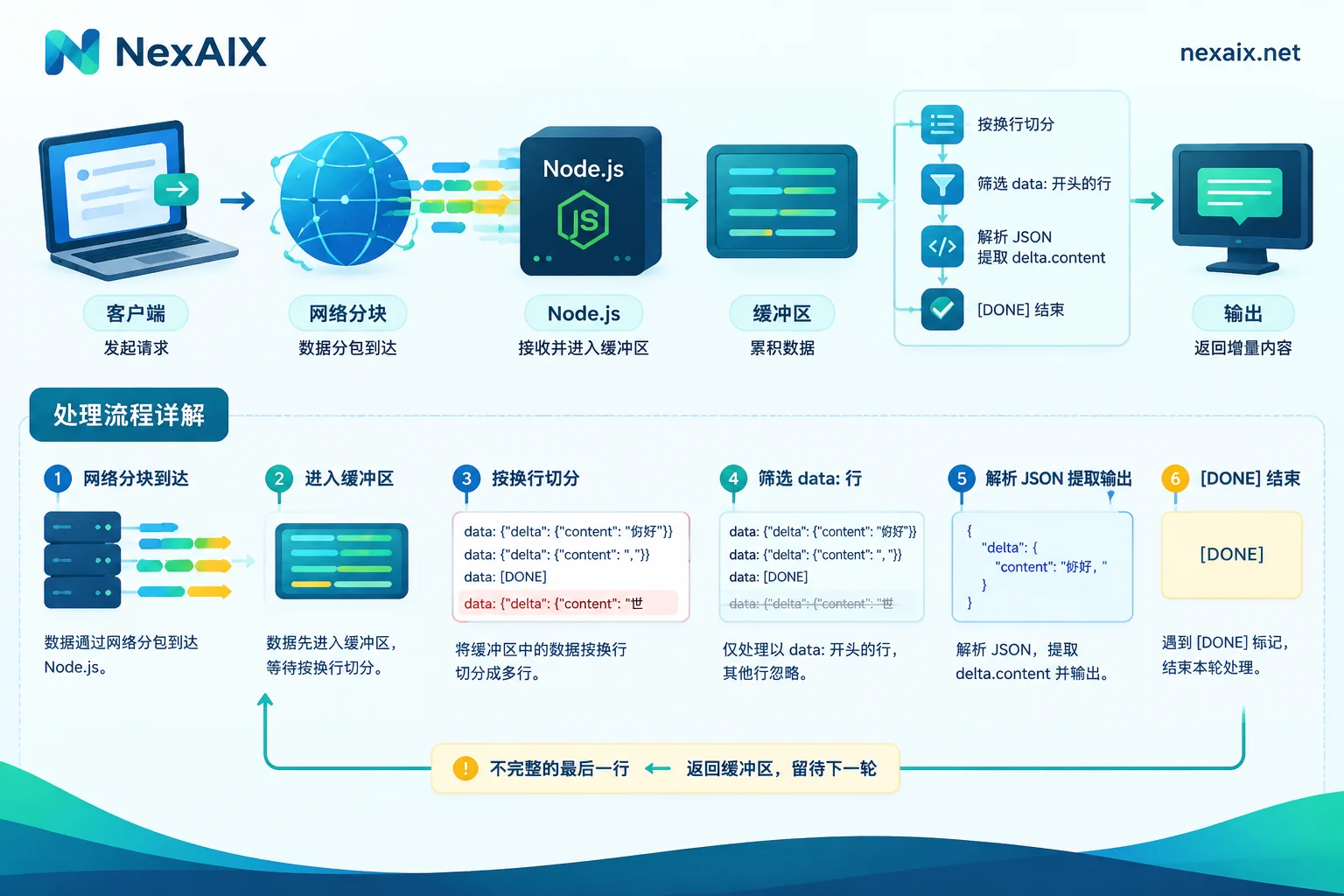
Streaming responses follow the Server-Sent Events format: each data item starts with data: and ends with data: [DONE]. The most error-prone part of parsing is that a single network chunk doesn't necessarily align with a line, so you must buffer first, then split by newline:
async function streamChat(messages, onDelta) {
  const resp = await fetch('https://api.nexaix.net/v1/chat/completions', {
    method: 'POST',
    headers: {
      Authorization: `Bearer ${process.env.NEXAIX_API_KEY}`,
      'Content-Type': 'application/json',
    },
    body: JSON.stringify({ model: 'your-model-id', messages, stream: true }),
  });
  if (!resp.ok) throw new Error(`HTTP ${resp.status}: ${await resp.text()}`);

  const decoder = new TextDecoder();
  let buffer = '';
  for await (const part of resp.body) {
    buffer += decoder.decode(part, { stream: true });
    const lines = buffer.split('\n');
    buffer = lines.pop(); // 最后一段可能不完整,留到下一轮
    for (const line of lines) {
      const trimmed = line.trim();
      if (!trimmed.startsWith('data:')) continue;
      const payload = trimmed.slice(5).trim();
      if (payload === '[DONE]') return;
      const json = JSON.parse(payload);
      onDelta(json.choices[0]?.delta?.content ?? '');
    }
  }
}
Don't set a fixed timeout for the entire streaming request, as long responses would be falsely killed. A better approach is an "idle timeout": reset the timer each time a chunk is received, and only abort() after a period of no data.
Timeouts and retries: retry only what you should
SDK: timeout and maxRetries can be set globally when constructing the client, or overridden per call. For example, to relax settings for a particularly long generation task:
await client.chat.completions.create(params, { timeout: 120000, maxRetries: 1 });The SDK already does exponential backoff retries for 429 and some 5xx. Don't wrap another retry loop around it, or retry counts will multiply and you're more likely to hit rate limits.
fetch: you'll need to write your own retry logic, and the principle is to distinguish by status code:
- 400, 401, 403, 404: The request or configuration itself is problematic; retrying won't change the result. Should fail immediately.
- 429, 500, 502, 503, 504, and network interruptions: can be retried after backoff. If the response headers include
Retry-After, wait according to that value.
async function withRetry(fn, retries = 3) {
  for (let i = 0; ; i++) {
    try {
      return await fn();
    } catch (err) {
      const retryable = !err.status || err.status === 429 || err.status >= 500;
      if (!retryable || i >= retries) throw err;
      const wait = 2 ** i * 1000 + Math.random() * 300; // 指数退避加抖动
      await new Promise((r) => setTimeout(r, wait));
    }
  }
}

const answer = await withRetry(() => chat([{ role: 'user', content: '你好' }]));
For diagnosing which part of the chain is slow after a timeout (client, gateway, or model generation), see How to solve AI API timeouts.
Error classification and handling
The SDK throws structured errors. Since subclasses inherit from APIError, check specific types first, and fall back at the end:
try {
  const res = await client.chat.completions.create(params);
} catch (err) {
  if (err instanceof OpenAI.AuthenticationError) {
    // 401:Key 错误、失效或没有权限,应该报警,不要重试
  } else if (err instanceof OpenAI.RateLimitError) {
    // 429:可能是触发了限速,也可能是额度不足,要看 err.message 区分
  } else if (err instanceof OpenAI.APIConnectionError) {
    // 连接失败或超时:检查网络、代理和 baseURL
  } else if (err instanceof OpenAI.APIError) {
    console.error(err.status, err.message);
  } else {
    throw err;
  }
}
In production, at minimum log err.status and err.message. Even for the same 429, rate limiting and quota exhaustion require completely different handling: the former means reducing concurrency or queuing, while the latter requires top-up or switching keys. NexAIX's quota and rate-limiting rules are public; the specific error response structure is in the integration docs. For a complete explanation of status codes and degradation strategies, see How to read AI API error codes.
Pre-launch checklist
- Confirm connectivity with the shortest non-streaming request: get a 200 and ensure
choices[0].message.contenthas content. - Test a streaming request, confirm chunks are output continuously, and the end marker is received.
- Intentionally use a wrong key, confirm 401 is correctly identified and no retry is triggered.
- Run a concurrency test, observe whether 429 recovers via backoff, and whether logs can distinguish rate limiting from quota exhaustion.
Once these steps pass, you're ready to integrate into production. If you don't have a key yet, sign up via "Get API Key" in the NexAIX website navigation, claim your test quota, and verify directly with the code above. If your project also has a Python service, you can read Calling AI APIs in Python for comparison—the configuration approach is the same.




Comments(0)