 NexAIX-官方博客
To integrate an AI API compatible with the OpenAI protocol, you only need to change three things: the service address (base_url), the API Key, and the model name. The SDK stays the same, and your business code barely needs any changes. Most integration failures happen because the address has an extra or missing path segment, or because parameter names have the wrong case.
Below, we'll first explain how to write the address, then provide configurations for each client, and finally cover streaming, timeouts, and rate limiting that you must add before going live.
base_url Should End at /v1
The official OpenAI SDK works like this: you provide a base URL, and it automatically appends the business path, such as /chat/completions or /models. So the base URL must meet two conditions:
- Include the version path, usually
/v1 - Not include the specific operation path
Take NexAIX's compatible endpoint as an example:
| Writing | Result |
|---|---|
https://api.nexaix.net/v1 | Correct |
https://api.nexaix.net | Missing /v1, path mismatch |
https://api.nexaix.net/v1/chat/completions | SDK appends again, becoming /chat/completions/chat/completions, returns 404 |
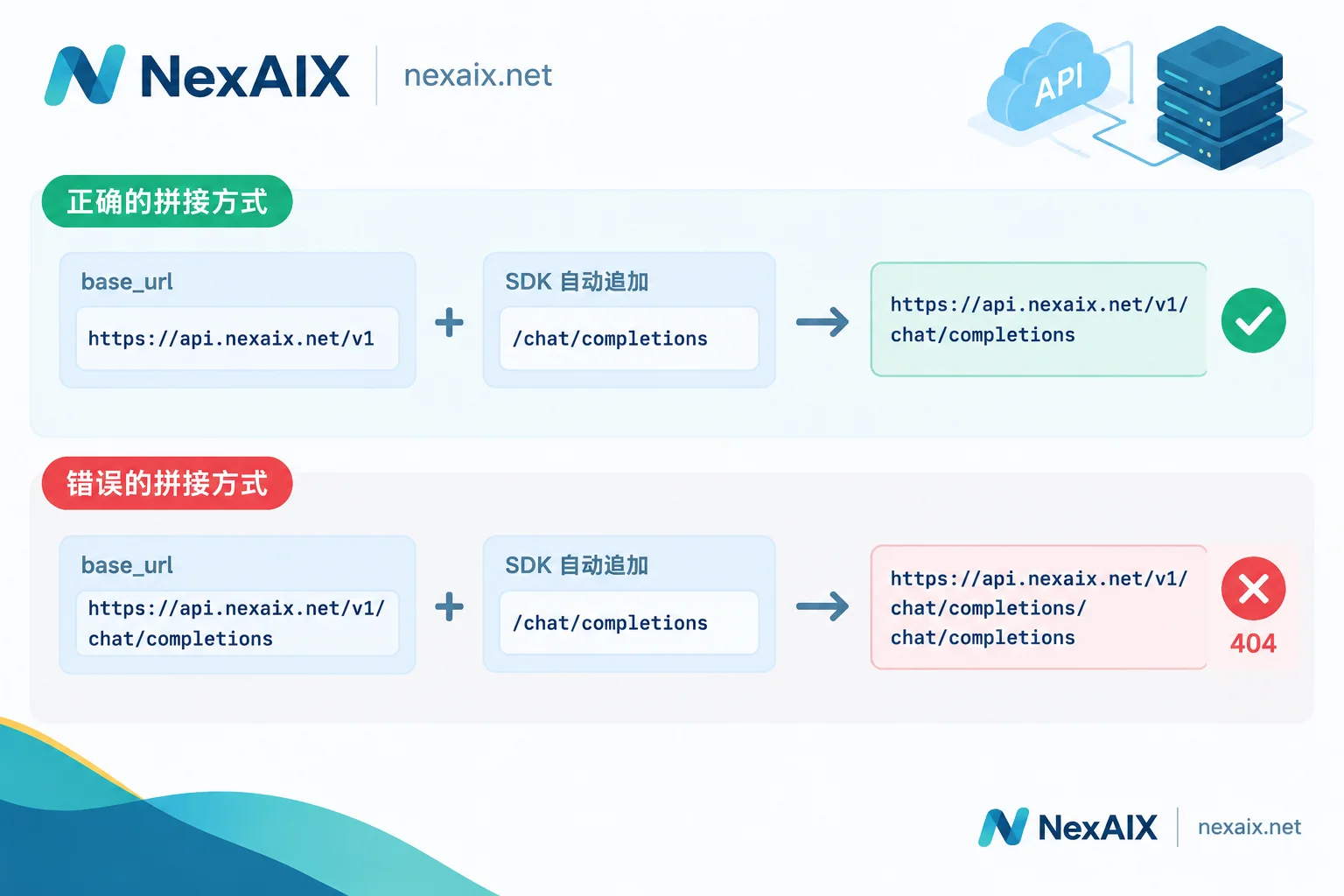 If you encounter a 404, check this first. Native HTTP requests are the opposite—you need to write the full path yourself, which we'll cover later.
Configuration for Four Clients
Python
import os
from openai import OpenAI

client = OpenAI(
    base_url="https://api.nexaix.net/v1",
    api_key=os.environ["NEXAIX_API_KEY"],
)

resp = client.chat.completions.create(
    model="你在模型页选定的模型名",
    messages=[{"role": "user", "content": "用一句话介绍你自己"}],
)
print(resp.choices[0].message.content)
If you don't want to change code, you can also set the environment variable OPENAI_BASE_URL, which the SDK will read as the base URL. When migrating an existing project, this approach avoids code changes.
Do not hardcode the Key in your source code. Read it from environment variables or a secret management service. Use a separate key for development, testing, and production so you can disable one individually if issues arise. For details on storing and distributing keys, see How to Obtain, Store, and Distribute AI API Keys.
Node.js / TypeScript
import OpenAI from "openai";

const client = new OpenAI({
  baseURL: "https://api.nexaix.net/v1",
  apiKey: process.env.NEXAIX_API_KEY,
});

const resp = await client.chat.completions.create({
  model: "你在模型页选定的模型名",
  messages: [{ role: "user", content: "用一句话介绍你自己" }],
});
console.log(resp.choices[0].message.content);
Note the parameter name is camelCase baseURL, not the Python base_url. If you copy from the Python example and write base_url, the configuration won't take effect, and requests will still go to the default address, usually resulting in a 401. In that case, check the parameter name—the Key is probably fine.
LangChain
import os
from langchain_openai import ChatOpenAI

llm = ChatOpenAI(
    base_url="https://api.nexaix.net/v1",
    api_key=os.environ["NEXAIX_API_KEY"],
    model="你在模型页选定的模型名",
)
print(llm.invoke("用一句话介绍你自己").content)
ChatOpenAI uses the standard Chat Completions protocol when connecting to third-party compatible endpoints, so regular chat and streaming work directly. Exceptions are non-standard fields: some models return extended content like thought processes, which may not be parsed by ChatOpenAI and might require additional adaptation parameters or dedicated components. The field name for thought content varies by provider. Before using a model with reasoning mode, check the field descriptions in the provider's integration documentation to decide how to parse it.
Native HTTP
curl https://api.nexaix.net/v1/chat/completions \
  -H "Authorization: Bearer $NEXAIX_API_KEY" \
  -H "Content-Type: application/json" \
  -d '{
    "model": "你在模型页选定的模型名",
    "messages": [{"role": "user", "content": "用一句话介绍你自己"}]
  }'
When not using an SDK, no one appends the path for you. You must write the full URL, up to /chat/completions. Authentication goes in the Authorization header, formatted as Bearer followed by a space and the Key.
curl is also useful for troubleshooting: when an SDK call fails, send a curl request with the same Key and model name. If it works, the problem is in the client configuration; if not, check the Key, model name, and address.
Where to Get the Model Name
The model name must exactly match the identifier provided by the service. A wrong name or a discontinued model will cause the request to be rejected. Model lists change, so don't copy from old code or others' examples.
If you use NexAIX, you can check currently available models in the Model List. Each model page indicates the provisioning method: open-weight models are deployed on our own compute clusters, while closed-source models go through the vendor's official authorized channels. Specifications are subject to the model's page. Apply for a Key at "Get API Key" in the website navigation. Registration includes free trial credits so you can run the minimal examples above.
Three Configurations to Add Before Going Live
Once the minimal example works, you need to add streaming, timeout, and retry configurations for production use.
Streaming Output
stream = client.chat.completions.create(
    model="你在模型页选定的模型名",
    messages=[{"role": "user", "content": "写一段产品介绍"}],
    stream=True,
)

finish_reason = None
for chunk in stream:
    if not chunk.choices:
        continue
    choice = chunk.choices[0]
    if choice.delta.content:
        print(choice.delta.content, end="", flush=True)
    if choice.finish_reason:
        finish_reason = choice.finish_reason
Streaming responses return data chunk by chunk via the SSE protocol. Pay attention to two things:
- Some data chunks have an empty
choicesor emptydelta.content; accessing directly will cause errors, so check first. - The connection may drop mid-stream. Record
finish_reason: if it's still empty when the loop ends, the stream didn't finish normally; if it'slength, the output was truncated due to length limit. In neither case should you treat partial content as complete—retry or notify the user based on your business needs.
If there's a reverse proxy in between, ensure it doesn't buffer responses, otherwise content will accumulate and be returned all at once, defeating the purpose of streaming.
Timeout
Long text generation and reasoning models can take a long time to respond. If the client timeout is too short, it will disconnect prematurely, showing a timeout exception while the server is still generating.
client = OpenAI(
    base_url="https://api.nexaix.net/v1",
    api_key=os.environ["NEXAIX_API_KEY"],
    timeout=120,      # 秒,按任务类型调整
    max_retries=3,
)
There's no universal timeout value; set it per task: tighten for short Q&A to fail fast; relax for long outputs along with streaming so data keeps flowing. If the connection still drops after increasing the client timeout, the issue may be in the gateway or proxy layer. For step-by-step troubleshooting, see How to Solve AI API Timeouts.
429 and Retries
A 429 means rate limiting was triggered. The SDK's max_retries automatically retries such errors, which handles typical fluctuations. For batch tasks or high-concurrency scenarios, add an exponential backoff layer in your business logic:
import time, random
from openai import RateLimitError

def call_with_backoff(fn, max_attempts=5):
    for attempt in range(max_attempts):
        try:
            return fn()
        except RateLimitError:
            if attempt == max_attempts - 1:
                raise
time.sleep(min(2 ** attempt + random.random(), 30))- Double the wait time each attempt, and add random jitter to avoid multiple processes retrying simultaneously.
- Only retry 429 and temporary server errors. Retrying 401 or 404 won't succeed; report them directly to fix the configuration.
- If 429 keeps occurring, concurrency exceeds the quota. Reduce concurrency or adjust request pacing—increasing retries won't help. Specific quota and rate limit numbers are available in the service provider's public documentation; use them to set concurrency limits.
For the meaning and handling of each status code, see How to Read AI API Error Codes.
Self-Check Order After Integration
When requests fail, troubleshoot in this order:
- 404: Check if base_url ends at
/v1and doesn't have an extra/chat/completions; then verify the model name. - 401: Check if the Key is read (environment variable name might be wrong). In Node.js, check the parameter is
baseURL. - 429: Reduce concurrency and confirm retries include backoff.
- Timeout or stream interruption: Increase
timeout, switch long outputs to streaming, and check proxy settings. - Incomplete output: Check
finish_reasonto distinguish between length truncation and connection interruption.
The first two are configuration issues that won't recur once fixed. The last three are load-related and require long-term handling logic in your code.




Comments(0)