 NexAIX-官方博客
The meaning of an OpenAI-compatible API is actually quite simple: the server implements the same set of paths following OpenAI's REST specification, /chat/completions is still /chat/completions, and the request body fields are essentially the same. So the answer to 'how to use it' is—your existing code doesn't need to be rewritten, just change two things:
base_url(base address, calledbaseURLin some SDKs)api_key
model should be filled with the model name provided by the target service, and messages, temperature, stream, max_tokens remain unchanged. The only real pitfall is: how deep should base_url go.
base_url should go up to the version number
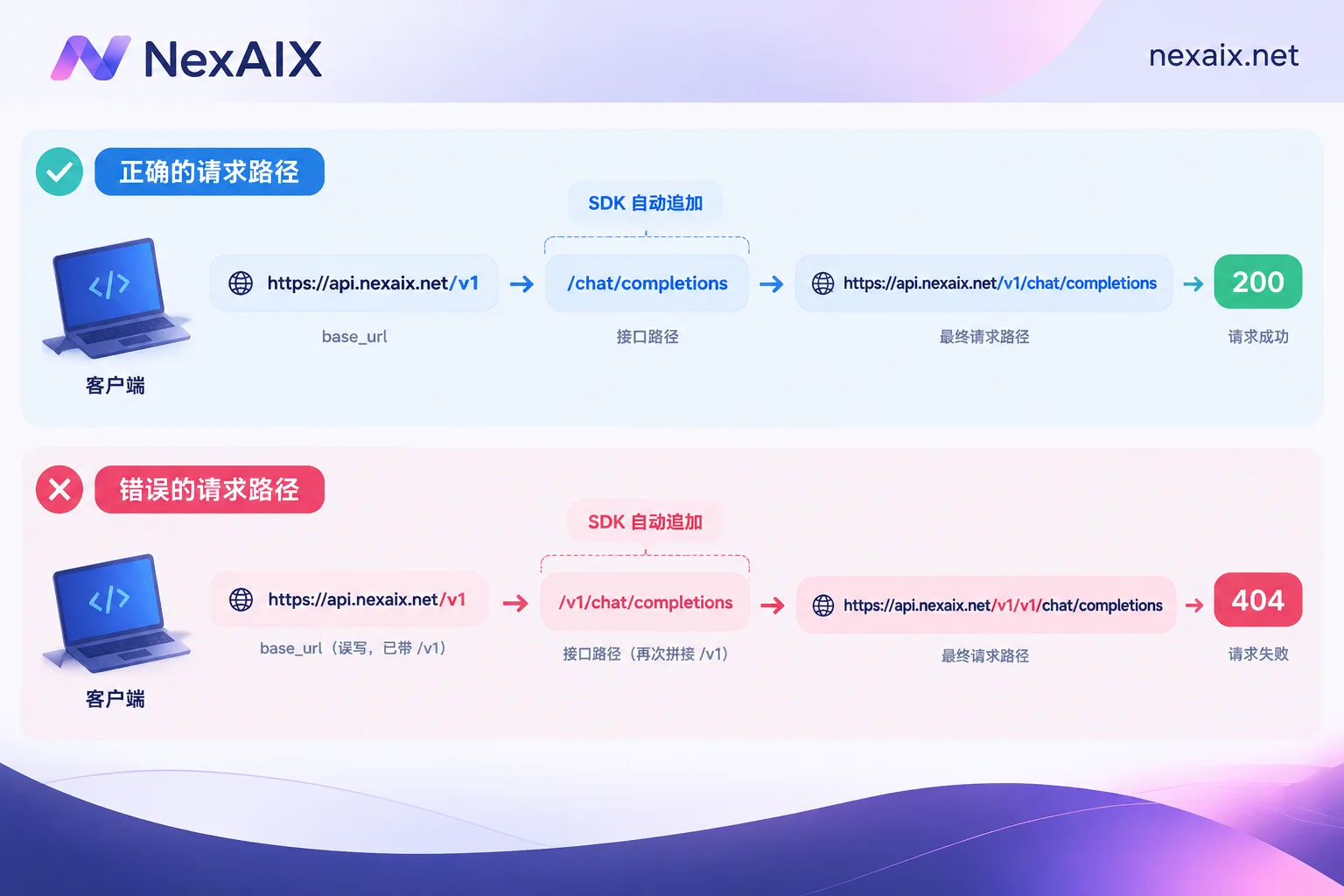
Remember one rule: the SDK will append subpaths (like /chat/completions) after base_url, so base_url only needs to go up to the version number.
Taking NexAIX as an example, the compatible endpoint is https://api.nexaix.net/v1, so:
base_url  = https://api.nexaix.net/v1
实际请求  = https://api.nexaix.net/v1/chat/completions
Don't append chat/completions yourself again, and don't write /v1/v1. Conversely, omitting /v1 is also common—some tools will add it for you, some won't, which is why many people find 'the same Key works on the web version but returns 404 in code'.
Python: Using the official SDK
The openai Python SDK (after v1.0) takes base_url when instantiating the client:
from openai import OpenAI

client = OpenAI(
    base_url="https://api.nexaix.net/v1",
    api_key="你的 API Key",
)

resp = client.chat.completions.create(
    model="你的模型名",
    messages=[{"role": "user", "content": "你好"}],
)
print(resp.choices[0].message.content)
If you don't want to change code, use environment variables: set OPENAI_BASE_URL and OPENAI_API_KEY, then OpenAI() will take effect upon initialization. This is especially handy in containers and CI—just keep OpenAI() in the code and switch environment variables for different environments.
For streaming output, add stream=True, then extract incremental content chunk by chunk:
for chunk in client.chat.completions.create(..., stream=True):
    if chunk.choices and chunk.choices[0].delta.content:
        print(chunk.choices[0].delta.content, end="")
Note that delta.content might be None (e.g., a first chunk with only role information), so check before accessing.
Node.js: Watch the camelCase naming
In openai-node, the parameter is baseURL, not base_url. Incorrect casing will silently fail and fall back to the official address:
import OpenAI from "openai";

const client = new OpenAI({
  baseURL: "https://api.nexaix.net/v1",
  apiKey: process.env.API_KEY,
});

const resp = await client.chat.completions.create({
  model: "你的模型名",
  messages: [{ role: "user", content: "你好" }],
});
Raw HTTP / cURL: Build the path yourself
When not using an SDK, the full address is base_url + /chat/completions. It must be POST, and two headers are essential:
curl https://api.nexaix.net/v1/chat/completions \
  -H "Content-Type: application/json" \
  -H "Authorization: Bearer $API_KEY" \
  -d '{
    "model": "你的模型名",
    "messages": [{"role": "user", "content": "你好"}],
    "stream": false
  }'
To list available models, using GET {base_url}/models is more reliable than copying model names from documentation.
Frameworks: LangChain's resolution order
langchain_openai.ChatOpenAI also accepts base_url and api_key parameters:
from langchain_openai import ChatOpenAI

llm = ChatOpenAI(model="你的模型名", base_url="https://api.nexaix.net/v1", api_key="...")
Its priority for resolving custom endpoints is: explicitly passed base_url > environment variable OPENAI_API_BASE > environment variable OPENAI_BASE_URL. The two environment variable names are similar, and setting both can lead to 'works locally but not online'. It's best to keep only one, or hardcode it in the code.
Another detail: when the framework detects a non-official base_url, the default strategy for streaming usage statistics may differ, and parameters like stream_usage might not get token counts. If you rely on token billing or budget control, don't depend solely on the framework's streaming stats—reading the usage field in the response is more reliable.
Four common errors and the order to check them
404 Not Found — 90% of the time it's a path concatenation issue, not permissions. Print the full request path and compare: /v1/v1/chat/completions means base_url has an extra /v1; /chat/completions (missing version segment) means it's missing. The quickest way is to test with the same cURL—if it works, it's an SDK configuration issue.
401 Unauthorized — Invalid Key, or the value has leading/trailing spaces or newlines, or the header is missing the Bearer prefix (note the space after it). Reading the Key from environment variables is especially prone to including newlines.
Model not found / invalid model — The model parameter must strictly match the name provided by the server, including case and version suffix. First call GET /models to get the exact list.
Streaming not responding or parsing errors — Streaming returns SSE, one data: {...} per line, with the last line being data: [DONE]. Don't throw the entire response body into json.loads all at once, and don't miss the [DONE] end marker, otherwise you'll either fail to parse or loop endlessly.
Error code handling can be layered: 400 and 401 are code issues that shouldn't be retried; 429 and 5xx are suitable for backoff retries.
After switching endpoints, what to confirm in production
Working in development and being ready for production are two different things. When migrating, go through these points:
- Timeouts and retries: Default timeouts are often too long; set them explicitly in production and implement backoff retries for 429 and 5xx. Also consider the cost of duplicate requests in your idempotency design.
- Concurrency and rate limits: Understand the target endpoint's RPM/TPM limits upfront, stress-test to find a stable concurrency ceiling, then decide whether to queue or degrade.
- Context and truncation: Switching models may change the context window and max output. Recalculate input length for long-document tasks to avoid silent truncation.
- Behavior consistency: The same prompt may produce different output styles, refusal tendencies, and structured output capabilities on old vs. new endpoints. Comparing with a fixed test set is more useful than reading docs.
- Key isolation: Don't share one Key across development, testing, and production. It makes debugging easier and keeps usage and billing separate.
Where to start
If you don't have a usable endpoint and Key yet, think in reverse: first determine what model your task needs, then see what type of supply that model is. NexAIX's model list indicates the supply method for each model—open-weight models run on its own compute cluster, while closed-source models go through official vendor channels. This directly affects your expectations for stability, context, and response style. Once you've chosen a model, go to the official website's 'Documentation' and 'Get API Key' sections for access information.
For more detailed per-language steps, see these articles: Python and Node.js client initialization, streaming and retries; the AI API integration tutorial has a side-by-side comparison. For errors, check the error code troubleshooting guide.




Comments(0)