 NexAIX-官方博客
Shortest Path: Three Environment Variables
Claude Code configuration boils down to three things—credentials, endpoint, and model name—all of which can be set via environment variables.
export ANTHROPIC_API_KEY="sk-ant-..."
export ANTHROPIC_BASE_URL="https://<你的端点>"
export ANTHROPIC_MODEL="<服务端支持的模型名>"
If you're using the official Anthropic endpoint, don't set the second line; if you don't set it, the default api.anthropic.com is used. If you set it but fill in the wrong value, it's more likely to cause problems than not setting it.
After starting claude and entering an interactive session, first run /status. It displays the currently active authentication method, the source of the Key or Token, and the session configuration. Checking this first is much faster than repeatedly trial-and-error to find the cause of a 401.
Credentials: ANTHROPIC_API_KEY and ANTHROPIC_AUTH_TOKEN Are Not the Same
Both variables are often loosely called "API keys," but the request headers are completely different:
ANTHROPIC_API_KEYuses theX-Api-Keyheader. When this variable exists in the environment, Claude Code will prioritize it, and requests will be billed to the corresponding Console organization's API account, not the claude.ai web subscription. In interactive mode, it will first ask you to confirm this approval; after confirmation, browser login is skipped.ANTHROPIC_AUTH_TOKENuses theAuthorization: Bearerheader. Used for gateways, proxies, or relay endpoints that employ Bearer authentication.
The most typical pitfall is putting the Bearer Token your endpoint gave you into ANTHROPIC_API_KEY: the credential itself is correct, just placed in the wrong request header, resulting in a 401. The reverse is also true. Before integrating, clarify which authentication method the endpoint requires.
Another easily misjudged point: subscriptions and API keys are two separate billing systems. If you've already logged in with a claude.ai subscription, once ANTHROPIC_API_KEY appears in the environment, billing switches to the API account. To continue using the subscription, don't set it.
Endpoints: Confirm the Protocol First, Then Fill in the URL
ANTHROPIC_BASE_URL redirects requests from the official address to private gateways, enterprise proxies, or third-party endpoints.
There's a hard prerequisite here: Claude Code speaks the Anthropic Messages protocol and natively only interfaces with the official Anthropic API and native adapters from cloud providers like Bedrock and Vertex. If the target endpoint only exposes the standard OpenAI format /v1/chat/completions and lacks an Anthropic protocol conversion layer, then filling that address into ANTHROPIC_BASE_URL will fail at the request-sending step, with errors appearing at the protocol layer rather than the authentication layer. Changing the Key or model name won't fix it.
So the order for choosing an endpoint is: first ask "Is there an Anthropic-compatible Messages endpoint?", then ask about model names, and only then discuss pricing. If the protocol hurdle isn't cleared, everything else is moot. The request format differences between the two protocols have been broken down in Claude vs GPT API comparison.
When deciding on a long-term endpoint, beyond protocol, several other factors are worth clarifying before integration: whether rate limits and quotas are public, whether multi-user collaboration uses per-Key isolation (quotas, permissions, and usage bills are independent), and whether conversation content is retained. For example, NexAIX's model list annotates each model's supply method—whether it's an open-weight model deployed on their own compute, or a closed-source model from an official vendor-licensed channel; endpoints and Keys are obtained from the official website's "Documentation" and "Get API Key" navigation, and the site also states that conversation content is not recorded and is released upon request completion. Whether this information can be obtained in advance is itself a criterion for judgment.
Model Names: Claude Code Uses More Than One Model Internally
Claude Code selects models by role: main conversation, background light tasks, and subagents each use their own. After switching to a third-party endpoint, the server-side model names are almost never the same as the official defaults, so rewriting is needed:
ANTHROPIC_MODEL: main modelANTHROPIC_DEFAULT_OPUS_MODEL,ANTHROPIC_DEFAULT_SONNET_MODEL,ANTHROPIC_DEFAULT_HAIKU_MODEL: override the opus / sonnet / haiku aliases respectivelyCLAUDE_CODE_SUBAGENT_MODEL: model used for subagent tasks
These aliases have two practical uses. First, when the server only provides one or two models, point all three tiers to the same one, so Claude Code doesn't look for a non-existent name by tier. Second, point the haiku tier to a cheaper small model for light tasks like reading files and generating titles, while keeping the main tier on a strong model.
A wrong name is usually rejected by the server as "model does not exist" (typically 4xx), and such errors are relatively easy to locate; if the model identifier in the response doesn't match what you set, check on the endpoint side instead of repeatedly changing local variables.
Persisting Configuration: settings.json Takes Precedence Over Shell
export only lives in the current terminal window. For long-term effect, write the configuration into the env object of ~/.claude/settings.json:
{
  "env": {
    "ANTHROPIC_BASE_URL": "https://<你的端点>",
    "ANTHROPIC_API_KEY": "sk-...",
    "ANTHROPIC_MODEL": "<模型名>"
  }
}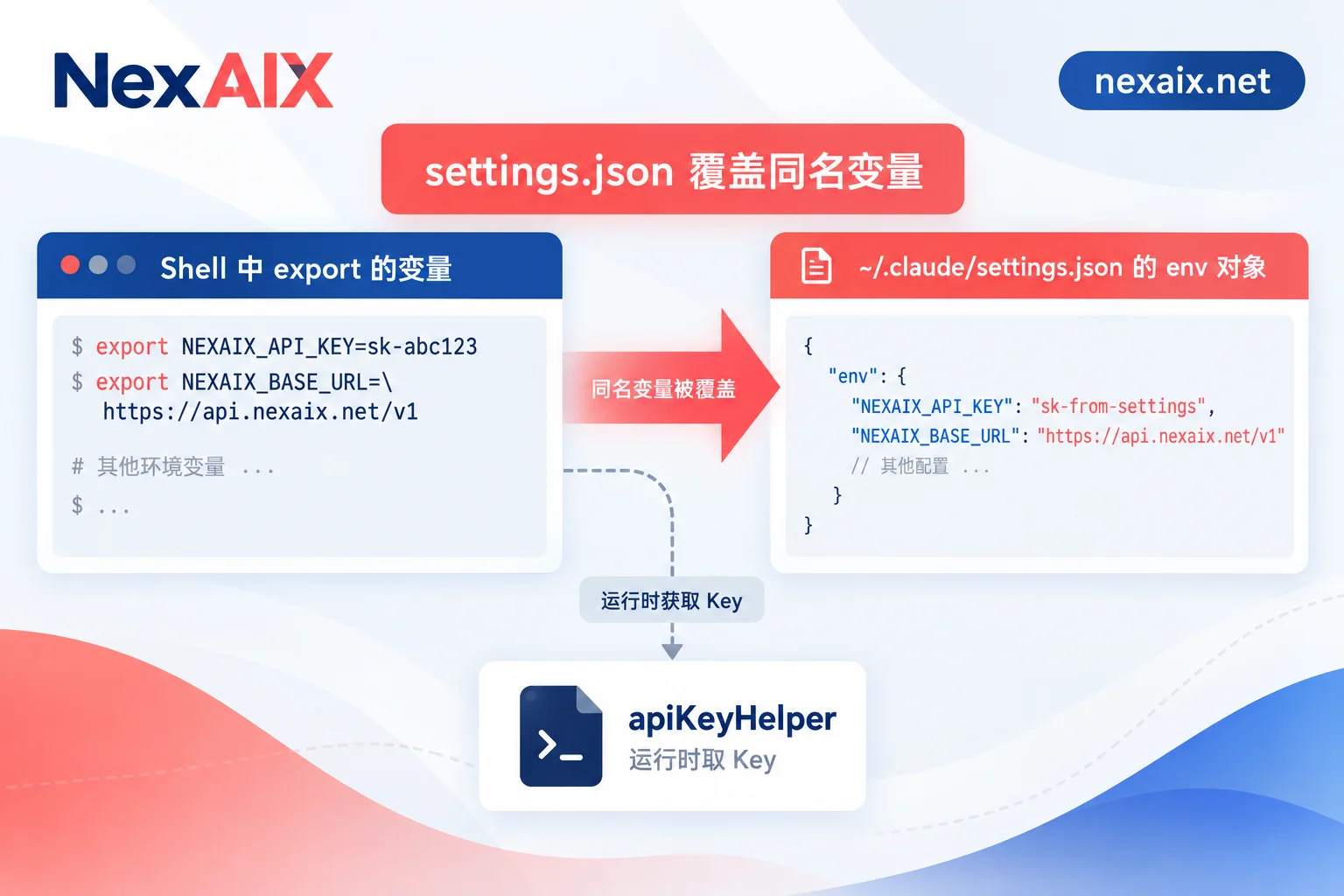
The key is precedence: env in settings.json overrides same-named variables exported in your current shell. This is the hardest type of problem to think of during troubleshooting—you change ANTHROPIC_BASE_URL in the terminal, restart Claude Code, and nothing changes, most likely because a higher-priority configuration is overriding it.
If the Key is issued by an external system and needs regular rotation, you can use the apiKeyHelper field to point to a script, letting Claude Code fetch it at runtime instead of leaving plaintext in the config file. When using multiple environments like local, CI, and production, this saves more hassle than manually editing files. For a more detailed discussion on how to obtain, store, and split API keys, see How to Get, Store, and Split AI API Keys.
How to Confirm Configuration Is Actually in Effect
- After starting, run
/statusto verify the authentication method, Key/Token source, and current endpoint. It's clearest here whether those three environment variables were actually read. - When behavior doesn't match expectations, first check both settings.json and shell variables together to confirm no second configuration is in effect—if precedence is reversed, changing either one is futile.
- If you suspect the model has been swapped, don't just look at the UI text; verify with actual requests: check the model identifier in the response and whether long inputs are processed with the context length you expect. The step-by-step troubleshooting order from 401, 404, 429 to timeouts and truncation is a ready-made route in AI API Troubleshooting.
- To firmly establish that "no downgrade occurred," you can check against the four commitments listed on the official website and their corresponding verification methods one by one, which is more reliable than gut feeling.
A Common Conflict Checklist
- 401: Key placed in the wrong variable. Bearer Token put into
ANTHROPIC_API_KEY, or vice versa. - Changed shell variable but no effect:
~/.claude/settings.jsonhas a same-named configuration with higher precedence. - Request doesn't go out at all, protocol error: The endpoint doesn't provide Anthropic Messages format.
- Model does not exist: The endpoint's model name doesn't match
ANTHROPIC_MODELor the tier variables. - Expected subscription but got API bill:
ANTHROPIC_API_KEYexists in the environment, which takes precedence over web subscription login.
When collaborating as a team, don't share a single Key. With per-Key isolation, quotas, permissions, and usage are independent, so when problems arise, it's clear which environment or person to check. For first-time integration, you can get the endpoint and Key from the official website's "Documentation," run through the entire configuration above with the free test credits from registration, and then decide whether to put it into your daily development workflow.




Comments(0)