 NexAIX-官方博客
When configuring an OpenAI-compatible endpoint for an LLM (Chat model) in Dify, fill in the API endpoint URL in this format: protocol + domain + /v1, with no trailing slash, for example:
https://api.nexaix.net/v1Do not write just the domain https://api.nexaix.net, do not write https://api.nexaix.net/v1/, and never include /chat/completions. The following explains how to fill each field, why /v1 is required, when to remove /v1, and the order in which to troubleshoot errors after clicking save.
Where to Fill It In and How to Configure Each Field
The entry point is Dify's "Settings" → "Model Providers" → "OpenAI-API-compatible". This provider is offered as an official plugin; if it's not in the list, first install OpenAI-API-compatible from the plugin marketplace.
After clicking Add Model, the required fields are:
- Model Type: Choose LLM for chat models. Choose Embedding, Rerank, etc. according to actual use. These types have exceptions to the URL rules, explained separately below.
- Model Name: Must exactly match the model identifier published by the provider, including capitalization, hyphens, and version suffixes. This is not a display name you make up; Dify puts it verbatim into the request's
modelfield. - API endpoint URL: In some versions, this is called API Base URL; they are the same field. Fill it in as described at the beginning.
- API Key: The key issued to you by the provider.
- Completion mode: Usually choose Chat.
If you're connecting to NexAIX, use the endpoint https://api.nexaix.net/v1. Copy the model identifier from the corresponding model page in the model list; don't type it from memory. The model page also states the model's provisioning method: open-weight models are deployed on self-owned compute, and closed-source models go through the vendor's official licensing channel. Apply for an API Key under "Get API Key" in the site navigation; there is a test quota after registration, enough to get this Dify step working.
Why /v1 Is Required
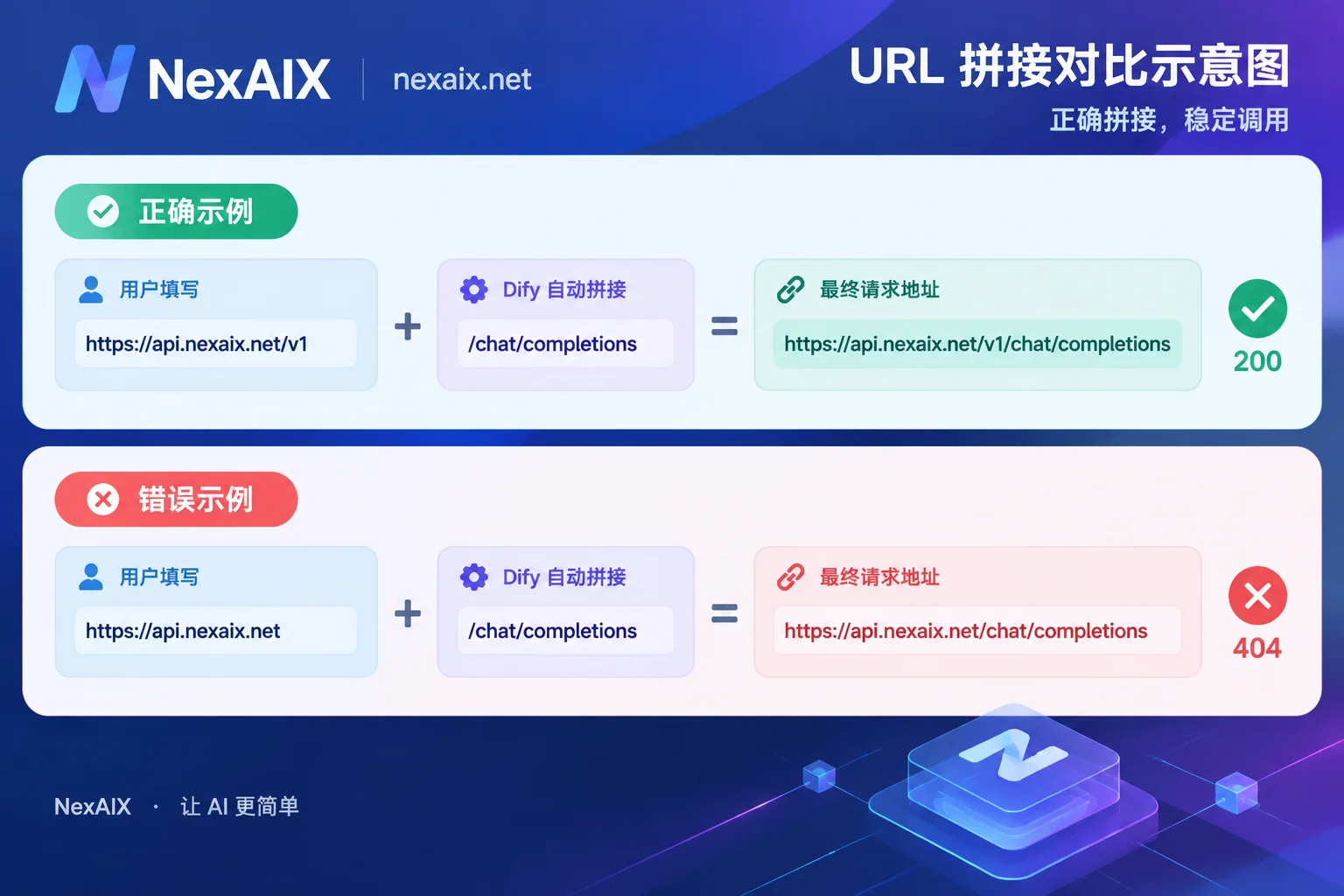
When Dify sends a request, it treats the URL you entered as a prefix and directly appends /chat/completions.
- Enter
https://api.nexaix.net/v1; the actual request ishttps://api.nexaix.net/v1/chat/completions, which is the correct path. - Enter
https://api.nexaix.net; the actual request becomeshttps://api.nexaix.net/chat/completions, missing the version number, so the server cannot find the route and returns 404.
It's also best to remove the trailing slash. Some plugin implementations automatically strip extra /, but not every version handles it that way. Writing https://域名/v1 is safest and avoids path-parsing issues like //chat/completions.
The "base_url" in other tools mostly follows the same logic. If you've already connected to the same service in an SDK or another client, the base_url that works there can generally be copied over directly. For the general approach to changing base_url, see How to Use OpenAI-Compatible APIs.
Exception: /v1/v1 Errors on Embedding and Rerank
The above rule applies to LLMs. In some older plugin versions, non-LLM models such as Text Embedding, Rerank, and speech-to-text (STT) internally append another /v1. If you fill in .../v1 as usual in this case, the actual request becomes .../v1/v1/embeddings, which also causes an error.
How to handle it: Only when you clearly see /v1/v1 in the error message for a non-LLM model should you change that model's URL to the root domain without /v1, such as https://api.nexaix.net. LLM models are unaffected and still get the full address with /v1. Don't remove /v1 from all models just for consistency.
Save Errors: Check in This Order
When Dify saves a model configuration, it immediately makes a test call using the parameters you entered. A "Credentials validation failed" or 400 error means that test call did not succeed; it's not necessarily a wrong Key. Check in the following order:
1. First confirm the URL shape. Check four points: includes https://, includes /v1, no trailing slash, and no extra /chat/completions. If the error is a 404, this is most likely the cause.
2. Then check the model name. If the name differs from the provider's published identifier by even one character, the test call fails. The most common mistake is entering a display name, an old version name, or the naming convention from another platform.
3. Then check the Key. The Key must be valid and have permission and remaining quota to call this model. If your service divides permissions and quotas by Key (NexAIX, for example, has independent quotas, permissions, and usage billing per Key), make sure the Key entered in Dify can actually call this model. For how to obtain, store, and assign Keys, see How to Get, Store, and Assign AI API Keys.
4. Finally check the network, mainly for Docker deployments. When Dify runs in a Docker container, localhost or 127.0.0.1 in the URL points to the container itself, not your host machine. So when connecting to a local model or proxy service on the host or LAN, you'll get Connection Refused. In this case, change it to host.docker.internal or the host's LAN IP. If you're calling a public HTTPS endpoint (such as https://api.nexaix.net/v1), this issue does not apply.
For troubleshooting, you can bypass Dify first and send a request directly from the command line using the same three things (URL, model name, Key):
curl https://api.nexaix.net/v1/chat/completions \
  -H "Authorization: Bearer $YOUR_API_KEY" \
  -H "Content-Type: application/json" \
  -d '{"model":"你在 Dify 里填的模型名称","messages":[{"role":"user","content":"hi"}]}'
Use the result to determine which side the problem is on:
- curl returns a normal reply but Dify fails to save: The problem is on Dify's side, such as a wrong field entry or container network unreachability.
- curl also errors: First check the status code. 401 usually means a Key problem, 404 means a path or model name problem, and 429 means rate limiting or insufficient quota. For the specific meaning of each status code, see How to Read AI API Error Codes.
Summary
For LLMs, enter https://域名/v1 without a trailing slash; only remove /v1 when a non-LLM model reports /v1/v1; copy the model name from the provider's model page; don't use localhost in Docker to point to the host machine. After saving successfully, create a new app in Dify, send a few messages to confirm replies work, and then you can use it in workflows.




Comments(0)