 NexAIX-官方博客
If your problem is "the same model name performs differently across API providers," or "is this provider giving me an open-source model or a closed-source one, and does it matter," here is a quick way to frame it: the difference between the two channel types is not the interface format, but who runs inference.
- Open-weight model API: The weights are public. The provider downloads the model and deploys it on its own or hosted GPU clusters, exposing an API through inference engines such as vLLM or SGLang. What precision it loads at, how long the context is set, how much concurrency it can handle, and how logs are handled are all decided by that deployment provider.
- Closed-source model official licensed channel: The weights are not public, and inference can only be performed by the original vendor. The channel sends requests to the vendor through the official vendor API or an authorized relay. Model precision and behavior are the vendor's responsibility, and data retention and rate limits follow the vendor's commercial terms.
So when evaluating an open-weight API, ask what configuration the deployment provider uses; when evaluating a closed-source channel, ask whether requests truly go through the official service and what the vendor's terms say.
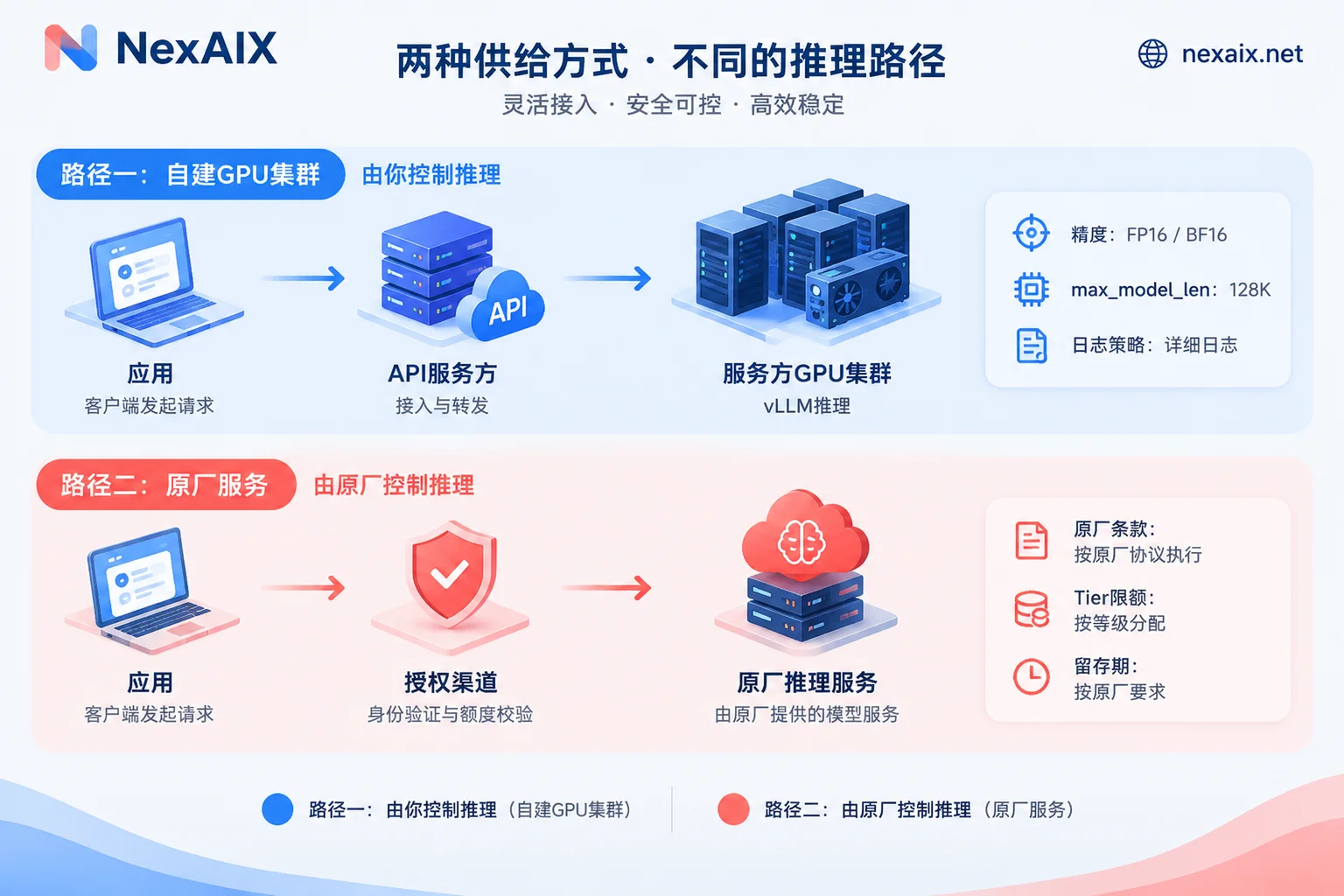
| Open-weight model API | Closed-source model official licensed channel | |
|---|---|---|
| Where inference runs | The provider's GPU cluster | The vendor's infrastructure |
| Who decides precision | The deployment provider, possibly with quantization | The vendor; not externally visible |
| Actual context limit | Depends on deployment parameters and VRAM | As declared by the vendor |
| Data retention | The deployment provider's own policy | Vendor terms, plus the intermediary's own policy |
| Rate limits and latency | The deployment provider's compute scale and scheduling capability | Vendor tiered quotas |
The following sections explain item by item how these differences affect your calls.
Precision: The most fragile point on the open-weight side
The same open-source model can be loaded in BF16, FP8, or low-bit quantization formats such as INT4 and W4A16. Lower precision means less VRAM usage, more concurrency per card, and lower deployment cost. Some deployment providers choose high-loss low-bit quantization to cut costs, at the price of numerical instability in tasks such as complex code generation and multi-step logical reasoning. Common symptoms include small errors in long code or a reasoning chain drifting off course midway, while simple Q&A often shows no visible difference.
Keeping the original weights (BF16, or the officially released FP8 version) requires more VRAM and costs more. Before using an open-weight API, it is worth confirming two things with the provider:
- What precision is used when loading for inference?
- Are the weights the official release, or have they been swapped for a smaller-parameter version?
On the closed-source channel side, you cannot see or adjust precision. However, inference is performed by the original vendor itself, and an intermediary has no way to swap in a low-precision version, provided that requests truly go through the official channel.
For the specific differences between BF16 and FP8 in VRAM, speed, and quality, see What is the difference between BF16 and FP8 inference precision. To check for yourself whether responses come from the original model, see How to confirm whether an API returns the original model.
Context: A declared 128k does not mean you can actually use the full 128k
Long context consumes KV Cache, and KV Cache consumes VRAM. In vLLM, for example, the maximum context length is controlled by the max_model_len parameter. If physical VRAM cannot support the model's declared maximum length, the deployment provider may lower this parameter while still advertising the vendor's upper limit externally. Context is then quietly shrunk: long-document requests may return an over-length error, or part of the input may be truncated so the model only "sees" the latter half.
To guarantee full context, the deployment provider needs to reserve enough VRAM in the cluster. That is also a cost, and only providers willing to bear it will state in their commitments that context is not cut.
A direct way to check for yourself:
- Construct an input close to the declared limit and see whether the request completes normally or returns an error.
- Compare
usage.prompt_tokensin the response with your locally estimated token count; if the gap is too large, ask why. - If the problem is truncated output rather than input, check
finish_reasonfirst; for troubleshooting steps, see What to do when LLM API output is truncated.
The context limit of a closed-source model follows the vendor's documentation; the main risks are that your own request exceeds the limit or that some intermediary applies additional truncation.
Data retention: The boundaries differ on each side
Requests through closed-source official channels ultimately reach the original vendor, and retention rules follow the vendor's terms. Under the publicly available commercial terms of OpenAI and Anthropic, API data is not used for model training by default, but is usually retained for a period (commonly around 30 days) for abuse review and security compliance. Some enterprise customers can separately request a Zero Data Retention agreement. Terms change, so for a formal evaluation, rely on the vendor's current version.
One easily overlooked point: when an intermediary channel promises "we do not log conversations," that covers only its own layer. Retention at the vendor layer still follows the vendor's terms.
Open-weight APIs have no vendor layer. The deployment provider has full control over data flows and can technically release requests from memory as soon as they finish, without writing to disk or keeping logs. Note that "can do" does not mean "has done": you also need to see whether the provider explicitly commits to this and whether there is anything you can verify. For what can and cannot be checked, see How to verify whether an AI API logs conversation content.
Rate limits and latency: Vendor quotas on one side, provider compute on the other
Calls through closed-source channels follow the vendor's tiered RPM and TPM quotas, and the total capacity a channel can offer is also constrained by upstream quotas. When limits are exceeded, you receive a 429 error and need to handle backoff and retries in code.
For open-weight APIs, concurrency capacity and response speed depend on the deployment provider's cluster scale, network topology, and continuous batching scheduling. In high-concurrency, long-text scenarios, time to first token (TTFT) and time per output token (TPOT) depend heavily on the card type and cluster configuration, and there is no universal benchmark figure you can apply directly. A more reliable approach is to first look at the provider's published quotas and rate limits, then run a load test using your own real request patterns (input length, concurrency, whether streaming is used).
How to choose: Decide based on task and constraints
- Your task depends on the capabilities of a particular closed-source model: You can only use official licensed channels, because third parties cannot obtain closed-source weights. If someone claims to offer a closed-source model but cannot clearly explain whether requests go through the original vendor, be cautious.
- You have strict requirements on where data goes and have not signed a zero-retention agreement with the vendor: Prioritize open-weight models deployed by a provider that explicitly commits to no retention, so requests do not pass through a third-party vendor.
- Long-document or large-codebase analysis: Either side can work. If you choose open weights, first verify the actually available context length using the method above.
- High call volume and cost sensitivity: Open-weight models are usually more flexible, but confirm that the low cost is not achieved by reducing precision.
- Production environments that need stable throughput: For closed-source channels, look at vendor quotas and your tier; for open weights, look at the provider's published rate limits and run your own load tests.
How to tell the difference on NexAIX
NexAIX offers only two supply models: open-weight models deployed on its own compute clusters, and closed-source models through official vendor licensed channels. Each model page states which category it belongs to. When choosing a model, first confirm the supply model in the model list, then check the specifications on the corresponding model page. The model list changes; for specific models and pricing, refer to the official website.
For the risk points above, NexAIX's approach is: no swapping to smaller models, no precision reduction, no context cutting; no logging of conversation content, with requests released as soon as they finish; published quotas and rate limits; and isolation by API Key, with each Key having its own quota, permissions, and usage billing. How to verify each commitment yourself is described in Four commitments and how to verify them. One reminder: when calling closed-source models, requests still reach the original vendor, and retention at the vendor layer follows the vendor's terms.
Integration is the same for both model types, using the OpenAI-compatible endpoint https://api.nexaix.net/v1. Existing code usually only needs changes to base_url and the model name; for other parameters you may need to check, see Which code changes are needed when switching LLM APIs. After registration you receive trial credits, with no enterprise qualification required, so you can first use them to run the context and precision checks above, then decide which model to use in production. Integration documentation and the entry point for obtaining an API Key are in the official website navigation bar.




Comments(0)