NexAIX-官方博客
You have an agent codebase to modify, or a pipeline that runs dozens of tool calls, and you want to try GLM-5.2—this article follows this order: first decide whether it's worth switching, then change the configuration, then handle the timeouts and truncation that come with 1M context, and finally confirm you're actually calling this model.
First, decide: is this task worth using GLM-5.2?
GLM-5.2 is the open-weight flagship model released by Zhipu (Z.ai) under the MIT license. Its positioning is stated plainly: Long-Horizon Tasks and Agentic Engineering. On complex software engineering benchmarks like SWE-Bench Pro and FrontierSWE, the officially published results are close to Claude Opus 4.8 and GPT-5.5.
Translated to the tasks at hand, these are the categories worth switching:
- Refactoring across dozens of files, bug fixing with compilation feedback loops, requiring continuous tool calls without going off track;
- Feeding an entire codebase or hundreds of pages of documentation for retrieval and analysis in one go, relying on the 1M token engineering-grade context;
- The planning and decomposition node in a custom agent framework, which demands high multi-turn consistency.
Conversely, single-turn classification, extraction, short Q&A, and intent recognition won't benefit from the switch. The inference cost and first-token latency of a long-horizon model are there; leaving these tasks to smaller, faster models and using GLM-5.2 only in the one or two stages that truly need it is a more common approach.
The MIT license is worth noting separately: the weights are publicly available, meaning the same model name can come from completely different providers—official platforms, various relays, self-hosted clusters. This directly determines the verification we'll do in the last section of this article.
Change configuration: base_url and model name, leave the rest alone
The GLM-5.2 API is compatible with the OpenAI interface specification. To connect an SDK, Cursor, Claude Code, or your own agent framework, it's the same action: replace the request endpoint with the OpenAI-compatible endpoint, write the model name as the corresponding GLM-5.2 identifier, and all your message construction, tool definitions, and streaming parsing in the business logic don't need to be rewritten.
Python SDK usage:
from openai import OpenAI

client = OpenAI(
    api_key="你的 Key",
    base_url="https://api.nexaix.net/v1",
    timeout=600.0,  # 长程任务务必显式调大,别用默认值
)

resp = client.chat.completions.create(
    model="glm-5.2",
    messages=[{"role": "user", "content": "..."}],
    max_tokens=32000,
    stream=True,
)
The entry points differ across clients, but the changes are the same: In Cursor, fill in the custom OpenAI Base URL and model name in model settings; tools like Claude Code point to the compatible endpoint via environment variables; frameworks like LangChain and LlamaIndex use their OpenAI-compatible provider and pass in base_url and model. The support for custom endpoints in these clients varies by version; refer to the documentation of the version you installed for the exact configuration item names.
The exact model name should follow the model page of the platform you use—don't copy strings from blog posts. If you're choosing a supply channel, NexAIX's model list and supply methods marks each model as either open-weight self-hosted compute or closed-source official authorized channel. Individual model pages list context length, max output, and rate limits that directly affect your configuration. Checking this page before touching code can save a round of rework.
Thinking depth, tool calling, and caching
GLM-5.2 supports hybrid reasoning and multiple levels of Flexible Thinking Effort, allowing you to adjust between deep reasoning and response latency based on the task. For planning nodes, set a high level; for formatted output or simple rewriting, set a low level or turn it off—this is a practical division.
One pitfall to mention upfront: the field naming for this parameter under the OpenAI-compatible interface is not yet standardized across providers—it could be reasoning_effort, or a passthrough field like thinking_budget. So don't hardcode it in your business logic from the start. Send a minimal request with the parameter, and see whether the response returns normally, the field is ignored, or you get a 400. Confirm before wrapping it. Different platforms handle unknown fields differently, and this is the easiest place for silent failures when switching channels.
Function Calling, Structured Output, and context caching are all natively supported. In agent scenarios, it's recommended to separately verify that tool_calls returns strictly match your provided JSON Schema before running in production, especially for nested parameters and enum values—the pass rate here determines the overall success rate of long chains. For specific verification points, see How to Integrate Agent API: Four Verification Points from Framework Configuration to Tool Calls.
Caching requires a stable prefix: place system prompts, tool definitions, repository summaries, and other content that doesn't change each turn at the very beginning of messages, and append changing parts afterward. If the order is mixed up, the cache becomes invalid.
Three pitfalls of 1M context
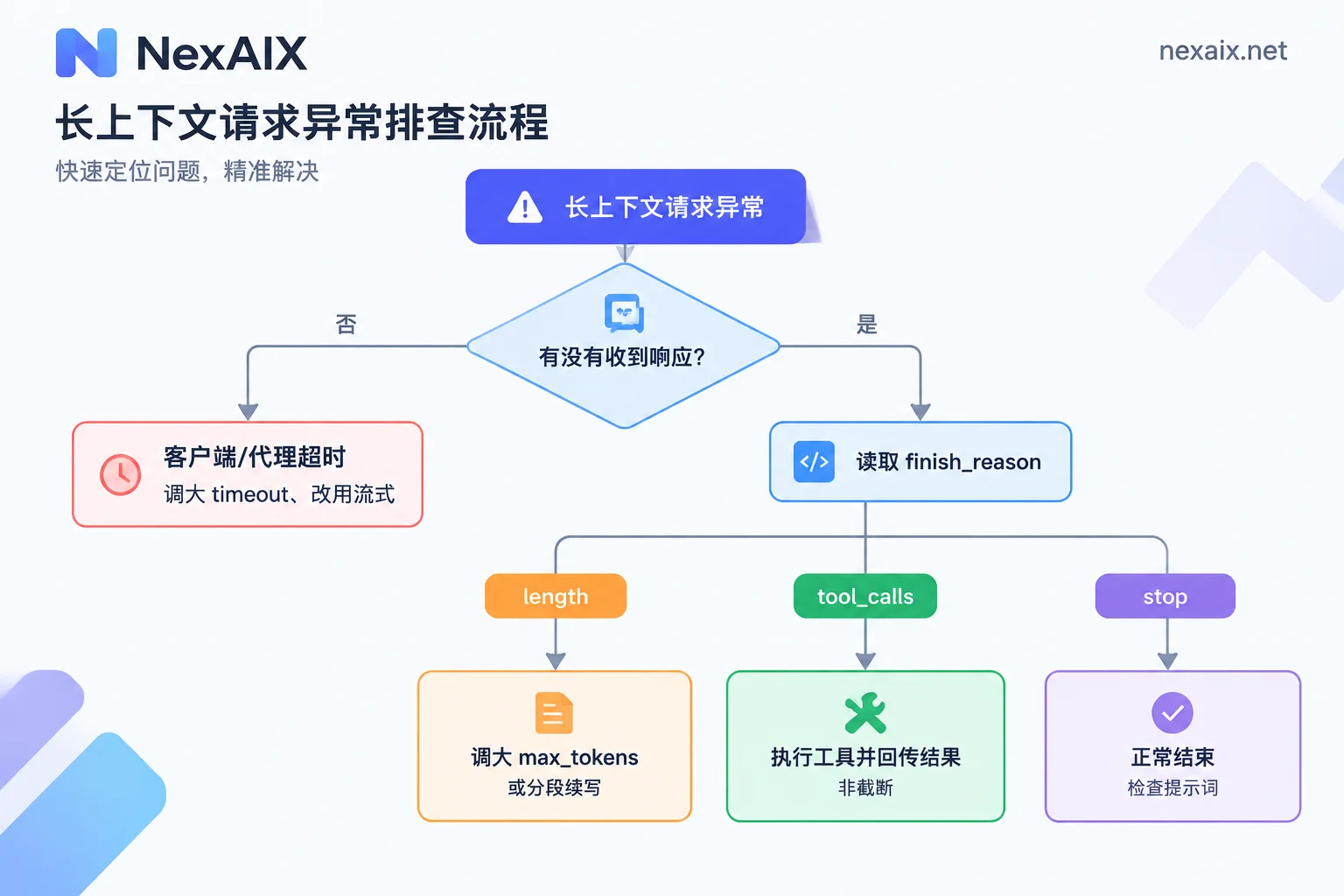
Timeouts. This is the most common failure mode for long contexts, and the error messages are often misleading—they look like network issues but are actually client read timeouts. The prefill computation density for 1M context is very high; the SDK's default timeout is often insufficient, and reverse proxies and gateways along the request path each have their own idle timeouts. Do two things together: explicitly increase the timeout in the SDK or HTTP client; use streaming if possible, so the first token comes back earlier and intermediate devices won't cut the connection due to prolonged no data. For pitfalls in streaming parsing itself, see How to Integrate Streaming Output API: SSE Parsing, Token Counting, and Proxy Stalling Troubleshooting.
Truncation. When output looks incomplete, don't judge by eye—read finish_reason in the response:
length: Hitmax_tokensor the single output limit; increase the parameter, or split the task into multiple continuation segments;tool_calls: This is not truncation; the model is waiting for you to execute the tool and return results;stop: Normal completion; short content is a prompt issue, not an API issue.
In streaming scenarios, don't forget to read the finish_reason of the last chunk. Many people only concatenate delta and discard this field, thus misjudging a normal length truncation as poor model capability.
Latency and rate limiting. GLM-5.2 has targeted architectural optimizations: it introduces an IndexShare mechanism where every 4 layers of sparse attention share the same indexer, reducing per-token FLOPs under 1M context by about 2.9x; the multi-token prediction (MTP) layer for speculative decoding has also been improved, increasing acceptance length and throughput. But these are optimizations relative to long-context solutions of the same scale—they don't mean feeding 1M is as fast as feeding 8K. Engineering-wise, it's still the same three things: only include what's truly needed, stabilize prefixes to use caching, and split long tasks into segments.
Concurrency-wise, long requests quickly consume token-level quotas, and 429s arrive earlier than in short-request scenarios. For backoff strategy, first check whether the response headers include retry-after; don't just use a fixed sleep. For details, see How to Handle AI API Rate Limiting? From 429 Headers to Backoff Retries and Traffic Isolation.
Confirm you're actually calling GLM-5.2
Open-weight models have many providers, so this step is essential. Two categories to distinguish:
First, official alias forwarding. In version updates, the Zhipu open platform has enabled automatic forwarding rules for historical model aliases in some plans (such as GLM Coding Plan), for example routing GLM-5.2 to a higher version like GLM-5.3. This is usually an upgrade rather than a downgrade, but if you're doing regression tests for version alignment, or downstream parsing strongly depends on a specific version's output style, silent version switching makes results irreproducible. When choosing a plan and writing calling code, first confirm whether the channel you use is fixed-version or follows forwarding.
Second, downgrades at third-party nodes. Substituting a smaller model, reducing precision via quantization, or quietly cutting the context window—none of these are visible in surface responses. There are three probes you can do:
- Long-context stress test. In input over 100K, plant a unique marker at the beginning, middle, and end. Run multiple times and check retrieval accuracy. Nodes with a cut window will systematically lose the earlier markers.
- Multi-turn complex reasoning chain consistency. Run the same task requiring continuous reasoning several times, and see if conclusions and intermediate steps are stable. Deployments with reduced precision show increased variance, not single wrong answers.
- Response field verification. Record the model field and usage statistics in each response, and log them for long-term comparison. Fields can only prove so much, but they often reveal a silent version change first.
One reminder: a single quality drop cannot directly be judged as a downgrade. Prompt changes, temperature parameters, and cache hits all affect output; you need multiple samples and a fixed test set to see trends. For judgment logic, refer to How to Choose a Stable AI API? Verification Methods for Version Identifiers and Routing Fallbacks, and the section on supply transparency in Three Major Engineering Risks in Selecting API Relay Stations.
If you don't want to build this verification from scratch, you can directly check NexAIX's Four Commitments and Verification Methods item by item—no swapping to smaller models, no precision reduction, no context cutting, and public quotas and rate limits. Each item lists the corresponding verification method, and you can also run your own probes.
Checklist before going live
- base_url and model name changed, all other calling logic unchanged;
- timeout explicitly set, long tasks use streaming;
- Log
finish_reasonand usage, don't judge truncation by eye; - Test the thinking level field with a minimal request first, then wrap it into business logic;
- Backoff for 429 reads
retry-after, use different Keys for different business lines to avoid one pipeline consuming the quota and affecting other features; - Keep a fixed long-context test set and run it regularly as a baseline for version changes.
If you're ready to start, the most efficient order is: first confirm GLM-5.2's supply method, context limit, and max single output on the model page, then use the free trial credits from registration to run the probes above. Once confirmed, switch production traffic over. The integration docs and API key acquisition entry are in the official website navigation.