 NexAIX-官方博客
An AI API Key is used to prove "who sent this request and whose account it should be charged to." It simultaneously handles identity authentication, permission control, and usage billing. Once a Key falls into someone else's hands, they can directly use your quota.
Let's put the conclusion up front:
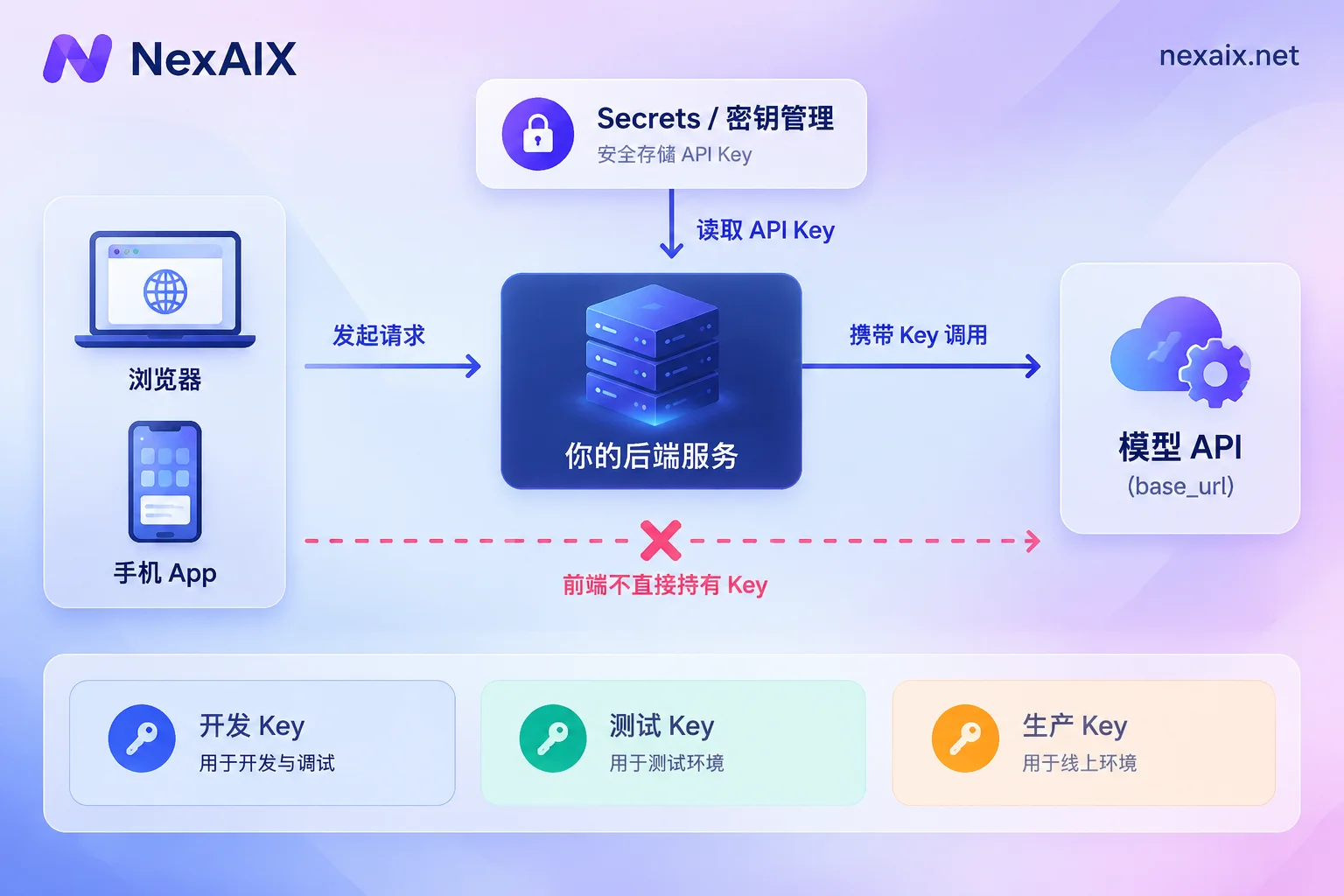
- The Key is not written into code, not entered into code repositories, and not distributed to browsers or mobile apps.
- For local development, use environment variables or a
.envfile, and add.envto.gitignore. In production, use the deployment platform's Secrets or a dedicated secret management system for injection. - Use a separate Key for each environment and each business. If one has a problem, revoke only that one without affecting other services.
- When a leak is discovered, revoke first, then investigate the cause.
Below is the actual sequence after obtaining the Key.
Step 1: Decide where the Key goes first, then write code
Many leaks happen during the "get it working first" stage: the Key is written directly in a script, submitted accidentally after it works, and the repository is later made public. OpenAI's security guidelines explicitly prohibit this practice, including not hardcoding in client code and not committing to public repositories like GitHub.
Local development only needs environment variables:
# macOS / Linux,写进 ~/.zshrc 或 ~/.bashrc
export NEXAIX_API_KEY="sk-..."
If the project is used to using a .env file:
# .env
NEXAIX_API_KEY=sk-...
# .gitignore
.envThere is an easily overlooked situation here: if .env has already been committed once, adding it to .gitignore later will not make it disappear from history. In this case, the Key should be treated as compromised; see the handling method later.
Production environment: It is best not to manually place .env on the server. Container platforms, CI/CD, and cloud providers all have Secrets or Secret Manager, which inject the Key as an environment variable during deployment. This way the Key does not appear in images, repositories, or deployment scripts, and permissions can be controlled separately.
Frontend and mobile: The Key can only stay on the server
JavaScript in web pages and packaged apps can be unpacked and viewed by users, and obfuscation cannot stop it. If your product needs to call the model from the frontend, the correct structure is: the frontend calls your own backend, and the backend uses the Key to request the model API. This also has the benefit that you can rate-limit by user on the backend, preventing a single user from using up the entire Key's quota.
Step 2: Integrate the code, only change base_url and Key
Currently, many model services offer OpenAI-compatible interfaces. During integration, only two things need to be configured for the SDK: the base address base_url and the corresponding API Key. Business logic does not need to be rewritten.
Taking NexAIX as an example, the endpoint is https://api.nexaix.net/v1. When migrating from the official OpenAI interface, only this one line of address needs to be changed. Model names are subject to the model page. The model list indicates the supply method for each model: open-source weight models are deployed on proprietary compute, while closed-source models go through the vendor's official authorized channels. You can confirm this when choosing a model.
Python:
import os
from openai import OpenAI

client = OpenAI(
    api_key=os.environ["NEXAIX_API_KEY"],  # 没配置时直接报 KeyError,比静默传空值好排查
    base_url="https://api.nexaix.net/v1",
)

resp = client.chat.completions.create(
    model="<模型页上的模型名>",
    messages=[{"role": "user", "content": "ping"}],
)
print(resp.choices[0].message.content)
Node.js:
import OpenAI from "openai";

const client = new OpenAI({
  apiKey: process.env.NEXAIX_API_KEY,
  baseURL: "https://api.nexaix.net/v1",
});
Before writing code, you can first use curl to confirm that the Key itself is fine:
curl https://api.nexaix.net/v1/chat/completions \
  -H "Authorization: Bearer $NEXAIX_API_KEY" \
  -H "Content-Type: application/json" \
  -d '{"model":"<模型页上的模型名>","messages":[{"role":"user","content":"ping"}]}'
If it returns 401, common reasons include: the Key had spaces or line breaks when copied, the environment variable did not take effect in the current terminal or process, the Key has been revoked, or the Key and base_url are not from the same service. The last one is very common during migration: the address was changed, but the Key being read is still from the old service. For specific troubleshooting methods for each status code, see How to Read AI API Error Codes.
Regarding third-party clients and frameworks: different tools read different environment variable names. Some read OPENAI_API_KEY and OPENAI_BASE_URL, while others require filling them in the settings interface. Refer to the tool's own documentation and do not assume it will automatically read the variable names you set.
Step 3: Partition Keys by environment and business
Using one Key everywhere is convenient normally, but hard to handle when problems arise: the bill cannot distinguish which service spent what; a test script with an infinite loop will consume production quota as well; and once leaked, it can only be replaced entirely, affecting all services at the same time.
A more practical partitioning method:
- By environment: one each for development, testing, and production. The development Key can be managed more loosely, while the production Key is only placed in Secrets, with no copy kept by hand.
- By business or service: one each for customer service bots, internal knowledge bases, and batch tasks. This makes usage per business line clear, and rate limiting will not crowd each other out.
- Include the purpose in the name, such as
prod-support-bot,staging-batch. Half a year later, when you open the console, you can still tell what each Key is for.
NexAIX isolates by Key. Each Key has independent quota, permissions, and usage billing. After partitioning as above, you can directly see how much each line used. As for how granular permissions can be, such as whether a Key can be limited to calling only specific models, please refer to the options currently provided in the console.
Key leaked: revoke first, then investigate
Common signs of a leak: a sudden increase in usage, unfamiliar call times, or a secret scanning alert from a code hosting platform. The handling sequence is as follows:
- Immediately revoke or delete this Key. Do not first change code or clean up Git history. The Key is already exposed; every extra minute it is valid is another minute it can be misused.
- Create a new Key, write it into Secrets or environment variables, and redeploy the relevant service. If Keys were partitioned by service earlier, only this one service needs to be handled.
- Check usage records to confirm when the abnormal calls started and how much was used.
- Find and close the leak path: whether it was committed to a repository, written in logs, appeared in screenshots or tickets, or was packaged out in frontend code.
- Clean up Git history if necessary. Note that cleaning history only prevents future viewing; it cannot retract content that has already been seen, so step 1 cannot be skipped.
Logs are an easily overlooked leak path. Printing request headers, writing the complete configuration object into logs, or error reporting tools automatically collecting request information can all carry the Key out. When you need to verify in logs, output only the last few characters of the Key.
Regular rotation
Even without a leak, production Keys are worth rotating regularly, especially at nodes such as employee departures and handovers or the end of outsourcing cooperation. To avoid service interruption, you can do it in three steps: first create a new Key and deploy it, confirm that all traffic has switched to the new Key, then revoke the old Key. As long as the production service reads the Key from Secrets, rotation only requires updating one configuration and redeploying once.
Quick self-check before launch
- No plaintext Key can be found in code, images, or repository history
- There is no Key in frontend artifacts; all model calls go through your own backend
- Development, testing, and production use different Keys
- Complete Keys will not appear in logs or error reporting
- Someone knows where to revoke a Key and who will redeploy when a leak occurs
After confirming these, then handle runtime issues such as rate limiting and timeouts, for example by referring to AI API Troubleshooting to locate 429, timeouts, and truncation in order.




Comments(0)