 NexAIX-官方博客
When an LLM API times out, in most cases the network connection hasn't actually dropped. What usually happens is that the model is still generating while some layer along the chain hits its wait limit first. Prefilling a long prompt takes time, and decoding token by token gets slower as the output grows, while the default timeouts of the SDK, Nginx, and Cloudflare are typically only tens of seconds to around a hundred seconds.
Work through it in this order: first determine which layer is breaking → enable streaming output → set per-phase timeouts on the client → adjust proxy configuration → limit retries and output length. For most projects, completing the first two steps noticeably reduces timeouts.
Step 1: Determine which layer timed out
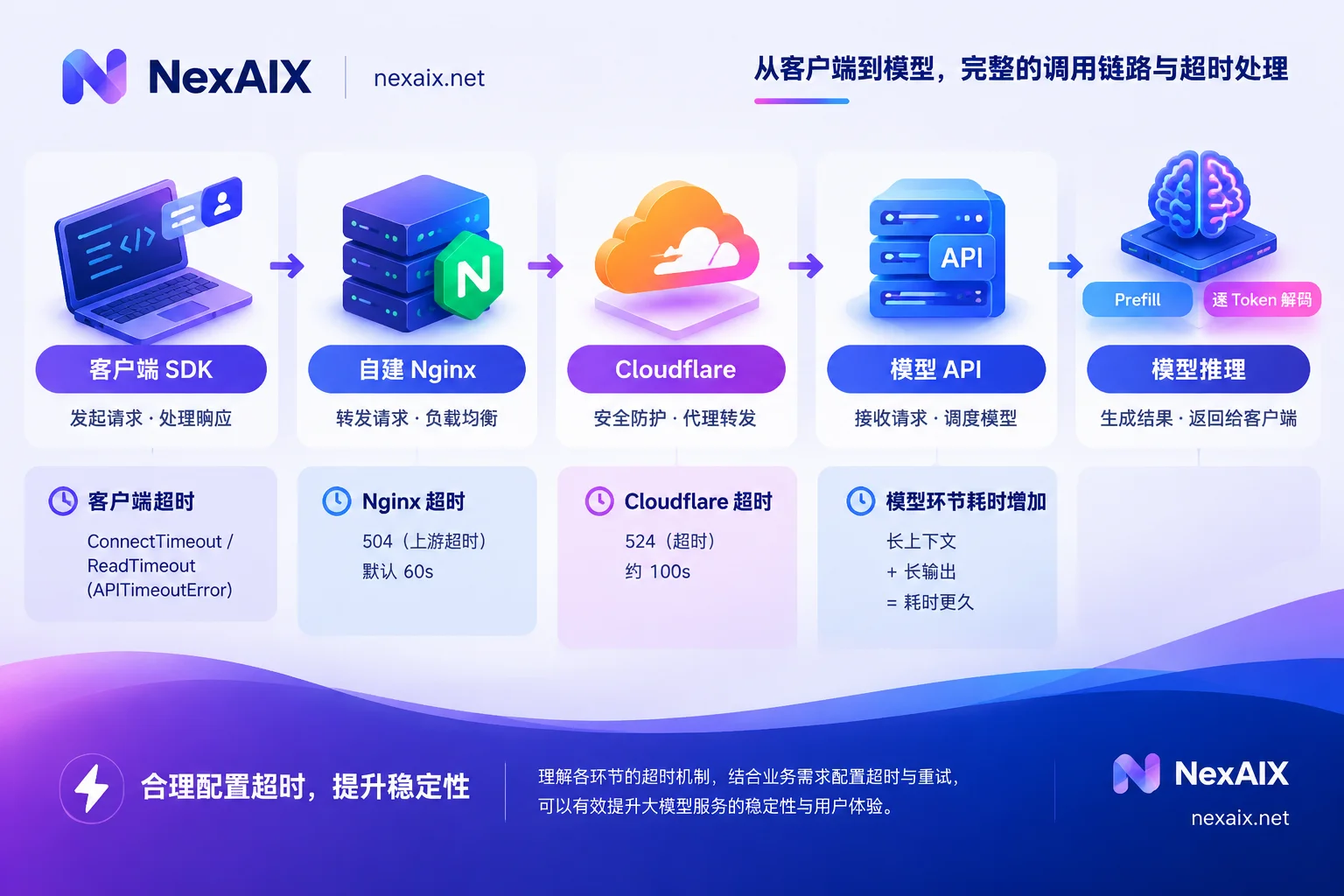
Different errors correspond to different break points, so match yours first:
| Symptom | Where it usually breaks | What to check first |
|---|---|---|
| Fails at the connection stage, with ConnectTimeout or a connection error | Connection from local machine to server | DNS resolution, local proxy, firewall, whether base_url is correct |
APITimeoutError, httpx.ReadTimeout | Client exceeded the read limit while waiting for a response | Whether the prompt is too long, whether the output is too long, whether streaming is off |
| HTTP 504 | An intermediate reverse proxy (commonly self-hosted Nginx) | proxy_read_timeout, proxy buffering |
| HTTP 524 | Cloudflare timed out waiting for the origin server | Whether streaming is off, whether the total task duration is too long |
The exact moment of disconnection is also informative. Log the send time, time to first token, and end time for each request. If failures always stall around 60 seconds, suspect Nginx's default first; if around 100 seconds, look at Cloudflare; if it matches exactly the timeout you set in code, the problem is on the client. These are only troubleshooting clues—the logs at each layer are the final word.
Also note that 429 is rate limiting, not a timeout. For how to diagnose 401, 404, and 429 errors, see AI API Troubleshooting: From 401, 404, 429 to Timeouts and Truncation.
Step 2: Enable streaming for long-output tasks
A non-streaming request doesn't start returning data until the entire answer is generated. Once the output gets long, it easily exceeds the default 30–60 second threshold. With stream=true enabled, the server returns tokens chunk by chunk over SSE, which has two benefits:
- Users see the first character sooner, greatly improving the perceived time to first token (TTFT);
- Data keeps flowing over the connection, so intermediate proxies won't treat the connection as idle and drop it for lack of data.
If your business logic needs the complete result before processing, you don't have to switch back to non-streaming. The official Anthropic SDK recommendation is to still use a streaming request internally and then collect the final message through the SDK's provided method. This gives you the full result while avoiding timeouts caused by long blocking non-streaming HTTP calls. You can do the same with OpenAI-compatible endpoints by concatenating the chunks in your code.
Step 3: Set per-phase timeouts on the client
The OpenAI Python SDK is built on HTTPX, whose timeouts can be set separately for connect, read, and write phases. Connection failures are usually network issues, so set that one short to fail fast; leave read longer to give the model enough generation time.
import httpx
from openai import OpenAI

client = OpenAI(
    base_url="https://api.nexaix.net/v1",  # 直连官方端点时删掉这一行
    api_key="YOUR_API_KEY",
    timeout=httpx.Timeout(120.0, connect=5.0, read=120.0, write=5.0),
    max_retries=0,  # 重试交给下文的自定义逻辑
)

stream = client.chat.completions.create(
    model="your-model",
    messages=[{"role": "user", "content": "..."}],
    stream=True,
    max_tokens=2000,
)

parts = []
for chunk in stream:
    if chunk.choices and chunk.choices[0].delta.content:
        parts.append(chunk.choices[0].delta.content)
result = "".join(parts)
Two things to note when setting read:
- HTTPX's read timeout measures the maximum time waiting for the next chunk of data, not the total duration of the whole request. So once streaming is enabled, a longer total generation time won't trigger it.
- The wait before the first token also counts toward read. Prefilling a long context, or a reasoning model's thinking before output, can pause here for a while, so read needs enough headroom.
If you're migrating an existing app to NexAIX, you only need to change the base_url line; the timeout and streaming code above stays the same. NexAIX's endpoint is compatible with the OpenAI protocol, and its quotas and rate limits are publicly documented. For the gateway's specific idle duration, refer to the onboarding docs, and it's best to test with the longest-running request type in your own workload before deciding the read value. When choosing a model, you can first check each model's context specs and availability in the model list.
Step 4: Check self-hosted proxies and Cloudflare
Nginx. proxy_read_timeout defaults to 60 seconds, and long-generating requests are easily cut off by it, returning 504. When proxying a streaming endpoint, also disable buffering. Otherwise Nginx will buffer the SSE data first, the downstream client won't receive data for a long time, and the client's own read timeout will trigger instead.
location /v1/ {
    proxy_pass https://your-upstream;
    proxy_http_version 1.1;
    proxy_buffering off;
    proxy_cache off;
    proxy_read_timeout 300s;
    proxy_send_timeout 300s;
}
300–600 seconds is a common range; the specific value should be slightly greater than the actual duration of the longest request in your workload. If there's a load balancer or Ingress in front of Nginx, they have their own timeout settings too, so check each layer.
Cloudflare. When proxied through Cloudflare, the read timeout is around 100 seconds; beyond that it returns 524 and the request is cut off outright. There are two main workarounds: first, enable streaming so data keeps flowing; second, convert offline tasks like batch long-document generation or whole-book processing to asynchronous execution—return a task ID first, generate the result in the background, and let the client fetch it via polling or callback.
Step 5: Control retry count and output length
Retries are useful, but misconfigured they make things worse. With too short a timeout, the SDK's automatic retry will drop the connection just as the model is nearly done and start a fresh request. The wait is longer, and the cost is billed twice.
A safer approach: retry only on occasional timeouts and connection errors, at most 2–3 times, with intervals computed as "exponential backoff + random jitter" to avoid a flood of simultaneous retries crushing the service:
import random, time
from openai import APITimeoutError, APIConnectionError

def call_with_retry(fn, attempts=3, base=1.0, cap=20.0):
    for i in range(attempts):
        try:
            return fn()
        except (APITimeoutError, APIConnectionError):
            if i == attempts - 1:
                raise
            time.sleep(random.uniform(0, min(cap, base * 2 ** i)))
If a streaming request breaks mid-way, a retry regenerates from the start. The front end needs to handle the portion already displayed, for example by clearing and re-rendering, or telling the user "regenerating."
You also need to control duration at the source. Set a reasonable upper bound on max_tokens to prevent runaway latency from overly long model output; trim unnecessary history messages and verbose system prompts, and prefill time drops accordingly. For a more detailed calculation of the relationship between input length, output limits, and latency, see Model Context Window Comparison.
Self-check in order
- Use the disconnect time in the logs to tell whether it's the client, Nginx, or Cloudflare timing out;
- Switch long-output or reasoning-heavy tasks to streaming, and concatenate chunks in code when you need the full result;
- Set per-phase client timeouts: short connect, and read with enough headroom based on the measured duration of your longest request;
- On self-hosted proxies, raise
proxy_read_timeoutand disableproxy_buffering; for long tasks behind Cloudflare, switch to streaming or async; - Limit retries to 2–3 with backoff plus jitter, and set
max_tokensand trim context.
If timeouts only appear under high concurrency and come with 429s, the bottleneck is more likely throughput and rate limits rather than timeout configuration, so continue with How to Measure and Improve AI API Throughput.




Comments(0)