 NexAIX-官方博客
When a call fails, don't rush to switch models or modify business code. The troubleshooting order is: record the status code and error fields in the response body → reproduce with a minimal request → handle by error category. Most problems lie in the client configuration layer: Key, base_url, model ID, or timeout settings. The rest are mainly rate limiting, long text timeouts, and context length. If you suspect the model has been "watered down", you need a separate set of verification tests.
First, do two things: preserve the scene and narrow the scope
First, fully record the error information. Just noting "an error occurred" makes troubleshooting impossible. You need to preserve these:
- HTTP status code;
error.type,error.codeanderror.messagein the response body;- Response headers, including request ID and rate limiting related fields (if returned by the service).
Even for the same 429, different error types require completely opposite handling.
Second, bypass the framework and send a minimal request with curl.
curl $BASE_URL/chat/completions \
  -H "Authorization: Bearer $API_KEY" \
  -H "Content-Type: application/json" \
-d '{"model":"<模型ID>","messages":[{"role":"user","content":"ping"}],"max_tokens":16}'- curl works but code doesn't: the problem is in your client, framework, or intermediate proxy.
- curl also fails: check item by item according to the status codes below.
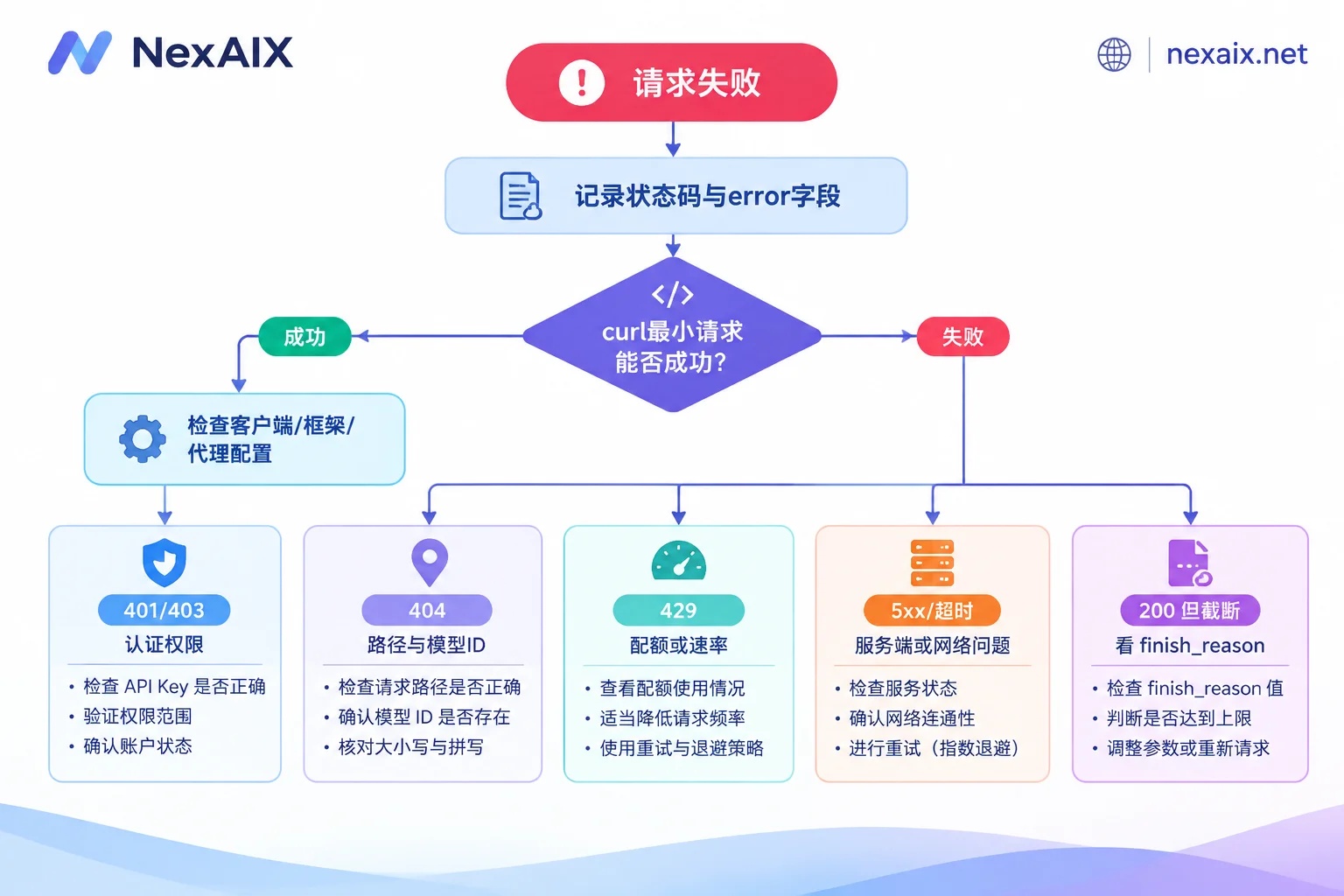
401 / 403: First suspect the Key itself and its "ownership"
401 usually means the credentials were not recognized. Check in this order:
- Request header format. It should be
Authorization: Bearer <API_KEY>. A common mistake is missingBearer, or no space after Bearer. - Environment variable contamination. When copying the Key from
.env, CI variables, or a configuration panel, it's easy to introduce leading/trailing spaces, invisible newlines, or quotes. You can print the Key's length and first/last few characters, and do astrip()when reading it. - Whether the Key and base_url belong to the same platform. This is a common mistake: an original vendor Key sent to a relay service endpoint, or vice versa. Each platform's Key is only valid on its own endpoint.
- Whether the Key is active. Confirm it has not been disabled or deleted.
403 is more about permissions. The Key itself is valid, but it doesn't have access to this model or this feature. If the platform assigns permissions per Key, check the corresponding Key's settings to see which models it can call.
404 / model_not_found: Path misspelled, or wrong model ID
When using an OpenAI-compatible interface, 404 is basically due to two reasons.
Reason 1: base_url is wrong. Most OpenAI-compatible SDKs automatically append a path like /chat/completions after base_url, so base_url should be filled up to the version number:
- ✅
https://api.example.com/v1 - ❌
https://api.example.com: missing/v1, the resulting path does not exist. - ❌
https://api.example.com/v1/chat/completions: the SDK appends it again, causing a duplicate path.
A few tools require the full path; follow their own documentation.
Reason 2: Model ID mismatch. For the same open-source model, different providers may have different naming, with variations in version suffixes, capitalization, and organization name prefixes. Don't fill in from memory, and don't copy from another provider's docs; check the exact ID in the current provider's model list.
If you are migrating to NexAIX, you only need to change base_url to https://api.nexaix.net/v1, and the rest of the calling code remains unchanged. Model IDs are based on the NexAIX model list. Each model page also indicates the supply method: open-weight models are deployed on our own compute, while closed-source models go through the vendor's official authorized channel.
429: First distinguish "out of quota" from "too fast"
429 cannot be retried indiscriminately. First parse the error type in the response body:
- Quota or balance exhausted, e.g.
insufficient_quota,credit_balance_exhausted. Retrying won't recover it, it only wastes requests. You should check the quota or balance, and in your code throw such errors directly to the upper layer without entering a retry loop. - Rate limit, i.e. RPM (requests per minute) or TPM (tokens per minute) exceeded. This can be retried, but follow the rules: first read the
Retry-Afterorx-ratelimit-*field in the response headers; if these fields are absent, use exponential backoff with random jitter.
import random, time

def call_with_backoff(fn, max_retries=6):
    for i in range(max_retries):
        try:
            return fn()
        except RateLimitError as e:  # 只捕获速率类 429,配额耗尽不要进来
            wait = min(60, (2 ** i)) + random.uniform(0, 1)
            time.sleep(wait)
    raise RuntimeError("重试次数用尽")
Jitter helps avoid a large number of requests retrying at the same moment and hitting the rate limit again. Rate limit header field names vary by platform; refer to your service's documentation.
If 429 occurs frequently, it means the concurrency design and quota don't match; retrying alone won't solve it. You can refer to How to measure and improve AI API throughput to re-plan concurrency, RPM/TPM, and latency together.
500 / 502 / 503 / 504 and timeouts: Check if it's long text non-streaming
500 / 503 are mostly transient server-side jitter or temporary model overload, which are retryable errors. Official SDKs automatically retry such errors a limited number of times by default. If a model continuously returns 503, reduce request frequency and observe for a while.
502 / 504 or client Read Timeout require focusing on the task type. They occur frequently in non-streaming long text generation: the model needs to generate thousands of tokens, which may take several minutes, while the HTTP client or intermediate reverse proxy (Nginx, Cloudflare, etc.) has a default read timeout of 30 to 60 seconds, and disconnects once time is up. The model is actually still generating, but the result couldn't be sent back.
Two solutions:
- Increase the timeout. Adjust the client and every proxy layer you control, e.g. to over 180 seconds. If you only change the client and not the proxy, the problem persists.
- Switch to
stream: true. With SSE streaming, tokens are returned incrementally, the connection always has data flowing, and it's less likely to be cut off as an idle connection. This is also the recommended approach for long output tasks.
After enabling streaming, if the output is intermittent or comes all at once, check whether the intermediate Nginx has response buffering enabled. Streaming interfaces usually need proxy_buffering turned off.
Truncation: Distinguish "over-length error" from "normally filled"
400 context_length_exceeded: the sum of input tokens and your set max_tokens exceeds the model's context window. The solution is to compress the input (trim history messages, summarize) or reduce max_tokens. Note that setting max_tokens too large can itself trigger this error.
Returns 200, but content cuts off abruptly: first check finish_reason in the response.
length: output reachedmax_tokens, or the model's single-reply length limit. This is not a network issue; you need to increasemax_tokens, or have the model output in segments.stop: the model ended normally.- During streaming, no end chunk with
finish_reasonwas received: this is more like a connection interruption; go back to the previous section to troubleshoot timeouts and proxies.
Different models have very different windows and output limits; for how to calculate, see Model context window comparison.
Suspected model downgrade: Speak with reproducible tests
"Feels dumber" cannot be used as evidence; you need comparative tests:
- Check metadata. Some interfaces return
system_fingerprint; a change in it indicates backend configuration adjustments. However, an unchanged field does not prove there's no problem, and not all models and providers return this field. If logprobs are supported, you can also use token probability distribution as an auxiliary reference. - Build a fixed set of probe cases. Pick questions that small models are likely to get wrong, such as tricky code problems or multi-step math reasoning. Run multiple times under the same parameters (including fixed temperature), and compare accuracy with the official channel or your early baseline results; don't look at a single result.
- Do a long-context "needle in a haystack" test. Bury a piece of information deep in a very long text, then ask the model to retrieve it. If recall drops off a cliff after a certain length, and the same model doesn't show this on the official channel, the context may have been trimmed.
This method applies to any provider. NexAIX has publicly committed to not switching to smaller models, not reducing precision, not cutting context, etc., and provides self-verifiable methods; see Four commitments and verification methods. It's recommended to run a baseline early in the integration and save the results, so you have a reference when questions arise later.
A quick reference checklist
- 401: Bearer format, whitespace in the Key, whether the Key and endpoint are on the same platform
- 403: Does this Key have permission for that model
- 404: Does base_url only go up to
/v1, is the model ID from the current provider's list - 429: Stop retrying if quota is exhausted; if rate limit exceeded, retry according to Retry-After or exponential backoff with jitter
- 5xx and timeouts: 500/503 can be retried; for 502/504, first check long text non-streaming, increase timeouts at each layer or switch to streaming
- Truncation: For 400 check the total window; for 200 truncation check
finish_reason - Downgrade: Fixed probe set plus needle-in-a-haystack test, compare with baseline




Comments(0)