 NexAIX-官方博客
In production, when throughput is insufficient, it's usually a mix of three issues: slow model generation, incorrect client concurrency, or hitting provider rate limits. Here's how to handle it:
- Measure: Use system output tokens per second (TPS) and completed requests per second (RPS) to measure throughput, while also recording time-to-first-token (TTFT) for each request.
- Set concurrency: Gradually increase concurrency within rate limits, stopping before the inflection point where TPS stops growing significantly and TTFT begins to deteriorate.
- Reduce cost: Lower per-request overhead through connection reuse, prompt caching, and controlling token usage.
- Handle 429: Prioritize reading
retry-after, then reschedule with jittered exponential backoff instead of retrying immediately.
Throughput and latency are two separate accounts
The end-to-end latency of a single request can be broken down as:
E2E latency = TTFT + TPOT × output tokens
- TTFT (time to first token): Mostly spent in the Prefill phase. The model must read the entire input first; this step is compute-bound, and longer inputs are usually slower.
- TPOT (time per output token): Belongs to the Decode phase of token-by-token generation, mainly limited by memory bandwidth.
System throughput looks at the whole picture. The more concurrent requests, the better the server can batch them (Continuous Batching), increasing GPU utilization and total TPS until compute or memory bandwidth saturates. The cost is queuing, which increases TTFT for individual requests.
So first define goals by scenario:
- Online chat, real-time code completion: Users are waiting for the first character on screen; you should prioritize TTFT and be conservative with concurrency.
- Offline batch processing, document processing, Agent auto-loops: What matters is how fast the entire batch finishes; you can push concurrency higher and trade queuing time for total TPS.
Measure your own numbers first
Others' benchmark data is only for reference. Your input length, output length, and model will change the results. We recommend using real business prompts for step-load testing:
- Fix a set of representative requests, sampling input and output lengths from your production distribution.
- Increase concurrency step by step: 1, 2, 4, 8, 16, 32... running at least dozens of requests per level.
- For each request, record three values: TTFT (time to receive the first content chunk in a streaming response), total duration, and output tokens (preferably from usage in the response).
- Summarize per level: TTFT p50 and p95, system TPS (total output tokens ÷ wall-clock time), and number of 429s.
TPOT can be approximated as (total duration − TTFT) ÷ output tokens. For how to get time-to-first-token and usage from streaming responses, see How to integrate streaming output APIs.
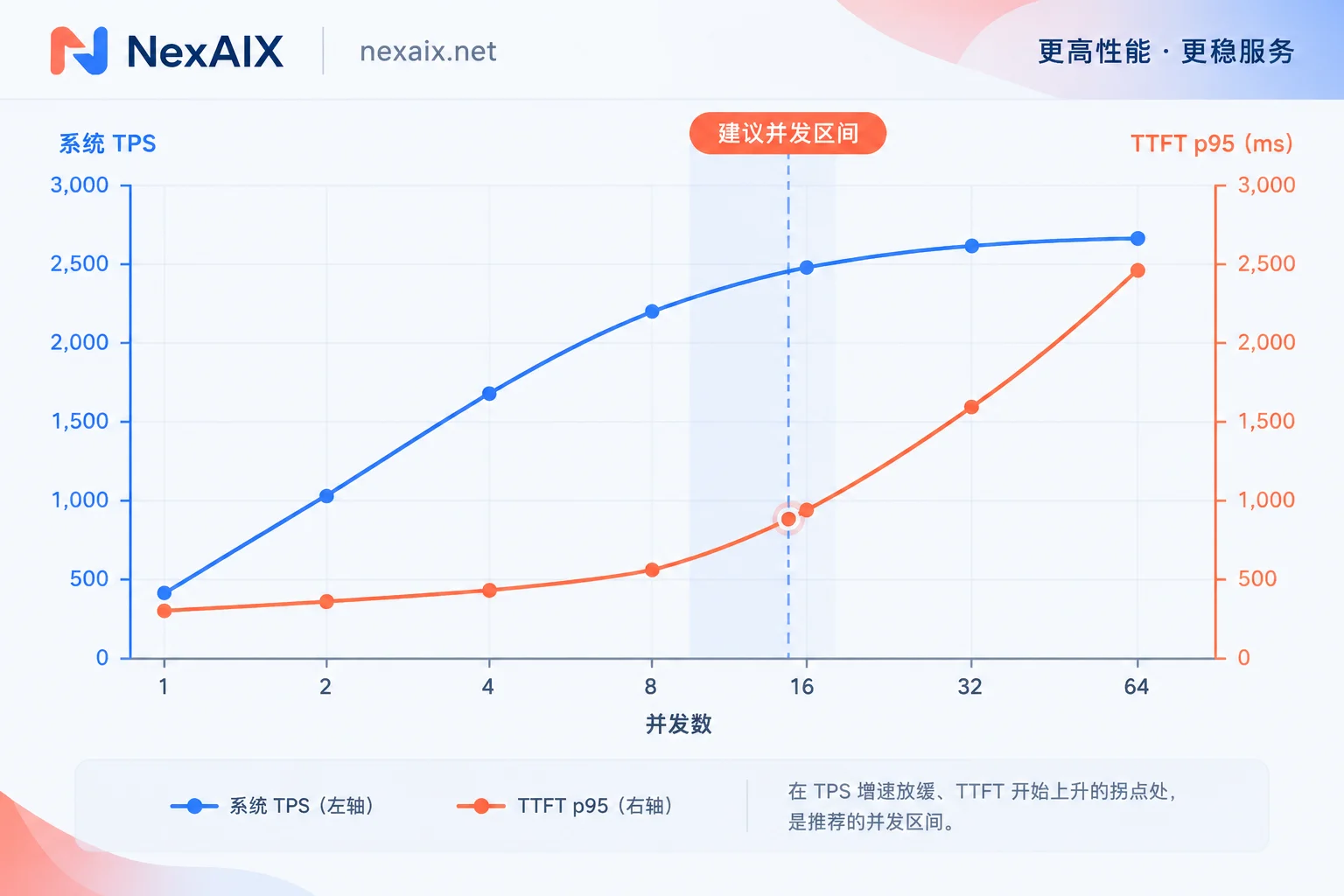
Plotting the results across levels, you'll typically see this trend: TPS rises rapidly, then flattens; TTFT starts to climb noticeably during the plateau. For interactive scenarios, pick the level just before the inflection point; for batch scenarios, you can pick near the inflection point. If 429s appear frequently before the inflection point, the bottleneck is the rate limit, not the model.
Concurrency must be calculated against both latency and rate limits
Mainstream model APIs typically enforce rate limits independently across four dimensions:
- Requests per minute (RPM)
- Tokens per minute (TPM); some providers also split into input ITPM and output OTPM
- Requests per day (RPD)
- Tokens per day (TPD)
Most use sliding window counting, and exceeding any limit returns HTTP 429. When estimating, calculate both:
- Request dimension: Required concurrency ≈ target RPS × average per-request duration (seconds). For example, if a request takes 20 seconds on average and you want 3 completed per second, you need about 60 requests in flight. Convert to requests per minute and check against RPM.
- Token dimension: Requests per minute × average (input + output) tokens per request, check against TPM. Long-input scenarios often hit TPM first, not RPM.
Whichever limit is hit first is your ceiling. Adding more concurrency only gets you more 429s.
The limits you plug into calculations must match the endpoint you actually call. On NexAIX, quotas and rate limits are public. You can first go to the model list, enter the page for the corresponding model, confirm the specifications and provisioning method, and then plug the numbers into the above estimates. NexAIX isolates by API key; each key has independent quotas, permissions, and usage billing. You can use different keys for online chat and offline batch processing, so batch jobs won't eat into interactive business quotas. To integrate, just replace base_url with https://api.nexaix.net/v1, and the rest of your calling code stays the same.
Make each request "cheaper"
When rate limits are fixed, the less each request consumes, the more you can run:
- Reuse connections: Share one client instance across the process, maintaining an HTTP/TLS connection pool. Creating a new connection each time adds 1–3 round trips of handshake overhead.
- Leverage prompt caching: Put invariant content like system prompts and fixed examples at the beginning, and variable parts at the end, so services that support context caching can reuse the prefix and reduce Prefill time. Cache triggers vary by provider; check the specific model's documentation.
- Control token count: Streamline prompts and set a task-appropriate limit for
max_tokensto directly reduce TPM usage. Setting the limit too tight causes truncation; for how to balance context window and output limit, see Model context window comparison.
Concurrency gate and 429 backoff
Retrying immediately on 429, or at fixed intervals, causes a thundering herd—many requests hitting at the same moment, burning through quota faster. Here's a minimal viable implementation: use a semaphore to cap in-flight requests; on 429, first wait according to retry-after, and if that header is absent, use exponential backoff, both with random jitter.
import asyncio, random, time
from openai import AsyncOpenAI, RateLimitError

# 全进程共用一个客户端以复用连接;关闭 SDK 自带重试,避免和下面的重试逻辑叠加
client = AsyncOpenAI(base_url="https://api.nexaix.net/v1", api_key="YOUR_KEY", max_retries=0)
sem = asyncio.Semaphore(16)  # 用压测得到的并发拐点替换

async def call(model, messages):
    async with sem:
        for attempt in range(6):
            try:
                t0, ttft, out = time.perf_counter(), None, 0
                stream = await client.chat.completions.create(
                    model=model, messages=messages, max_tokens=800,
                    stream=True, stream_options={"include_usage": True})
                async for chunk in stream:
                    if ttft is None and chunk.choices and chunk.choices[0].delta.content:
                        ttft = time.perf_counter() - t0
                    if chunk.usage:
                        out = chunk.usage.completion_tokens
                return ttft, time.perf_counter() - t0, out
            except RateLimitError as e:
                ra = e.response.headers.get("retry-after")  # 这里假设值为秒数
                wait = float(ra) if ra else min(60, 2 ** attempt)
                await asyncio.sleep(wait + random.uniform(0, wait * 0.5))
        raise RuntimeError("重试次数耗尽")
A few more points:
- If the endpoint doesn't return usage, use a tokenizer to estimate output tokens.
- If your SDK has built-in retries, either disable them or keep only one layer; otherwise actual retry counts multiply.
- In multi-instance deployments, per-process semaphores can add up beyond the key's limit. In that case, move rate limiting to the gateway layer with a unified token bucket and queue for proactive pacing, rather than waiting for upstream 429s.
- Separate interactive and batch requests into two queues to ensure interactive requests are dequeued first.
Monitor these after launch
- TTFT p50 and p95: to see if user experience degrades.
- System TPS and RPS: to see if you're near the plateau from load testing.
- 429 ratio and retry count: a persistently rising ratio means concurrency or token usage exceeds limits.
- Rate-limit response headers: e.g., OpenAI-style
x-ratelimit-remainingcan be used to slow down proactively. Header names may differ across services; rely on actual responses.
When traffic patterns change—such as significantly longer inputs or a model switch—rerun the step-load test. If you don't have an environment ready, you can register via "Get API Key" in the site navigation, and use the free trial credits to measure your own inflection point following the steps above.




Comments(0)