 NexAIX-官方博客
You have a task that needs multi-step reasoning and tool calling, but you don't want the budget to follow closed-source flagship pricing—gpt-oss-120b is one tier worth seriously evaluating right now. It's an open-weight model released by OpenAI in August 2025 under the Apache 2.0 license. It uses a mixture-of-experts architecture with about 117B total parameters, activating only 5.1B per forward pass, and with MXFP4 quantization it can fit on a single 80GB GPU (H100, MI300X class). For callers, these three points define its cost-performance range and the risks you need to watch extra carefully.
Here's the conclusion first, then the parameters and boundaries.
What tasks is it suitable for?
The official positioning is high-reasoning-density and agentic production tasks: core reasoning benchmarks are close to o4-mini, and it performs well on math, code, function calling, and tool-use evaluations like Tau-Bench. It natively supports full chain-of-thought output and Structured Outputs.
In practice, these categories fit well:
- Agent main control loop. For scenarios that need to reliably return tool parameters according to a schema, plan over multiple turns, and converge, its tool-calling training is solid.
- Code assistance and refactoring analysis. Medium-complexity cross-file reasoning, writing tests, and explaining errors don't need a closed-source flagship every time.
- Data extraction and structured output. With JSON Schema constraints, it's more reliable than forcing a small model into a template.
- Batch processing with adjustable reasoning intensity. On the same pipeline, simple items can use a low level and difficult items can be upgraded—the cost difference is obvious.
Conversely, pure intent classification, short-text rewriting, and templated customer-service replies are a waste—it generates a chain of thought by default, so both time-to-first-token and completion tokens are higher than non-reasoning models. Those tasks belong on lighter models.
Multimodal input is also out of scope; use other models for images and audio.
Integration: only change the base_url line
gpt-oss-120b is fully compatible with the OpenAI SDK and the Responses API protocol. For projects already using the official SDK, there are only two changes—point the client's base_url to your chosen endpoint, and replace model with the corresponding model identifier:
from openai import OpenAI

client = OpenAI(
    api_key="你的 Key",
    base_url="https://api.nexaix.net/v1",
)

resp = client.chat.completions.create(
    model="gpt-oss-120b",          # 以模型页标注的标识为准
    messages=[{"role": "user", "content": "..."}],
    reasoning_effort="medium",
    max_tokens=8000,
)
The same applies to the Node.js SDK; change baseURL. In frameworks like LangChain and LlamaIndex, the ChatOpenAI class usually exposes openai_api_base (or base_url) parameters, so just fill in the same address—no need to swap provider adapters.
The model identifier is the one easy place to stumble: different platforms name open-weight models inconsistently—some have an openai/ prefix, some add version suffixes. Confirm the actual string on the model page before calling; it's easier than guessing from an error. NexAIX's model list page shows each model's identifier and supply method—open-weight models are deployed on its own compute cluster, while closed-source models go through official vendor-authorized channels; gpt-oss-120b belongs to the former. This labeling is useful for the verification section later: knowing it's a weight running on its own cluster tells you which metrics to verify.
reasoning_effort: the main switch for latency and cost
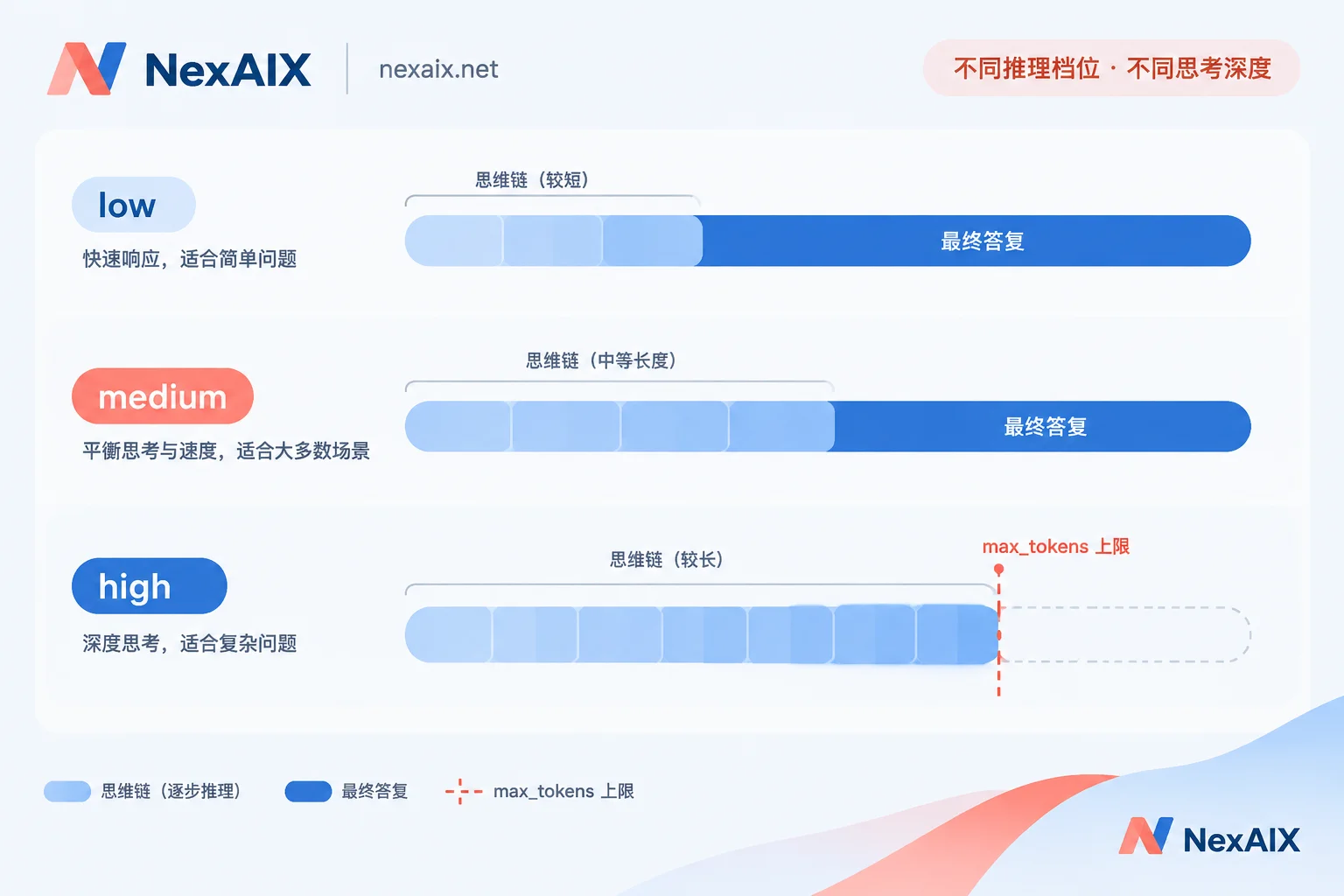
This model has a reasoning_effort parameter, generally supporting low / medium / high, with a default of medium. It controls the implicit reasoning budget—how many tokens the model is willing to spend thinking before giving an answer.
How to choose in practice:
- low: classification, extraction, format conversion, clear-cut judgments. Time-to-first-token and completion tokens drop noticeably; it's the default for interactive scenarios.
- medium: most business logic, routine code tasks, single-step agent decisions.
- high: mathematical derivations, complex algorithms, long-chain planning, and scenarios requiring self-checking. The cost is a significant increase in response time and token consumption.
Don't hard-code a single level in your system. Making it a parameter that switches by task type or input complexity pays off more than prompt tuning. If you've already done similar tiering on other reasoning models (e.g., Kimi K3's reasoning_effort levels), that routing logic can basically be reused.
The most common failure: setting max_tokens and getting empty replies
This is the problem most easily misdiagnosed as "the service is down" when integrating a reasoning model.
The model first generates a chain of thought, then the final answer—both count as completion tokens. If max_tokens is set too tightly, say 512 out of old habit, the model may be cut off before finishing its chain of thought, returning empty content or half-finished reasoning, with finish_reason showing length. At this point, the troubleshooting direction isn't network or auth—it's budget.
The fix:
- Give enough budget. For high-level tasks, set
max_tokensto several thousand or even tens of thousands, depending on the task; err on the generous side since unused portions aren't billed. - Check finish_reason first. When the response is abnormal, check this field first—
lengthmeans truncation,stopis a normal finish. - Track usage in streaming. When
stream=Trueis enabled, log usage statistics, observe the real completion-token distribution over time, and then infer a reasonable upper bound. For pitfalls in streaming parsing itself (SSE chunking, proxy buffering causing stalls), see troubleshooting streaming output integration. - Lowering the level also helps. If the budget really can't be loosened, lowering
reasoning_effortis safer than harshly cuttingmax_tokens.
As for context window, gpt-oss-120b standardly supports 131,072 tokens (128k). But how much the provider exposes is another matter—the per-request context limit and RPM/TPM rate limits should be checked on the specific model page for current values; don't plan capacity based on the model card's theoretical numbers. For backoff and isolation strategies after hitting a 429, design them following general rate-limit handling practices.
Downgrade risks unique to open-weight models, and how to verify them
Closed-source models go through official channels, and the provider doesn't hold the weights; open-weight models are different—anyone can get the weights and deploy them, which means anyone can tamper with them. Three common ways gpt-oss-120b gets squeezed:
First, aggressive quantization. The model is natively designed for MXFP4, but providers can compress it to lower bits. Throughput goes up and VRAM is saved, at the cost of accuracy in long-chain reasoning and code generation. To verify, prepare a set of difficult questions with definite answers—multi-step math derivations, algorithm problems requiring exact boundary conditions, real cases from your own business where errors occurred—fix the seed and parameters, run the same batch across time and across providers, and compare accuracy curves. A single conversation won't reveal it subjectively; batch comparison will.
Second, routing to a smaller model. The same family includes gpt-oss-20b, an order of magnitude smaller in parameters. If it's actually swapped in, the pass rate on complex reasoning questions will drop noticeably, while response speed actually increases. Besides the question set above, also watch whether the system_fingerprint in responses changes when you haven't changed your configuration.
Third, quietly truncating context. Claiming 128k while actually trimming the excess server-side. Test with a needle-in-a-haystack approach: bury a fact that only you know at the 60k, 100k, and 120k positions, then ask. If it can't retrieve it, it's being truncated, not the model having a bad memory. This kind of verification also applies to other long-context models; for the approach, see three types of engineering risk checks for relay services.
These three tests are worth solidifying into scripts and running periodically, archiving the results. Running them after switching providers, price changes, or plan changes is more practical than reading any promotional page.
NexAIX writes "no swapping to a smaller model, no precision reduction, no context truncation" into its commitments and publishes its quotas and rate limits; the verification method is explained on this page—but a promise is a promise; you should have your own copy of the scripts above.
Pre-launch checklist
- Copy the model identifier from the model page; don't rely on memory;
- Set
reasoning_effortby task tier; don't hard-codehighglobally; - Leave enough room in
max_tokensfor the chain of thought; logfinish_reasonand usage; - Base context and rate-limit values on what the model page currently states;
- Write the downgrade verification scripts and run a baseline archive on integration day.
If you're ready to start, the fastest path is to use test credits to run the five items above once: confirm the model identifier, test the latency difference across the three reasoning levels, bury a needle once, and record a set of baseline scores. After those four steps, decide whether to switch production traffic over.




Comments(0)