 NexAIX-官方博客
In the second half of 2026, engineering teams maintaining production environments for large language models are experiencing a密集 wave of "interface refactoring."
Following the complete shutdown of the Assistants API by OpenAI and Azure on August 26, 2026 (all /v1/assistants and /v1/threads requests return errors with no extension), the official team密集 updated the deprecation schedule in October: not only were Dashboard Prompt objects, which early adopters relied on for migration, added to the deprecation list for November 30, 2026, but Custom GPTs are also scheduled to be discontinued in December; meanwhile, vendors are aggressively pushing developers toward proprietary primitives like the Responses API and Decisions API, which come with server-side state binding (store: true).
Many teams, after enduring "migrating from DALL-E to a transitional model and facing a second migration within six months" or "inability to automatically import Threads historical data into Conversations," have realized: The real OpenAI API migration should not just be rewriting code from one vendor's old private interface to another new private interface, but rather taking the opportunity to decouple the architecture, return to the industry-standard stateless interface, and establish the initiative to switch across models and compute resources at any time.
If you are already familiar with the basic GPT API model deprecation response strategies or what code changes are needed when switching LLM APIs, this article will approach from the perspective of architecture evolution and engineering implementation, detailing how to complete a smooth migration and production-grade gray validation from "proprietary state lock-in" to a "standard stateless multi-model architecture."
I. Three Engineering Pain Points of OpenAI API Migration in 2026
Before starting code modifications, technical leads need to first understand the three structural issues that cause the most rework in current API migrations:
1. Secondary migration costs caused by server-side state lock-in
Whether it's the already-shut-down Assistants Threads or the currently promoted Conversations interface, both essentially host conversation context and tool execution state in a single vendor's cloud storage. Once an interface is deprecated, the official team typically does not provide automated historical data migration tools, forcing engineering teams to write their own scripts for heterogeneous data backfilling and format conversion. More troublesome is that when business needs to introduce Claude, Gemini, or open-source weight models for cost or compliance reasons, the state data hosted on a single vendor's server cannot be transferred across platforms at all.
2. Proprietary primitives evolve too fast, application layer adaptation is exhausting
From early Function Calling syntax adjustments to the complete deprecation of the Assistants polling mechanism (while run.status), and then to newly launched proprietary interfaces, if business code is deeply coupled with a particular vendor's proprietary SDK primitives, every time the upstream adjusts its product line, the business layer has to rewrite core logic accordingly.
3. "Configuration and protocol fragmentation" during multi-model coexistence
To avoid rate limits or failures from a single upstream, many teams introduce both closed-source flagship and open-source models during migration. But directly integrating multiple native interfaces leads to another pitfall: Anthropic, Google, and various open-source models have different constraints on message role alternation, streaming chunk structures, and inference parameters. At the same time, operations teams have to manage multiple Base URLs, multiple API Keys, multiple bills, and different enterprise contracts.
II. Architecture Decoupling: Why High-Availability Teams Are Returning to Standard Chat Completions
Faced with frequently changing proprietary interfaces, more and more mature teams are choosing a "step back to gain a broader view" strategy when performing OpenAI API migration: localize state and converge the communication layer to the standard OpenAI Chat Completions specification.
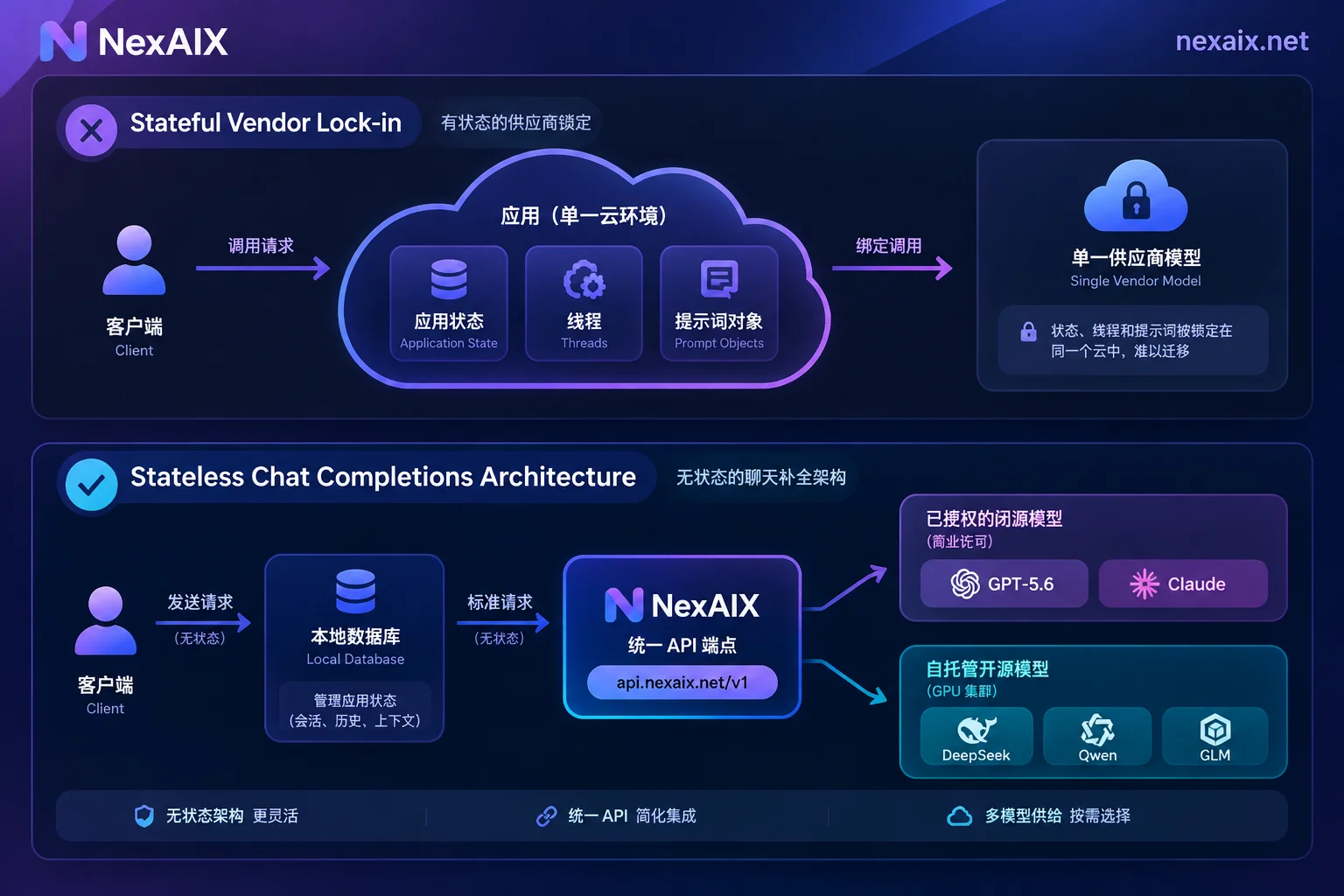
Specifically, this decoupled architecture follows two core principles:
- Localized state, stateless invocation:
Store system prompts (system/instructions), multi-turn history messages (messages), and tool definitions (tools) in your own database or cache. Each request passes them in full or with a sliding window through the standard Chat Completions interface. Changing a prompt is just changing a database configuration; switching models is just changing a request field. - Single endpoint for unified access to open-source and closed-source models:
Through NexAIX's OpenAI-compatible endpoint, projects originally using OpenAI SDK, LangChain, LlamaIndex, Vercel AI SDK, or Dify, Cherry Studio, NextChat, Cline, OneAPI, in most cases only need to changebase_urltohttps://api.nexaix.net/v1and replace with NexAIX's API Key to run.
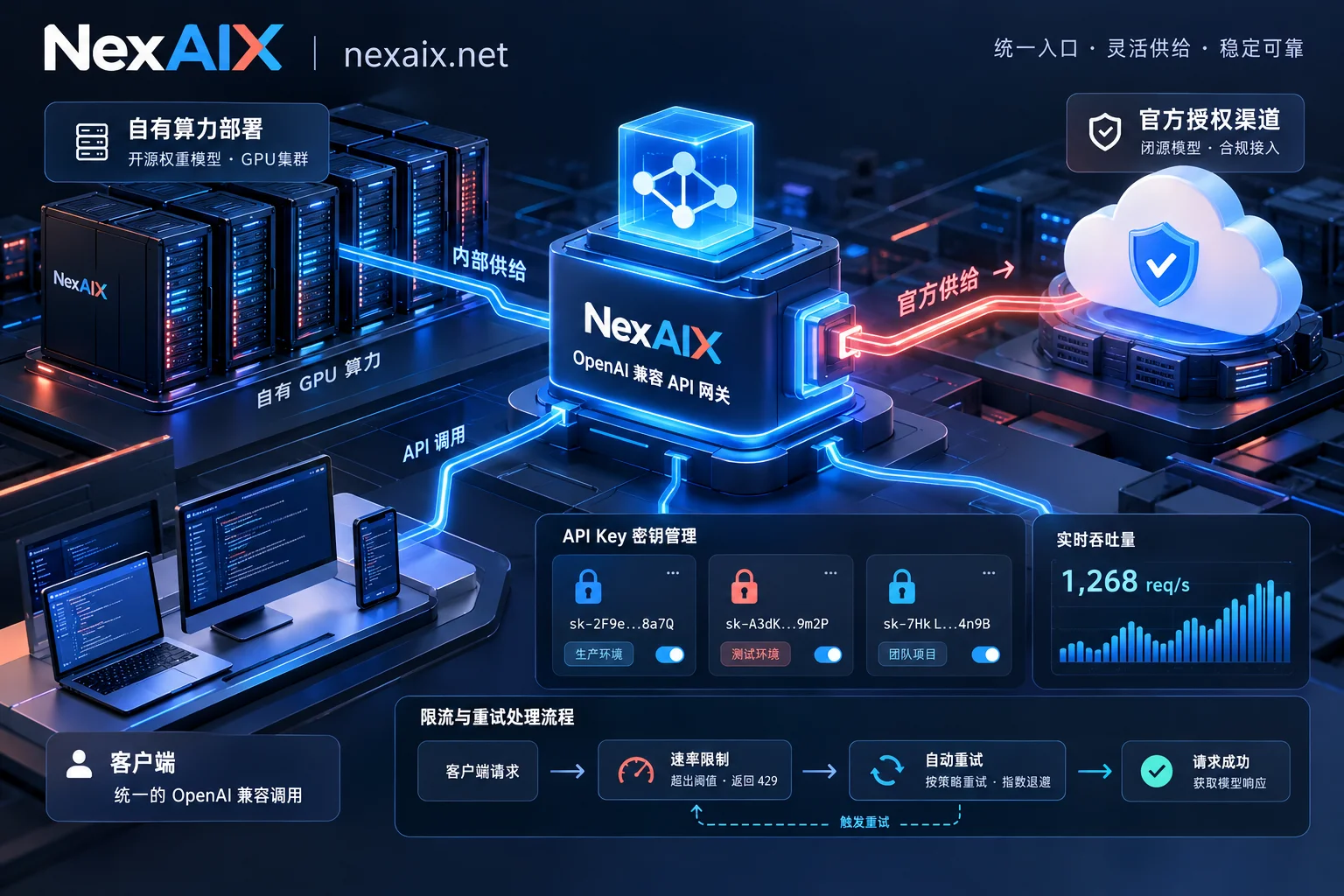
Under this architecture, with the same Key and the same request code, you can call closed-source models provided through officially authorized channels (such as GPT-5.6, Claude, Grok, Gemini series), and seamlessly switch to open-source weight models running on NexAIX's self-owned compute deployment clusters (such as DeepSeek, Qwen, GLM, Kimi, MiniMax, gpt-oss series), completely ending the history of rewriting adaptation layers for each new model. For more selection details on multi-model orchestration, refer to our OpenAI-compatible API production selection guide.
III. Code and Parameter-Level Migration Checklist
When migrating an application from an old model or proprietary interface to a unified OpenAI-compatible endpoint, besides replacing base_url and api_key, you need to focus on the following four engineering details to prevent pitfalls in production:
1. Model ID and documentation routing verification
Never hardcode model names from memory. Before migration, it is recommended to check the NexAIX model list for the exact parameters of currently available models. Each individual model page clearly indicates the model's supply method ("self-owned compute deployment" or "officially authorized channel"), publisher, license agreement, context window, maximum output length, inference precision (e.g., BF16, FP8, MXFP4), and three-step integration code.
Engineering pitfall tip: When checking an individual model detail page, note that theslugrule in the URL replaces dots (.) in the model ID with hyphens (-). For example, to view the specifications and code forglm-5.2, the access path ishttps://nexaix.net/models/glm-5-2/(using dots directly will return 404), while in the actual API request JSON body, themodelfield still uses the exact model IDglm-5.2.
If your business relies on specific open-source weight models not in the list, you don't need to maintain expensive GPU clusters yourself. Simply email ([email protected]) with the model type and estimated usage, and the team will reply with scheduling after evaluating compute resources.
2. Tool Calling and Streaming verification
When migrating from the Assistants API, the tool loop originally executed server-side as a black box needs to be explicitly managed by the client: after the model returns tool_calls, the business layer executes the local function and assembles the result as a tool role message for another request. NexAIX's endpoint strictly implements the OpenAI Chat Completions specification, natively supporting streaming output, function/tool calling, and multi-turn conversations. All enabled models support streaming responses, and you can directly reuse existing streaming parsing logic (for specific language implementations, refer to Python AI API tutorial and Node.js integration guide).
3. Multimodal input format alignment
If your migration involves visual understanding or video analysis applications, first check the target model's "input modality" tags on its model page. For request format, images are passed in the standard OpenAI multimodal format as image_url or base64 encoding; for video content, pass as a sequence of frames extracted as images, maintaining high consistency at the interface layer.
4. Parameter passthrough and "zero downgrade" self-check
Many teams migrating to third-party compatible endpoints worry most about hidden downgrades where "the flagship model is called on the surface, but behind the scenes requests are routed to a fine-tuned small model or low-precision quantized version."
Under NexAIX's no-downgrade mechanism, the model field in the response body strictly corresponds to the actual executed model—no switching to smaller models, no precision reduction, no truncation of context or max output, no hidden system prompt injection, and parameters like temperature, top_p, max_tokens are passed through as-is. During migration testing, engineering teams can directly use the four official methods for blind verification:
- Re-test consistency with fixed prompts and random seeds;
- Check the
modelfield in the response body; - Stress test context and output length with extremely long text close to the model page's stated limits;
- Ask the model to repeat all complete messages received to check for hidden prompt injection.
IV. Four-Step Production Gray Switching and Rollback Practice
Executing OpenAI API migration in production means the standard is not "running a demo locally," but ensuring output quality, latency distribution, error rates, and billing costs meet expectations under real concurrent traffic. A four-step progressive gray strategy is recommended:
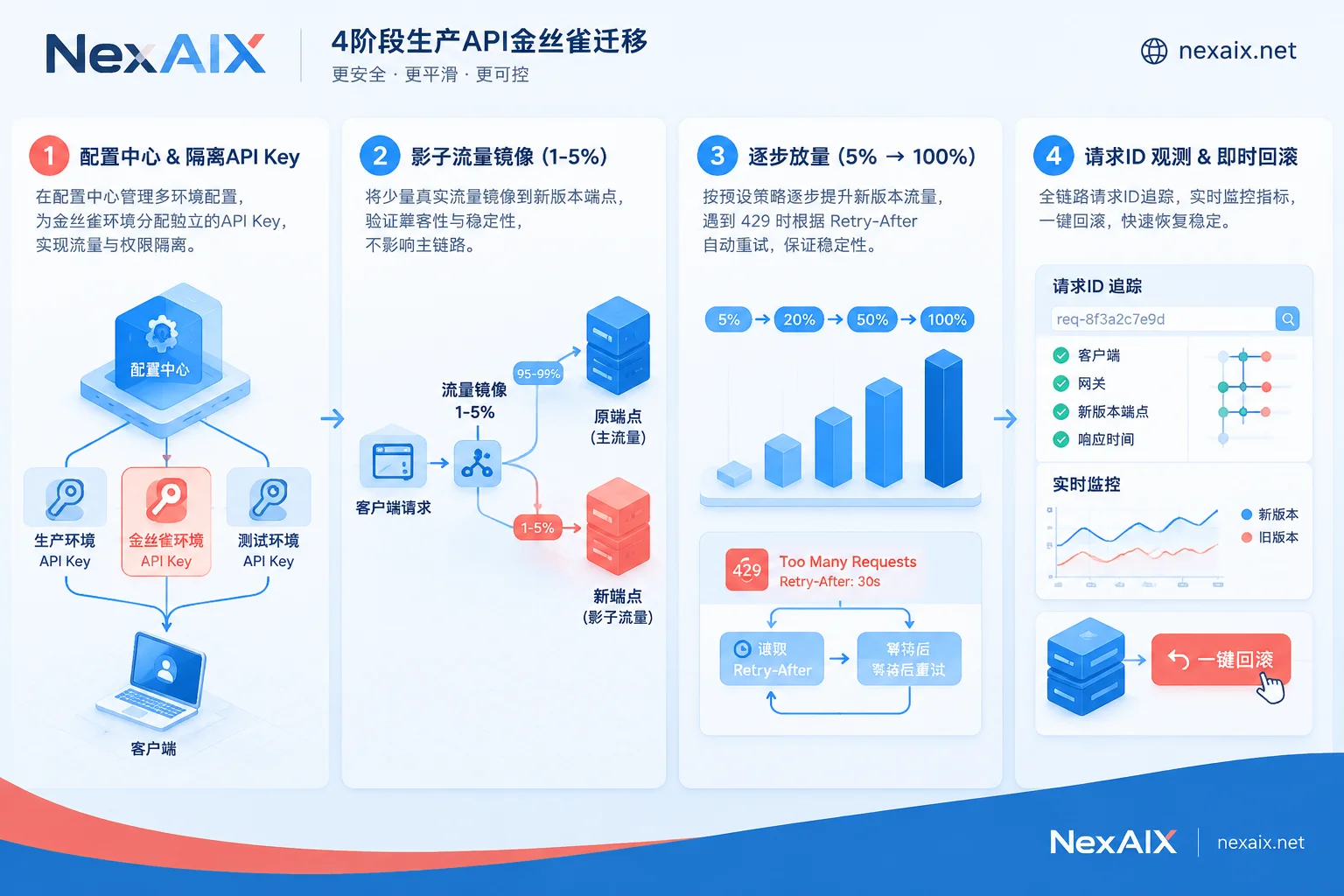
Step 1: Create independent Keys and configuration center switches
Do not hardcode credentials for the new endpoint in code, and do not share the same key with the old environment. You can first register with your email at the NexAIX console (no enterprise qualification required, free test credits upon registration), and create a separate API Key for this migration task.
In production architecture, NexAIX supports key-based isolation: each key has independent quotas, permissions, and usage billing. If compromised, it can be revoked individually without affecting other services. Put base_url, api_key, and model into the configuration center to ensure traffic can be switched in seconds without redeploying.
Step 2: Shadow Traffic comparison validation
Before正式 switching, asynchronously copy 1%~5% of real non-sensitive online requests to the new endpoint (log only, do not return to end users). Focus on comparing three metrics:
- Time to First Token (TTFT) and throughput: Note that TTFT and cost for very long inputs naturally increase with input length.
- Response format compatibility: Verify whether JSON structures or function call parameters can be consumed normally by existing business parsers.
- Cost accounting: Export per-model usage details from the console to compare actual token consumption before and after the migration for single tasks.
Step 3: Proportional rollout and deterministic 429 fault tolerance design
After shadow validation, gradually increase production traffic in steps: 5% → 20% → 50% → 100%. At this stage, rate limiting and capacity handling are core to ensuring high availability:
NexAIX adheres to a transparent strategy of single provider and single endpoint, no black-box automatic routing, and will not silently route your requests to cheaper models when compute is tight. Capacity for open-source models comes from self-owned GPU clusters; closed-source models are constrained by upstream official quotas; each key has explicit RPM, TPM, and concurrency limits (if you need higher quotas for business scaling, contact us anytime; the team will respond based on actual capacity).
When sudden traffic hits the limit or capacity is full, the server quickly returns a standard HTTP 429 status code with a Retry-After response header, never hanging connections indefinitely to drag down your application thread pool. Clients only need to implement deterministic backoff retries based on this header, or decide at the business layer whether to queue or switch to a backup model (see throughput and rate limiting explanation and API error code retry and fallback guide).
Step 4: Fast troubleshooting and rollback plan based on Request ID
During gray rollout, any anomaly needs to be located within minutes. Every NexAIX call returns a unique Request ID. Since the platform strictly enforces a no-logging policy, the server only retains five basic metadata items: request ID, model name, token count, timestamp, and status code. For troubleshooting, engineers only need to contact technical support with the request ID to quickly locate the link status.
V. Compliance Audit and Data Privacy: Bottom-Line Acceptance for Enterprise Migration
For finance, healthcare, government, and overseas SaaS teams, API migration often also requires compliance review by legal and security teams. This is also a core reason many teams migrate from "wild relays" or "single overseas direct connections" to NexAIX:
- Transparent and auditable supply channels:
NexAIX only provides two supply methods: "self-owned compute deployment" and "officially authorized channels", never using personal account pools, and never reverse-engineering client protocols. Open-source weights are deployed on self-built and self-leased GPU clusters, operated by ourselves, not reselling third-party quotas; closed-source models go through official commercial authorization from vendors, with proper entities, contracts, invoices, and auditability. You can learn the essential difference between legitimate supply and account pool reverse relays through the channel transparency self-check guide. - Zero logging and end-to-end encryption:
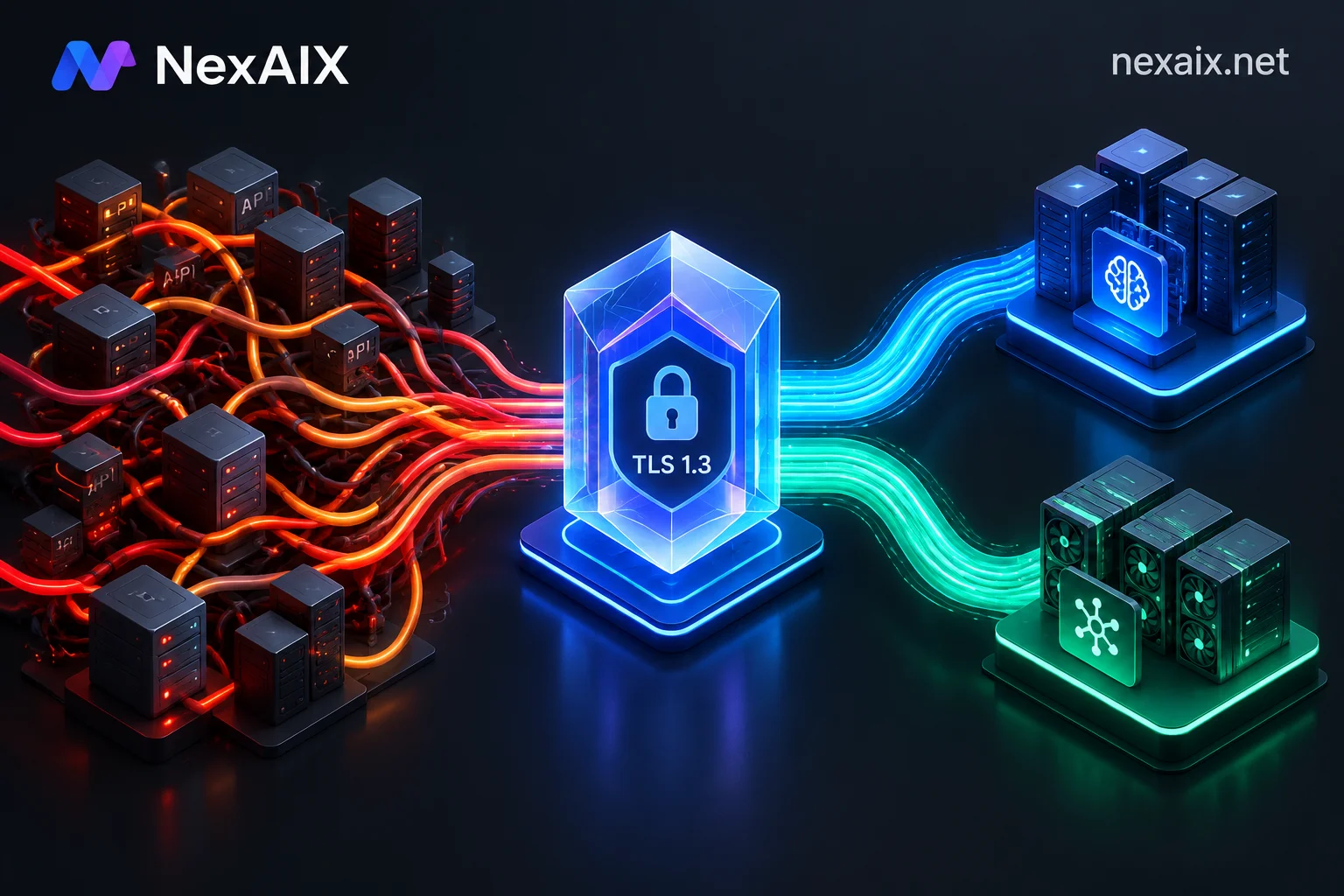
Under NexAIX's zero-log architecture, TLS 1.3 encryption is used from client to inference node; yourpromptandcompletionare forwarded only in memory, released immediately after the request ends, never written to disk, and never used for model training or handed to third parties for training. - Objective and transparent upstream data retention statement:
This is a strict commitment on NexAIX's side. When calling closed-source models, requests reaching upstream vendors are handled according to their respective commercial terms; policies vary, and we do not make false promises on their behalf (for example, among currently available Claude series, the Opus 5 model page explicitly states support for upstream zero data retention, while Fable 5 currently has 30-day upstream retention; refer to the official model page for details). - Enterprise agreements and private deployment support:
For medium to large teams with strict compliance requirements, NexAIX supports signing formal Service Level Agreements (SLA) and Data Processing Agreements (DPA); if your business requires dedicated resource pools or private deployment solutions, you can also email [email protected] for evaluation.
Conclusion: Return Interfaces to Standards, Keep Choices to Yourself
The iteration of large model technology stacks will not stop; more model version changes and proprietary API rises and falls will come. A high-quality OpenAI API migration is valuable because it helps engineering teams break free from dependence on single proprietary protocols and server-side state, and build a resilient architecture of "standard interfaces + transparent compute + free multi-model switching."
You can now go to the NexAIX console to register for free and receive test credits, point your test environment base_url to https://api.nexaix.net/v1, and run your first cross-model stateless call in minutes, preparing for smooth production evolution.


Comments(0)