 NexAIX-官方博客
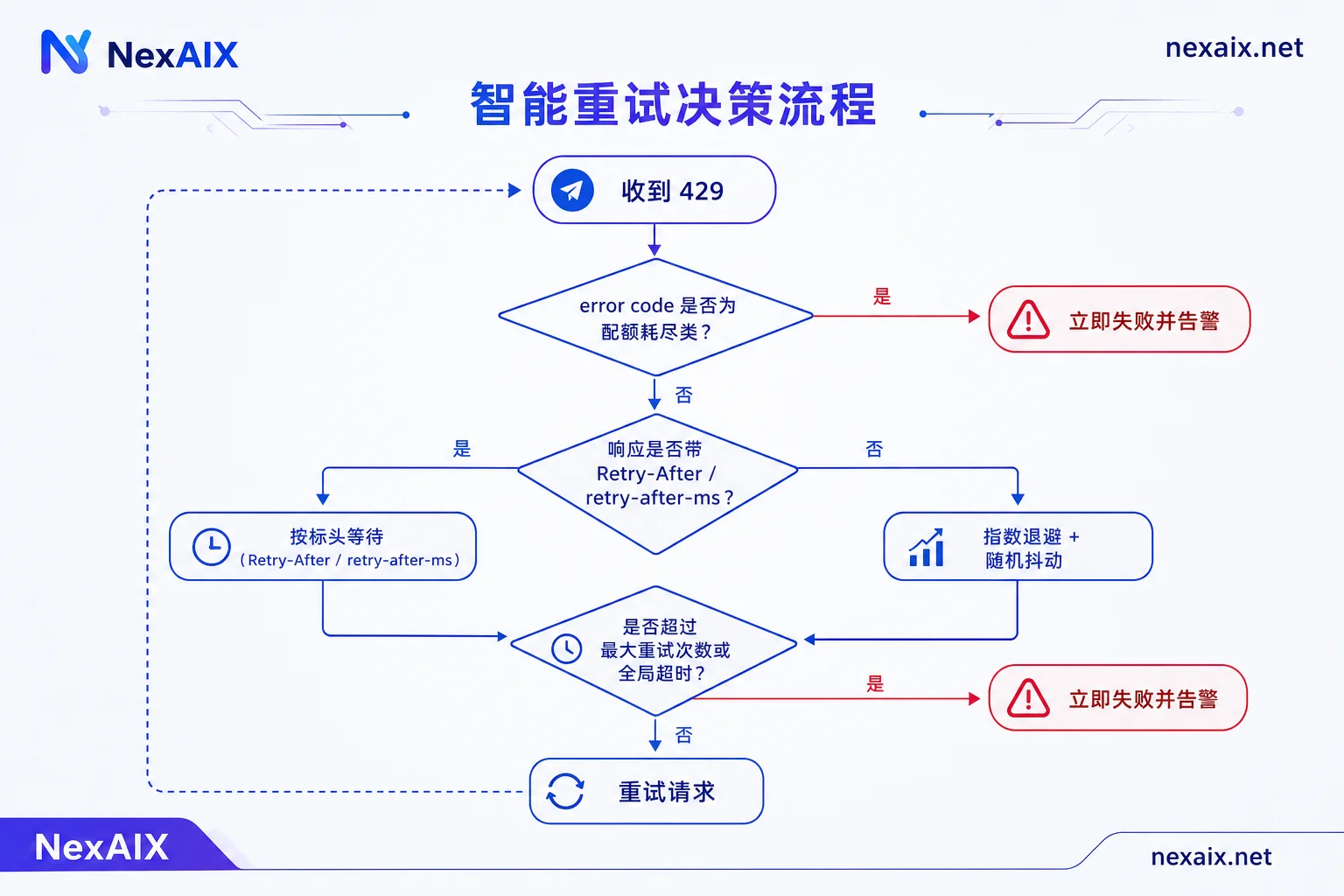
When you get a 429 Too Many Requests, don't immediately add retries. Do one thing first: log the response headers and the error code in the response body. A 429 corresponds to at least two opposite handling strategies:
- Rate/throughput limit exceeded (e.g.,
rate_limit_exceeded): waiting a bit will recover, so backoff and retry. - Account quota exhausted (e.g.,
insufficient_quota, insufficient balance, quota used up): waiting a million times won't help; stop retrying immediately and alert.
Mixing these two into one except and blindly retrying is a common cause of prolonged production incidents—every retry creates an invalid request, the logs are full of 429s, and the real cause (balance) is buried.
Below is the order you should troubleshoot: first understand how rate limiting is measured, then read headers, then write retries, and finally architectural avoidance.
Rate limiting isn't just "requests per minute"
Most OpenAI-compatible endpoints limit across multiple dimensions, and hitting any one returns 429:
- RPM / RPD: requests per minute/day.
- TPM / TPD: token throughput per minute/day.
- Concurrency or burst limit: number of in-flight requests in a short window.
The most overlooked is how TPM is measured. When a request enters the gateway, it's usually reserved based on input prompt tokens + your declared max_tokens, rather than settled after generation based on actual output. This means:
A request with 3K input and max_tokens=8192 may consume over ten thousand TPM quota the moment it enters the gateway, even if it only outputs 200 tokens.So a common "frequent 429s despite low request volume" is caused by a max_tokens that was casually set to a large value; a few concurrent requests reserve the whole window. Setting max_tokens to the actual upper bound your business needs (e.g., 512 for summarization, 64 for classification) often works better than adding retries.
Also note: streaming does not reduce rate-limit consumption. It improves time-to-first-token and user experience, but tokens still count.
Read headers first, don't guess how long to wait
A 429 response usually contains explicit wait instructions that take priority over your own backoff calculation:
Retry-After: usually in seconds.retry-after-ms: millisecond precision, more accurate.
If it exists, wait according to it. Retrying before that time will almost certainly earn another 429, wasting quota and a connection.
More valuable are the remaining-quota headers, which also appear on successful responses and let you slow down before hitting the wall:
| Header | Meaning |
|---|---|
x-ratelimit-limit-requests | Request limit for the current window |
x-ratelimit-remaining-requests | Remaining requests |
x-ratelimit-reset-requests | Request quota reset time |
x-ratelimit-limit-tokens | Token limit for the current window |
x-ratelimit-remaining-tokens | Remaining tokens |
x-ratelimit-reset-tokens | Token quota reset time |
Practical approach: add middleware in your HTTP client to extract these six values into your metrics system. When remaining-tokens falls below 10%–20% of the limit, proactively reduce send rate or queue requests instead of waiting for 429 to teach you.
One caveat: these headers are common implementations in compatibility specs, not all endpoints return them completely. Before integrating any endpoint, make a real request, print the response headers verbatim, confirm which fields are available and whether units are seconds or milliseconds, then write logic that depends on them. If fields are missing, fall back to pure backoff.
Retry skeleton: exponential backoff + jitter
After receiving a 429 and determining it's a rate limit, the standard algorithm is exponential backoff with random jitter:
wait = min(max_delay, base_delay * 2^attempt) + random_jitterThe jitter term is not optional decoration. If ten concurrent requests are rate-limited and back off using the same formula, they'll all return at the same millisecond, causing a thundering herd and being rejected together—backoff becomes a synchronizer. Adding a random term spreads out retries.
A Python skeleton you can adapt directly:
import random, time
import httpx

BASE_DELAY = 0.5      # 秒
MAX_DELAY = 30.0
MAX_RETRIES = 5
GLOBAL_TIMEOUT = 90.0 # 整个调用(含重试)的硬上限

FATAL_CODES = {"insufficient_quota", "billing_hard_limit_reached"}

def call_with_retry(client, payload):
    deadline = time.monotonic() + GLOBAL_TIMEOUT
    for attempt in range(MAX_RETRIES + 1):
        resp = client.post("/chat/completions", json=payload)
        if resp.status_code != 429:
            resp.raise_for_status()
            return resp.json()

        # 1. 配额类错误:立即失败,不重试
        code = (resp.json().get("error") or {}).get("code")
        if code in FATAL_CODES:
            raise RuntimeError(f"quota exhausted: {code}")

        # 2. 服务端给了等待时间就照办
        wait = None
        if "retry-after-ms" in resp.headers:
            wait = float(resp.headers["retry-after-ms"]) / 1000
        elif "Retry-After" in resp.headers:
            wait = float(resp.headers["Retry-After"])
        if wait is None:
            wait = min(MAX_DELAY, BASE_DELAY * (2 ** attempt))
        wait += random.uniform(0, wait * 0.3)  # 抖动

        # 3. 超过全局预算就别等了,把失败交回上层
        if attempt == MAX_RETRIES or time.monotonic() + wait > deadline:
            raise TimeoutError("rate limited, retry budget exhausted")
        time.sleep(wait)
A few easily missed boundaries:
- Must have a global timeout. Setting only max retries isn't enough; five backoffs could add up to a minute, the frontend has already timed out, and you're still burning quota.
- Distinguish idempotency. Pure text generation is fine to retry; but if the call triggers tool calls, writes to a database, or sends messages, confirm downstream can deduplicate before retrying. Whether retries in a tool-call loop go outside or inside the loop depends on your state recording; see the loop skeleton for tool-calling APIs.
- Retries must be observable. Log attempt count, wait duration, and error code; otherwise you can't tell later whether rate limiting is occasional or constant.
- For how to choose backoff parameters and when to give up, see How long should exponential backoff retries wait?.
Also distinguish a close cousin of 429: 5xx and connection timeouts also need retries, but semantics differ. 429 is "you're too fast"; 503 is more likely upstream congestion. Backoff works for the former; for the latter, besides backoff with a cap, consider a degradation path.
Architecture: make 429 less frequent
Retries are loss control, not a solution. Truly reducing rate limiting relies on these four steps, ordered by speed of impact:
1. Tighten max_tokens. As mentioned, it directly determines TPM reservation. Audit each endpoint and set values based on actual output length—this is the lowest-cost change.
2. Add a sender-side rate gate. Use a token bucket or leaky bucket in your app to control egress rate, paired with a concurrency semaphore (e.g., no more than 8 in-flight requests). With a gate, bursts queue in your own queue instead of becoming a batch of 429s. This is more controllable than passively being rejected—queued requests are visible, measurable, and prioritizable.
3. Divert non-real-time tasks. Batch tagging, offline summarization, nightly regression, etc., don't need second-level response; run them on a separate queue at low speed or schedule them off-peak. Don't let them compete for the same window as live chat.
4. Use long-document caching to reduce billing and throughput usage. If the same long prompt (system prompt, document context) is sent repeatedly, enabling prompt caching can reduce non-cached token consumption. Check your model's documentation for support and hit conditions.
Per-key isolation: don't let one script take down production
The most practical isolation measure is multiple keys per business: one for production, one for internal tools, one for development/debugging, one for batch jobs. Then if someone runs a load test locally and maxes out quota, only their key's window is maxed; production requests are unaffected. Usage bills can also be attributed by business—just look at the key-dimension curve to find "who ate the TPM".
NexAIX does per-key isolation: each key has independent quota, permissions, and usage billing. Quota and rate-limit values are publicly available, so you know your window size before integrating, rather than probing boundaries by hitting 429s repeatedly. The endpoint is OpenAI-compatible https://api.nexaix.net/v1; migration only requires changing base_url, and the header parsing and backoff logic above don't need rewriting. The model list and each model's supply type (open-weight models deployed on their own compute cluster, or closed-source models via official vendor channels) are indicated on the model page; when choosing a model, just confirm the corresponding specs and rate limits.
For how to allocate quota among multiple keys and distribute in team collaboration, there's a more detailed article: How to allocate quota when sharing an API key.
When you can't tell if it's your limit or upstream congestion
This is the most common blocker when using a relay/proxy: is the 429 because you maxed your own quota, or because the intermediary squeezes traffic from multiple users into one channel?
Three clues:
- Is quota public? If rate-limit numbers are explicitly stated, compare with your locally counted RPM/TPM. If your own calculation is far below the limit yet 429s persist, the problem isn't on your side.
- Are remaining-quota headers trustworthy? If
remaining-*still shows plenty but you're rejected, the rejection happens outside your quota ledger. - Time distribution of 429s. If they cluster on the hour or during peak periods and don't match your own traffic curve, it's more like shared-channel congestion.
NexAIX is a single provider with a single endpoint, does not do multi-upstream routing, and does not switch to smaller models, lower precision, or truncate context during peak times; the four commitments and corresponding verification methods are written openly for you to check yourself. For how to verify supply transparency and rate-limit troubleshooting during selection, Three engineering risks in choosing an API relay has a more complete checklist.
Pre-launch checklist
- [ ] Printed the full response headers of a real request, confirmed which
x-ratelimit-*fields are available and whetherRetry-Afterunits are seconds or milliseconds. - [ ] 429 handling distinguishes
rate_limit_exceededfrominsufficient_quota; the latter is not retried and triggers an alert. - [ ] Backoff includes random jitter, and both max retries and global timeout are set.
- [ ] Audited
max_tokensper endpoint; no oversized defaults remain. - [ ] Sender side has rate gate and concurrency cap; batch tasks use a separate queue.
- [ ] Production, internal tools, debugging, and batch each use independent keys.
- [ ] 429 counts, backoff wait durations, and key-dimension usage are all monitored.
The truly painful thing is never an occasional 429, but a 429 with no observability and only guesswork. Read the headers, split the keys, install the rate gate—most rate-limit problems will show up in charts before becoming incidents.




Comments(0)