NexAIX-官方博客
When pushing large model applications into production, almost every technical team will encounter one or more online alerts caused by AI API rate limiting. The QPS (queries per second) panel shows low numbers, yet the API suddenly returns a flood of HTTP 429 Too Many Requests; or a batch job starts in the background, and the real-time customer service bot in the front end spins endlessly.
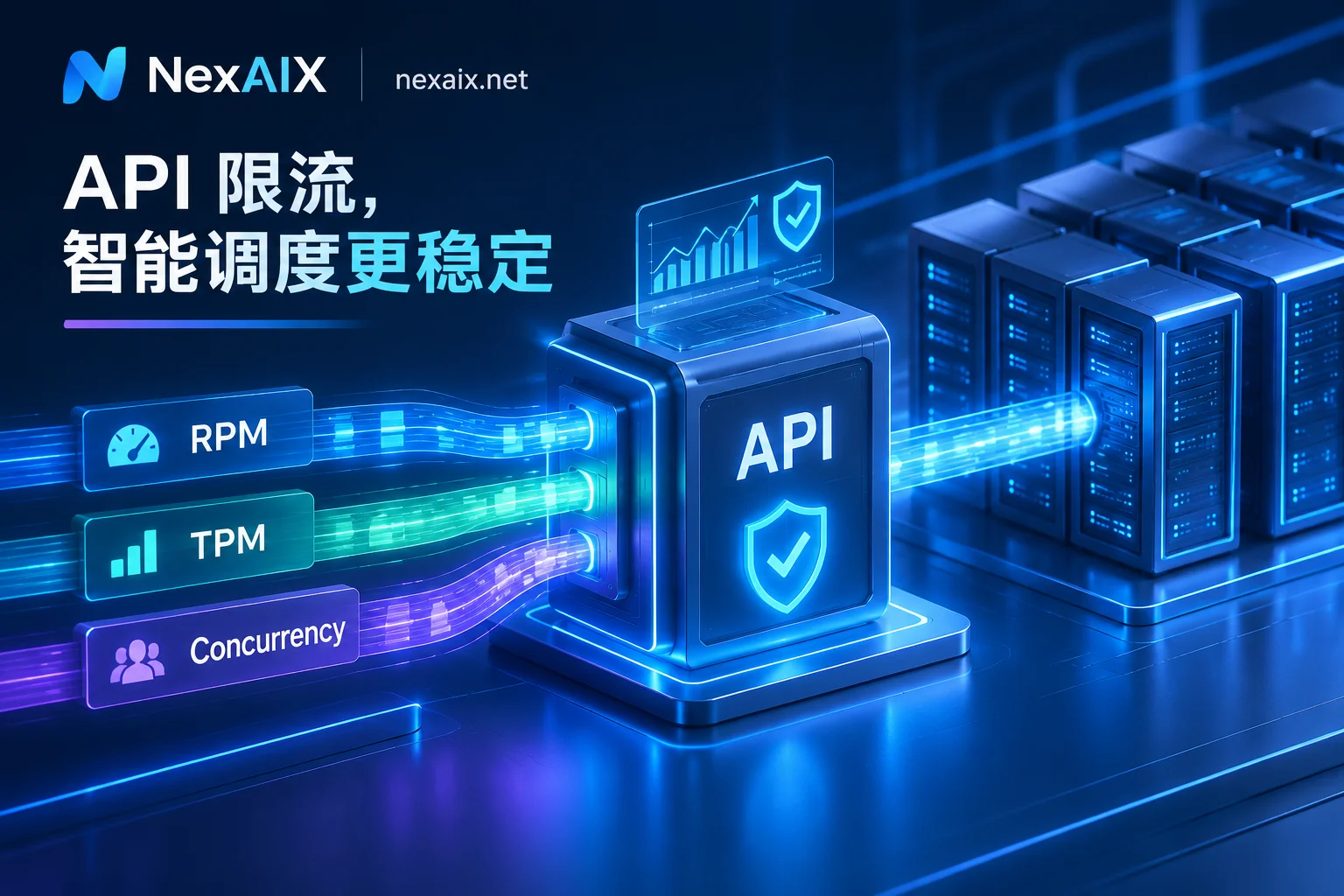
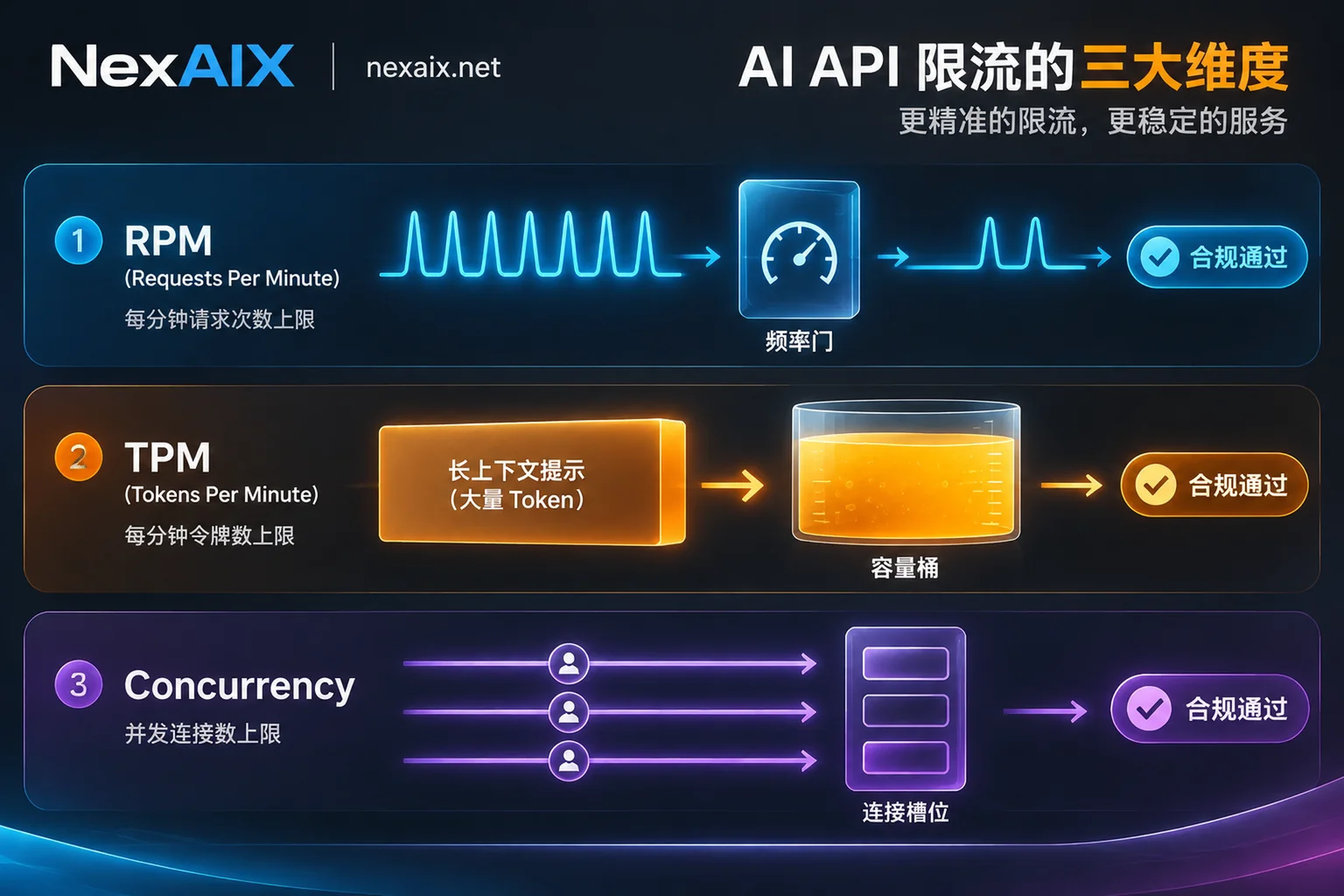
Traditional web API rate limiting mostly looks at request frequency, but large model API rate limiting is a three-dimensional model involving request frequency (RPM), token throughput (TPM), and concurrent requests (Concurrency). Without understanding the coupling of these three dimensions and the quota allocation logic of the underlying compute channels, simply relying on client-side "infinite retry loops" will only worsen the avalanche.
From a frontline engineering troubleshooting perspective, this article breaks down the trigger mechanisms of AI API rate limiting, analyzes common hidden channel traps, and provides a complete solution from client-side smooth backoff and per-key boundary isolation to multi-model compute scheduling.
1. Why does 429 trigger even with low request volume? Deconstructing the three-dimensional rate limiting mechanism
When an online 429 status code is received, the first step is not to change the retry count, but to determine which wall was hit. Mainstream large model interfaces typically rate-limit across three independent dimensions; any one of them hitting the limit immediately rejects requests.
1. RPM (Requests Per Minute) and per-second burst limits
RPM (Requests Per Minute) measures call frequency per unit time. Many developers think "60 RPM means I can fire 60 requests instantly in the first second, then rest for 59 seconds." But in actual engineering, mainstream platforms often combine minute-based statistics with token bucket or per-second RPS (RPM/60) burst protection.
- Typical trigger scenarios: scheduled tasks waking up on the hour, batch data labeling, parallel chunked text vectorization or summarization.
- Symptom: dense requests in a short period then immediate errors; after a few seconds pause, normal again—showing a clear periodic sawtooth error pattern.
2. TPM (Tokens Per Minute): the invisible killer in the long-context era
With the proliferation of million-token context models and multimodal inputs, TPM (Tokens Per Minute) has become the most easily misjudged rate-limiting dimension.
- Typical trigger scenarios: RAG retrieval injecting tens of thousands of words of knowledge base chunks, multi-turn Agent loops carrying lengthy history message trees, or high-resolution multimodal image sequences.
- Symptom: monitoring shows only a few requests per minute, but each request inevitably triggers 429. This is because a single input plus estimated output (
max_tokens) instantly consumes the current minute's token budget (additionally, very long inputs also cause first-token latency and per-request cost increases with input length). For more on memory and throughput governance in long-context scenarios, see our previous "Long-Context API Production Guide".
3. Concurrent requests limit: the bottleneck of slow-thinking models
The concurrency limit looks at "how many requests are currently sent but not yet completed." It's completely different from RPM.
According to Little's Law, 在途并发数 = 请求到达率 × 平均响应耗时. Suppose you send only 2 requests per second (well under RPM), but if you're calling a deep reasoning model or generating a 10,000-word essay, each request takes 15 seconds, then by the 15th second your in-flight concurrent requests will accumulate to 30.
- Typical trigger scenarios: using strong reasoning models for complex code generation, full-length document translation, or non-streaming output causing long-lived connections.
- Symptom: when upstream inference slows down, the client thread pool or coroutine pool quickly fills up, and subsequent new requests fail in batches.
| Rate limiting dimension | Core metric | Common causes | Core mitigation |
|---|---|---|---|
| RPM (request frequency) | Calls per window | On-the-hour batch jobs, tight-loop calls | Client-side token bucket smoothing, staggered scheduling |
| TPM (token throughput) | Sum of input + output tokens | Very long prompts, stacking full history context | Context trimming, reasonable max_tokens convergence |
| Concurrency | Requests currently in-flight | Long output generation time, deep reasoning time | Semaphore concurrency control, streaming reads |
2. More dangerous than 429: production incidents caused by "non-standard rate limiting"
When building your own or integrating third-party model gateways, the standard 429 is actually a healthy protection signal. What truly troubles technical leaders are secondary disasters caused by opaque underlying channels or non-standard gateway policies.
1. Account-level shared quotas leading to "internal friendly fire"
Many cloud vendors or aggregation platforms adopt a "main account merged rate limiting" strategy—all workspaces and all API keys under the account share the same RPM/TPM pool. If the data analytics team temporarily runs a batch cleaning script in the background and instantly maxes out the quota, the core transaction assistant serving real users in the front end will immediately be paralyzed by 429. Lack of API-key-level independent quota isolation means any traffic spike from a single module can turn into a global outage.
2. Indefinite hanging dragging down the call chain
Some relay stations built on reverse-engineered web protocols or low-quality account pools, when encountering upstream rate limiting or account bans, do not immediately return 429 to the client; instead, they hang the HTTP connection and poll dozens of free accounts in the background. This "fake dead" state disables client timeout controls, quickly exhausts the application server's connection pool, and triggers an avalanche along the entire Agent call chain (see "Stable AI API Production Guide: Ending Agent Call Chain Avalanches, Implicit Downgrades, and Hang Failures").
3. Implicit downgrading under full load
There are also black-box routing platforms touting "never rate limited" that, when the primary model quota is full, quietly forward user requests to cheaper models with smaller parameter counts and severely reduced precision (e.g., from BF16 to low-bit quantization), or even silently truncate the user's input context, just to avoid errors. The business appears error-free, but output quality plummets, making troubleshooting extremely difficult.
3. Production-grade AI API rate limiting response and governance plan
To keep large model applications robust under high concurrency, both explicit server-side boundaries and graceful client-side control are needed. Here is a four-step governance architecture proven in production:
1. Integrate a transparent gateway that explicitly returns 429 and Retry-After
When selecting API infrastructure, "determinism" trumps everything. In NexAIX's high-throughput architecture, we strictly adhere to transparent rate limiting principles:
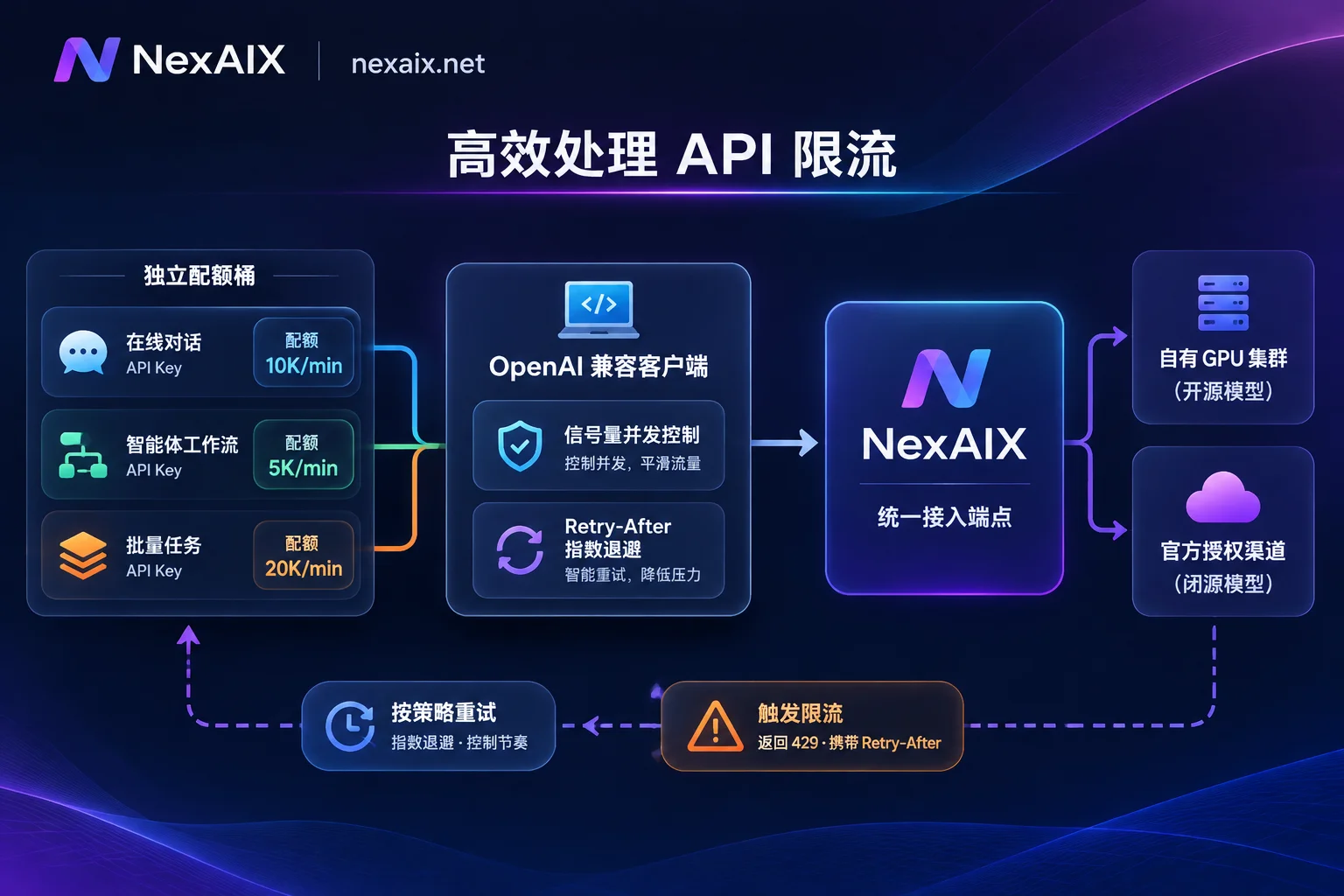
- Never hang or drop packets: When a request hits the quota limit or upstream is saturated, the gateway immediately returns the standard
HTTP 429status code and includes a clearRetry-Aftersuggested wait time in the response header. We never hang connections indefinitely, nor do we secretly replace requests with cheaper models under full load (you can always verify themodelfield and actual output quality via four methods on the no-downgrade self-check page). - Full streaming support: All models support streaming according to the OpenAI specification, helping clients receive the first token early, monitor connection liveness, and avoid long-running requests turning into black-box waits.
2. Client implementation: concurrency semaphore + prioritize Retry-After backoff
At the code level, never write a bare for loop for brute-force retries. Combine an async semaphore (controlling max in-flight concurrency) with an exponential backoff strategy that respects Retry-After.
Since NexAIX fully implements the OpenAI Chat Completions specification, existing projects only need to change base_url to https://api.nexaix.net/v1 and use a NexAIX key. Below is a production-grade Python example with concurrency control and standard 429 backoff:
import asyncio
import random
import time
from openai import AsyncOpenAI, RateLimitError, APIStatusError

# 1. 仅需替换 base_url 与 api_key 即可无缝接入 NexAIX
client = AsyncOpenAI(
    base_url="https://api.nexaix.net/v1",
    api_key="your_nexaix_api_key",
    max_retries=0  # 关闭 SDK 默认盲目重试,由自定义逻辑精准接管 Retry-After
)

# 2. 使用 Semaphore 严格限制在途并发数,防止慢请求堆积冲垮并发上限
MAX_CONCURRENT_REQUESTS = 10
semaphore = asyncio.Semaphore(MAX_CONCURRENT_REQUESTS)

async def call_model_with_backoff(messages: list, model: str = "glm-5.2", max_attempts: int = 5):
    async with semaphore:
        for attempt in range(1, max_attempts + 1):
            try:
                response = await client.chat.completions.create(
                    model=model,  # 切模型只改 model 字段,如 glm-5.2 或 gpt-5.6
                    messages=messages,
                    temperature=0.7,
                    max_tokens=2048,
                    stream=False
                )
                return response.choices[0].message.content

            except RateLimitError as e:
                if attempt == max_attempts:
                    # 提取请求 ID 便于联系技术支持快速排障
                    req_id = e.response.headers.get("x-request-id", "unknown")
                    raise RuntimeError(f"达到最大重试次数仍触发限流,Request ID: {req_id}") from e

                # 3. 优先读取服务端返回的 Retry-After 响应头
                retry_after = e.response.headers.get("retry-after")
                if retry_after and retry_after.isdigit():
                    wait_time = float(retry_after) + random.uniform(0.1, 0.5)
                else:
                    # 若无明确指示,执行带随机抖动(Jitter)的指数退避
                    wait_time = (2 ** attempt) + random.uniform(0.1, 1.0)

                print(f"[429 限流保护] 第 {attempt} 次退避,等待 {wait_time:.2f} 秒后重试...")
                await asyncio.sleep(wait_time)

            except APIStatusError as e:
                req_id = e.response.headers.get("x-request-id", "unknown")
                print(f"API 异常状态码 {e.status_code}, Request ID: {req_id}")
                raise
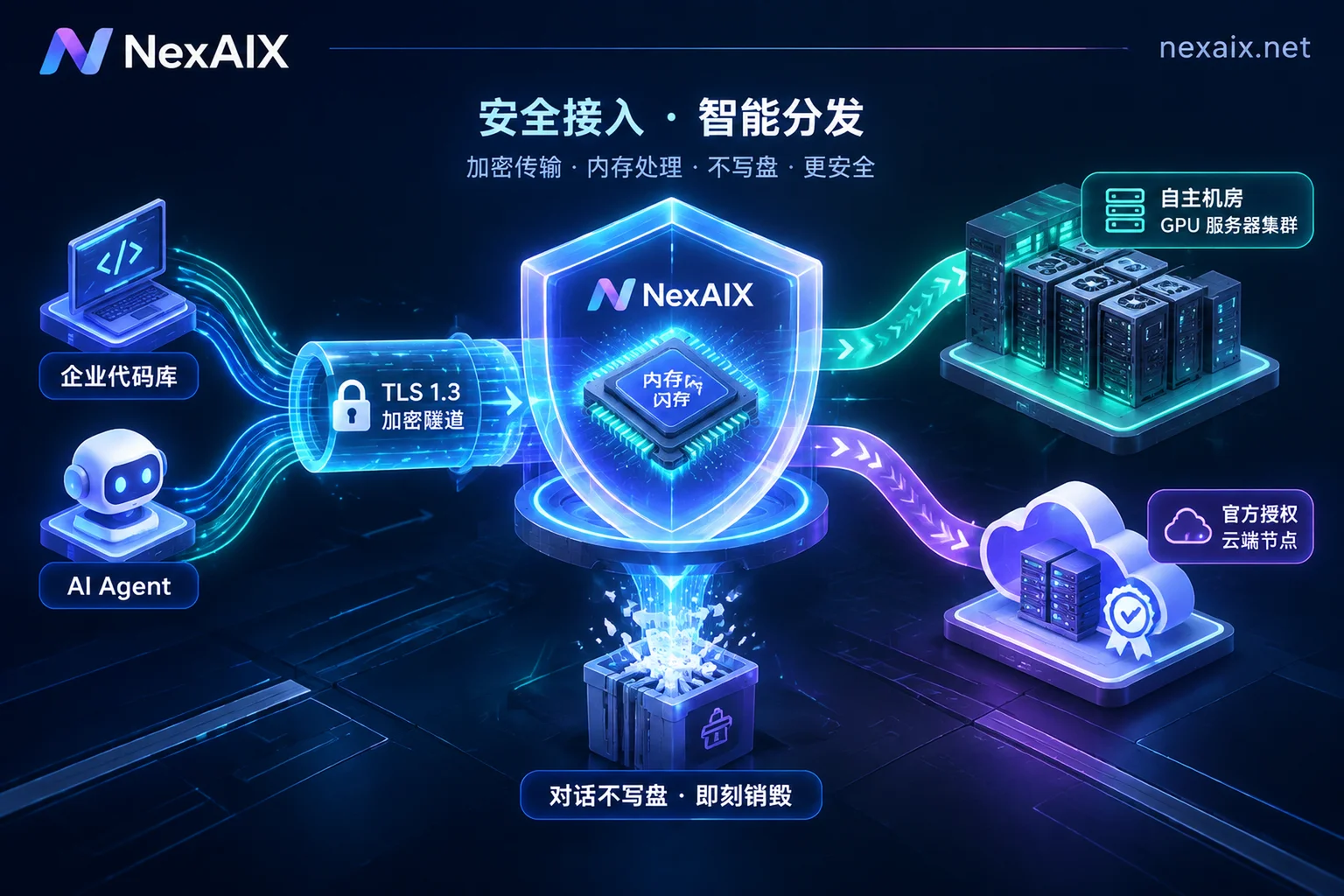
Troubleshooting tip: Every API call in NexAIX returns a unique request ID (and we release conversation content immediately after in-memory forwarding, not logging any Prompt or Completion to disk; only request ID, model name, token count, timestamp, and status code are retained). When encountering rate limiting or abnormal status codes online, contact us with the request ID for second-level root cause identification.
3. Architectural governance: per-key independent quota isolation to stop fault contagion
To thoroughly solve the problem of "background batch jobs dragging down front-end business", fault isolation domains must be well-defined at the authentication layer.
In NexAIX, each API key has independent quota, independent permissions, and independent usage billing:
- Business decoupling: You can create separate API keys for "online real-time chat", "internal office assistant", and "nightly offline batch processing". Each key calculates RPM, TPM, and concurrency limits independently; even if a batch job triggers 429, it will never squeeze the quota of online real-time core business.
- Security and cost auditing: If a key in one environment is accidentally leaked, it can be revoked separately without affecting other services; for financial reconciliation, bills can be exported itemized by key and by model (further reading: "AI API Cost Optimization Guide: From Agent Multi-Model Tiering and Hidden Loss Troubleshooting to Multi-Key Billing Governance").
4. Capacity breakthrough: plan throughput combining "dedicated compute deployment" and "official authorized channels"
When business volume grows and default quotas are truly insufficient, client-side backoff alone can no longer solve the fundamental throughput deficit. At this point, it's necessary to understand the underlying supply logic of different models and scale accordingly (for a detailed comparison of the two supply models, see "What's the Difference Between Open-Weight Model APIs and Official Authorized Channels").
In the NexAIX Model Marketplace, we only provide two transparent, auditable supply methods (see "Transparent Supply and Self-Check Guide"), rejecting any account pools or reverse-engineered channels:
- Official authorized channels (closed-source models):
Covering Claude, GPT-5.6, Grok, Gemini and other series. Through official commercial licenses from vendors, with contracts, invoices, and auditability. The total capacity of such models is constrained by upstream vendor quotas (meanwhile, upstream data retention follows each vendor's terms; for example, the Claude Opus 5 model page currently states zero data retention, while Fable 5 currently has 30-day retention). - Dedicated compute deployment (open-weight models):
Covering Kimi, GLM, DeepSeek, MiniMax, Qwen, gpt-oss and other officially released open-weight series. Deployed by NexAIX directly on self-built and leased GPU clusters in our own data centers, self-operated, not reselling third-party quotas. Each model detail page (e.g., the GLM-5.2 model page; note that the URL slug replaces dots in the model ID with hyphens, while the request body still usesglm-5.2) clearly lists context window, max output, and inference precision (e.g., BF16, FP8, MXFP4).
High-concurrency hybrid scheduling recommendations:
Because NexAIX is a single supplier with a single endpoint and will not automatically reroute 429 requests to other models behind your back, developers have full control over routing decisions. You can use the same key and the same interface specification to assign tasks with extremely high real-time throughput requirements and massive concurrency to open-weight models running on NexAIX's own GPU clusters (such as DeepSeek, GLM, or Qwen series), and when receiving 429, your business gateway decides whether to backoff and queue or switch the model field to an alternative model.
4. Hitting quota bottlenecks? Request scaling and dedicated resource pools on demand
Rate limiting rules are not meant to block business, but to ensure determinism in a multi-tenant production environment. As your application moves from prototyping to large-scale rollout, NexAIX provides a smooth capacity upgrade path:
- Online quota increase request: Each key has basic default RPM, TPM, and concurrency limits (refer to the official website and console for specific values). If your production business needs higher quotas, you can submit a request directly, and we will respond quickly based on the actual capacity of our own clusters and upstream quotas.
- Custom models not in the list and dedicated resource pools: If the open-weight model you need is not in the current list, you can submit the model and estimated usage (email
[email protected]), and we will reply with a launch schedule after evaluating compute. For enterprise teams with strict compliance and high-concurrency assurance requirements, we support signing formal contracts, service level agreements (SLA), and data processing agreements (DPA), issuing VAT invoices, and can evaluate customized dedicated resource pools and private deployment solutions.
If you are troubled by frequent 429 rate limiting alerts, channel response hangs, or quota contention, please go directly to the NexAIX Console (api.nexaix.net) and register with your email. No cumbersome enterprise qualification review—test credits are granted upon registration. It supports OpenAI SDK, LangChain, LlamaIndex, Vercel AI SDK, Dify, Cherry Studio, Cline, OneAPI and other mainstream tools; just fill in https://api.nexaix.net/v1 to verify immediately, and let every high-concurrency call run on transparent, controllable production-grade compute.