 NexAIX-官方博客
To put it bluntly: you cannot directly prove from the client side that the other party's server doesn't store your conversations. Once a request is sent over HTTPS, TLS terminates at the server. Whether the content is written to gateway logs, databases, or abuse monitoring storage afterward is invisible to the caller. Packet capture only confirms what you sent and to whom—it cannot confirm what the other side stored.
What you can do is a different category of work: gather indirect evidence, narrow the trust boundary, and ensure sensitive data never leaves your control in the first place. Below, ordered from least to most effort, are methods you can combine.
First, rule out a common misconception
Many people test like this: in a new session, ask the model "Do you remember what I said last time?" When the model says no, they conclude the platform doesn't log.
This test only shows that model inference is stateless—the API doesn't automatically carry the previous context into the current call. It says nothing about whether the gateway or backend writes prompts and completions to persistent logs, nor whether that content is used for abuse monitoring. "The model doesn't remember" and "the platform doesn't store" are two different things; the first being true does not imply the second.
Step 1: See what fields the console and usage API expose
This is the lowest-cost, highest-information step. Open the platform's call records, Request Logs, or usage query API, and see what content is visible for a single request.
- Metadata only: Request ID, model name, timestamp, input and output token counts, latency, status code. These are fields needed for billing and operations; services that promise not to log conversations typically retain only this layer.
- Full prompt or response visible: This means the server has already persisted the conversation in plaintext—conclusion is clear.
Two caveats. First, the console not showing full text only means this interface doesn't expose it; it doesn't mean the backend definitely doesn't store it. This evidence can only be used one way: seeing full text confirms storage; not seeing it doesn't prove absence. Second, some platforms let you toggle "save logs" or "debug logging" yourself—check that it's off.
Step 2: Read the data policy, focusing on defaults and exceptions
A public data policy is the provider's written commitment. If something goes wrong, it's the basis for accountability. When reading, focus on these points:
- Default retention period and purpose. For example, OpenAI's official API by default retains request content for up to 30 days for abuse monitoring. Only enterprise customers who qualify for Zero Data Retention (ZDR) stop persisting content to disk.
- How to enable zero retention and how to confirm it's active. Azure OpenAI uses governance flags like
ContentLogging=falseto confirm that abuse monitoring storage is disabled. Having a queryable status flag is more reliable than a verbal promise alone. - Whether data is used for training, and whether you need to opt out actively.
- How many layers are involved. When using a proxy service, your request may pass through the proxy before reaching the model provider; each layer has its own retention rules. Checking only the proxy's policy is insufficient—you also need to know who actually provides inference for the model.
Once you understand the default retention period of official endpoints, you have a reference to judge whether a proxy's commitments are stricter, equal, or looser than the official ones.
Step 3: Use canary bait to detect if content leaks
If you need more than a policy promise—actual evidence—you can do a Canary Token test. The idea is to place bait in the request that triggers an alert if a human or program ever extracts and uses it.
How to do it:
- Prepare bait used only for this test. Three common types: a dedicated webhook or tracking link that records the source when accessed; a unique, realistic-looking but invalid key, combined with your monitoring of that format; a dedicated email address that reveals when it's taken if it receives mail.
- Use different bait for each service under test. This way, if triggered, you know which link leaked.
- Put the bait in a normal prompt. For example, write it as a configuration example or contact info, making it look like data worth scraping. System prompts can also embed bait via steganography; tools like llm-canary in the community are worth checking.
- Observe for weeks, not just a day or two. Manual log review or offline analysis often has delays.
Interpret results this way: bait triggering is strong evidence that data was retained and accessed. Bait never triggering only means no human or program used it during the observation period; it doesn't prove content wasn't stored. If data is stored but never read, this method won't catch it.
Don't use real credentials as bait, and don't put any real business data in the bait.
Step 4: Check your own side first
When auditing logging points, it's easy to focus only on the upstream. In reality, plaintext conversations often reside in your own pipeline: your self-built API gateway or forwarding layer may have request body logging enabled; your application framework's tracing and debugging features may log full prompts; observability tools and error reporting tools may also carry request parameters along.
It's advisable to list every layer a request passes through from your code to the external endpoint, and confirm what each logs, how long it's kept, and who can see it. This part is fully under your control and easiest to check.
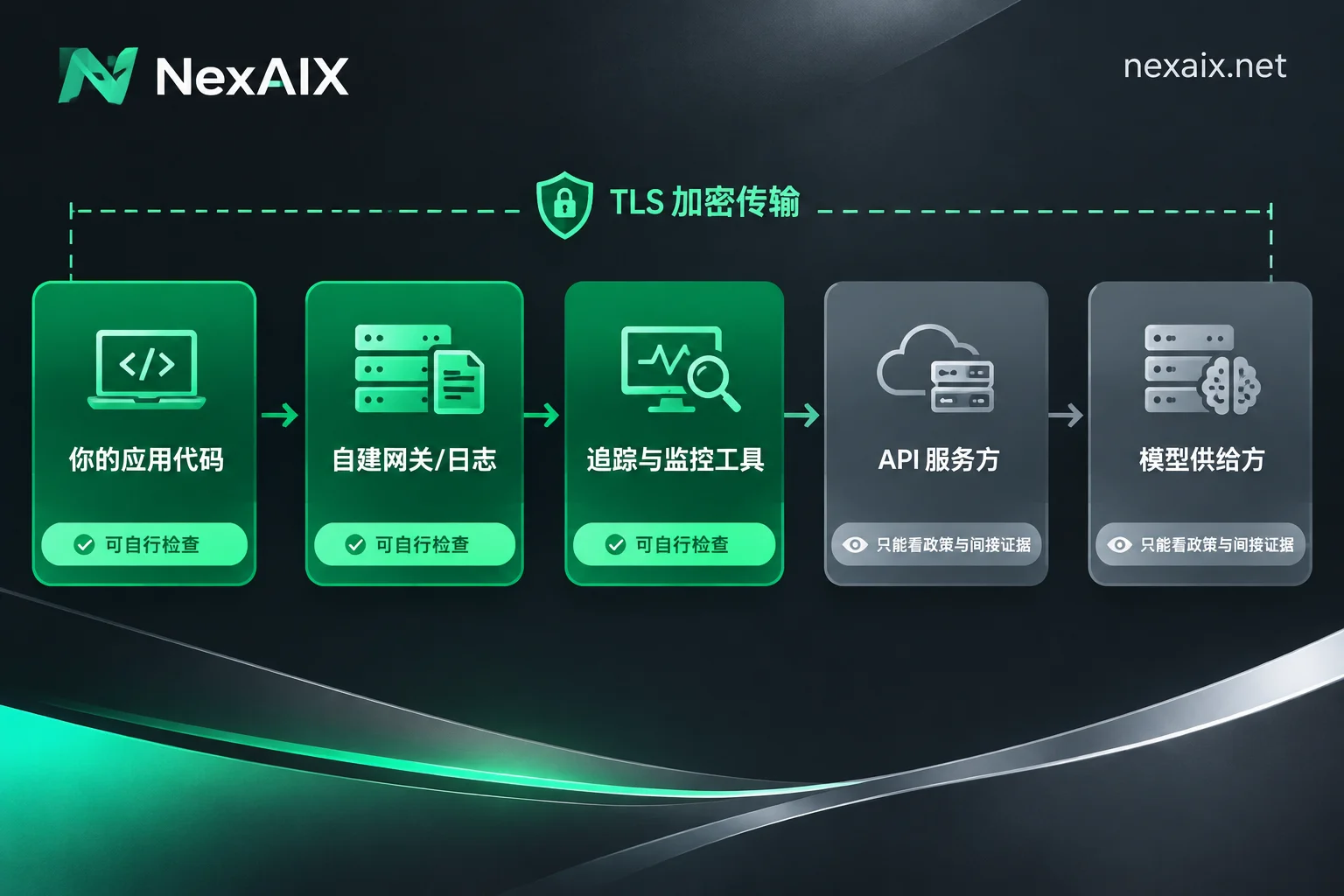
Step 5: Handle highly sensitive data before it leaves your boundary
Since whether the server persists data cannot be fully seen from outside, the safest approach for core sensitive data is not to let it leave your boundary in plaintext:
- Sanitize or pseudonymize at the gateway or client. Before sending, replace names, phone numbers, ID numbers, keys, and other entities with placeholders, then restore locally after receiving the response. The model typically doesn't need the real phone number to summarize, classify, or rewrite.
- Route by data sensitivity. For tasks involving highly sensitive fields, choose endpoints with the clearest retention rules and the shortest pipeline; general content can use other options.
- Use separate keys for different scenarios. Use independent keys for testing, production, and different business lines. This helps quickly scope issues and rotate keys separately. See How to get, store, and separate AI API keys.
How to use these methods when choosing or migrating endpoints
If you're selecting or switching API endpoints for a data-sensitive application, turn the previous steps into a checklist: Does the console show only metadata? Does the written policy state that conversations are not logged? Who provides inference for the model? How many layers are in the pipeline? Where on your own side might records be left?
Take NexAIX for example: its written commitment is not to log conversation content, to release data once the request ends, and to isolate by API key, with each key having independent quotas, permissions, and usage billing. Models are supplied in only two ways: open-weight models deployed on its own compute, and closed-source models through official vendor-authorized channels. Each model page indicates which type it is. For models via vendor channels, it's advisable to also understand that vendor's API data policy. How to verify each of the four commitments is explained on the NexAIX commitments and verification methods page. Registration comes with test credits, so you can verify using the canary method and console checks yourself—don't rely solely on promises.
Data retention is only part of the trust issue. If you're also worried about models being swapped for smaller ones or degraded, continue reading How to confirm whether an API returns the original model.




Comments(0)