 NexAIX-官方博客
When choosing a model, don't just look at the largest context number on the marketing page. Whether a request can run to completion depends on two boundaries:
- Context window: The maximum number of tokens for input and output combined in a single request.
- Single max output: The maximum number of tokens the model can generate in one reply, i.e., the upper limit that
max_tokens/max_completion_tokenscan be set to.
These two boundaries also compete with each other. The more input fills up, the less space remains for output. So before comparing model context windows, answer three questions:
- How long will my input be at most?
- How much content do I need the model to write in one go?
- Can I accept the latency, rate limiting, and cost that come with very long inputs?
What Each Boundary Controls
The context window doesn't just hold the user's current question. It includes the system prompt, multi-turn conversation history, tool definitions (function / tool schema), retrieved or uploaded reference documents, and the model's generated output for this turn. Many people only count "how long the document is" when budgeting, missing history and tool definitions, and then run into truncation after launch.
You can estimate using this relationship:
Input tokens + tokens reserved for output ≤ context window
Tokens reserved for output ≤ model's single max output limit
For example, a model with a 128K window and a 16K single max output.
- With 100K input, it can still output the full 16K.
- When input grows to 120K, only about 8K remains. Setting
max_tokensto 16K won't be fully used—generation will be cut off early.
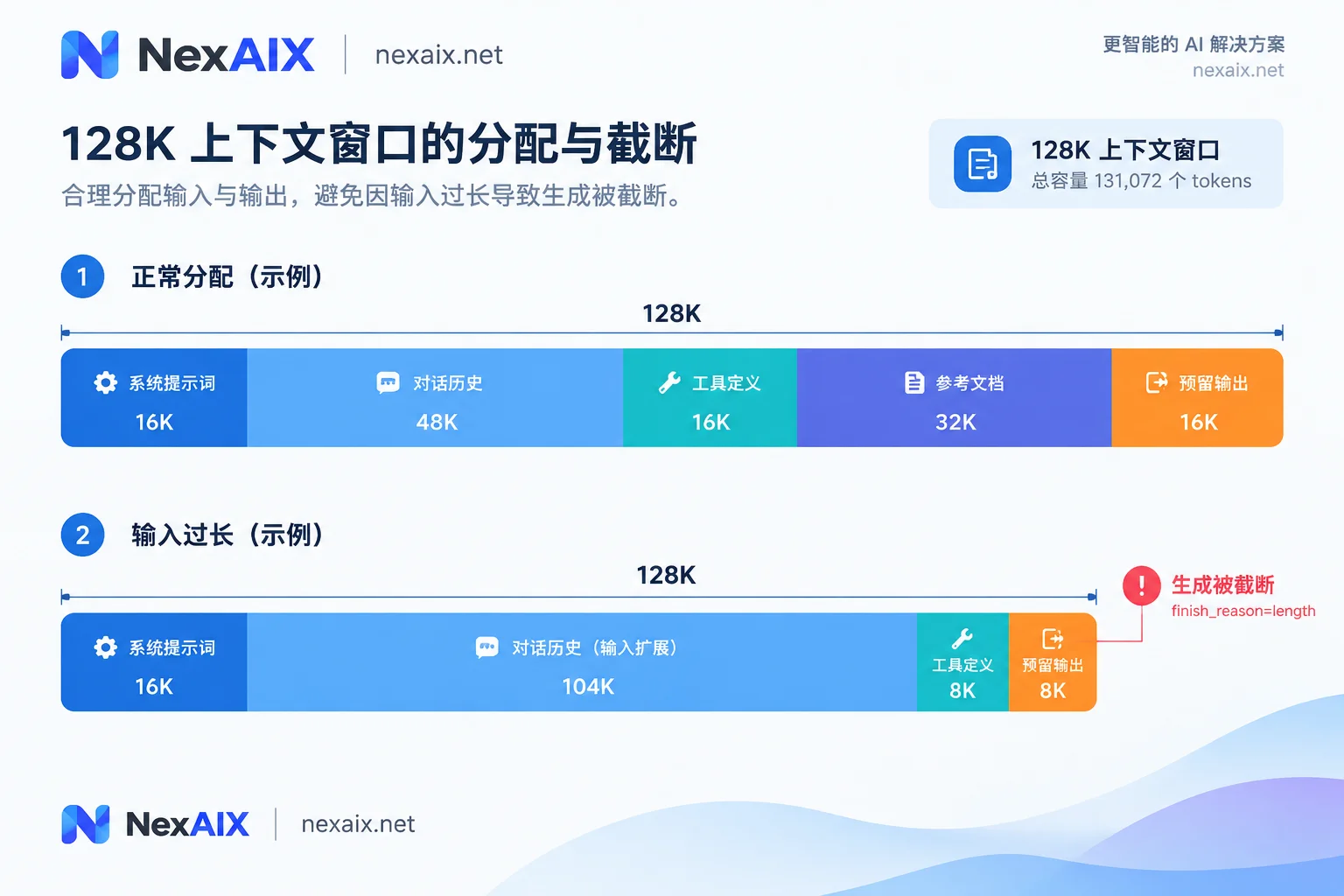
Also note that different models use different tokenizers, so the same Chinese text may tokenize to different token counts. Rough estimates are only for planning; rely on the values returned in usage for actual numbers.
Window and Output Limits of Some Representative Models
Below is what vendor documentation says about these specific versions. Models iterate quickly, and newer versions in the same series may have completely different numbers. When integrating, use the version you actually call.
| Model (representative version) | Context window | Single output limit | Best suited for |
|---|---|---|---|
| OpenAI GPT-4o / GPT-4o-mini | 128K | Typically 16,384 | General chat, medium-length documents, tool calling |
| Anthropic Claude 3.5 Sonnet | 200K | 4,096–8,192 | Long document reading, code review |
| DeepSeek-V3 series | 128K | Varies by version and mode; docs mention 8K to 64K | General tasks, code; newer versions expanding toward 1M |
| Google Gemini 1.5 Pro / Flash | 1M–2M | Refer to corresponding version docs | Large codebases, long audio/video and other multimodal materials |
Three points stand out from this table:
- A large window doesn't mean long output. Claude 3.5 Sonnet can read 200K but write at most around 8K at a time. A task like "read a 150K contract and rewrite it entirely" won't fit the output in one request; you need segmented generation.
- The gap in windows between vendors is much larger than the gap in outputs. If your bottleneck is generating long content, switching to a model with a larger window may not solve it—check the output limit first.
- Version name matters more than series name. Newer generations of Claude and DeepSeek are moving toward 1M context and higher output capacity. When migrating, if you just apply old parameters by series name, you'll either waste window or exceed limits.
Even If the Window Is Big, Don't Rush to Fill It
Long contexts have three common engineering costs.
Higher time to first token. Time to first token (TTFT) grows with input length, and it may not grow linearly. Streaming lets subsequent content appear as it's generated, but the wait for the first token can't be avoided. This matters especially for user-facing interactive scenarios. Also, set client request timeouts based on the actual time long inputs take.
Information in the middle is easily overlooked. This phenomenon is often called "Lost in the Middle": for key facts in the middle of very long documents, model extraction accuracy tends to be lower than at the beginning or end. Two common mitigations:
- Put key instructions at the beginning, and the specific question after the material.
- Only include truly relevant paragraphs—don't dump the entire database in.
A single request can exhaust TPM. Providers usually rate-limit by tokens per minute (TPM). A request with hundreds of thousands of tokens may consume most of the quota on its own, and a few concurrent ones will return 429. You can estimate: requests per minute ≈ TPM quota ÷ average tokens per request. For how to back off on 429, see How to Design AI API Retries.
One easily overlooked cost point: in multi-turn conversations, every turn re-bills the entire history as input. The longer the history, the more expensive each turn.
Choose Window Tier by Task
Customer service, single-document Q&A, most tool-calling Agents
128K is usually enough. The focus here isn't window size but controlling history length and the size of tool definitions.
Reading long contracts or reports in full (tens of thousands to over a hundred thousand tokens)
Choose the 200K tier. Leave headroom for output in your budget; don't use the window down to just a few hundred tokens.
Entire codebases, long audio/video, where content must be globally correlated
Only then does the 1M tier make sense. The premise is that you can accept longer latency and higher per-request cost.
Need to generate very long content in one go
Look at single max output first; window size is secondary. If the output limit isn't enough, generate by chapter or by file.
Large materials, but only a small part is used each time
Use RAG to retrieve chunks and only put the matching snippets into context. This is usually faster, cheaper, and more accurate than stuffing everything in.
The same long material is queried repeatedly
Consider Prompt Caching, which can reduce latency and billing for repeated parts. However, whether it's supported, how to trigger it, and how long it lasts vary by vendor—don't assume one vendor's approach applies to another. For differences between Claude and GPT caching, see Claude vs GPT API Comparison.
How to Troubleshoot When Output Is Truncated
In OpenAI-compatible responses, first check finish_reason:
stop: The model finished normally.length: Generation hitmax_tokens, or ran out of remaining context space.
Other vendors' native protocol field names may differ; refer to their documentation.
resp = client.chat.completions.create(
    model=MODEL,
    messages=messages,
    max_tokens=4096,
)
choice = resp.choices[0]
if choice.finish_reason == "length":
    u = resp.usage
    print("输出被截断", u.prompt_tokens, u.completion_tokens)
Once you confirm truncation, check usage to determine the cause, then decide what to change:
completion_tokensis close to themax_tokensyou set: Increasemax_tokens, but not beyond the model's output limit.prompt_tokensis already close to the window: Compress the input. You can summarize early history, streamline tool definitions, or replace full documents with retrieved snippets.- The required output itself exceeds the model limit: Switch to segmented generation. Note that when continuing, you must put the already-generated part back into context, which also consumes budget.
Verify on NexAIX That the Window Isn't Shrunk
If you call via NexAIX, the integration is an OpenAI-compatible endpoint—just change base_url to https://api.nexaix.net/v1, and the troubleshooting code above doesn't need changes.
Each model's window, output limit, and supply method are listed on the Model page. There are two supply methods: open-weight models deployed on our own compute, and closed-source models through official vendor-authorized channels. When selecting, budget using the numbers for the exact version you'll call.
NexAIX promises not to swap in smaller models, not to reduce precision, and not to cut context. You can verify yourself:
- Prepare a long text of known length, and compare whether
prompt_tokensin the response matches expectations. - Place a unique fact at the beginning, middle, and end of the document, then ask about each and see if the model can answer.
- Send a request near the window limit, and confirm it processes normally without silent truncation.
For the complete verification method, see Four Promises and Verification Methods. After registering, you'll receive test credits—you can get a key directly from "Get API Key" in the site navigation, and run your own real-length data first.




Comments(0)