 NexAIX-官方博客
Let's start with the conclusion: both providers offer OpenAI-compatible /v1/chat/completions interfaces, and the thinking process is placed in the reasoning_content field of the returned message, so most of the integration code can be shared. The choice mainly depends on the task type:
- Pure text tasks, such as code generation, mathematical reasoning, and long document processing, where you care about well-structured reasoning and controllable cost: try DeepSeek first.
- When you need to feed images or videos to the model, require 1M-level context, or are building an agent with multi-step tool calls: try Kimi's new generation models.
The most error-prone area for both is the handling of reasoning_content in multi-turn conversations: DeepSeek does not need it passed back, while Kimi recommends passing it back in tool-calling chains. If you implement the same logic for both, switching models can easily cause problems.
First, confirm the model ID
If your configuration still contains moonshot-v1-8k, moonshot-v1-32k, moonshot-v1-128k, or kimi-k2.5, you need to update them first. According to Moonshot's official model list, these models were deprecated on August 31, 2026. The current mainstays are kimi-k3, kimi-k2.7-code, and kimi-k2.6.
DeepSeek's commonly used endpoints are deepseek-chat (general conversation) and deepseek-reasoner (deep reasoning). Later, the V4 series was introduced, with capability tiers such as flash and pro. For changes in V4 model names and version selection, refer to DeepSeek V4 API Integration: Choosing Between Pro and Flash Versions.
The model lists of both providers are continuously updated. Before writing them into production configuration, rely on the official model list and do not directly copy IDs from old tutorials.
Four differences that affect model selection
1. Context length and input types
- Kimi:
kimi-k3supports native multimodal input of text, images, and videos, with a context window of 1M tokens.kimi-k2.6andkimi-k2.7have 256K. - DeepSeek: Different models cover 64K, 128K, and up to 1M, focusing on throughput and compression efficiency for long contexts. In standard API scenarios, text and code remain the primary inputs.
If your business needs the model to directly read screenshots, product images, or video frames, Kimi is more straightforward. If all inputs are text, this item does not affect the choice, and you should focus on comparing reasoning quality and cost.
2. Thinking mode switches and levels
Both providers support adjusting thinking depth through reasoning_effort, with similar parameter syntax:
- DeepSeek supports
reasoning_effort(low / high / max), andextra_body={"thinking": {"type": "enabled"}}can also be used to enable thinking. - Kimi (e.g.,
kimi-k3) also usesreasoning_effortin thinking mode to adjust the thinking budget. Some higher levels consume different quotas under different permission tiers, so you need to check your account's quota rules before going live.
3. Returning reasoning_content in multi-turn conversations
This is where the two differ the most in engineering.
- DeepSeek-Reasoner: In multi-turn conversations, the
reasoning_contentfrom historical turns does not need to be put back into the context. The next turn only needs to include the finalcontentfrom the previous turn. - Kimi: When handling multi-step reasoning and tool calls, the official recommendation is to retain and pass back
reasoning_content, i.e., Preserved Thinking, to ensure coherence before and after reasoning. Note that this thinking content will continue to occupy the context window of subsequent turns and count toward tokens.
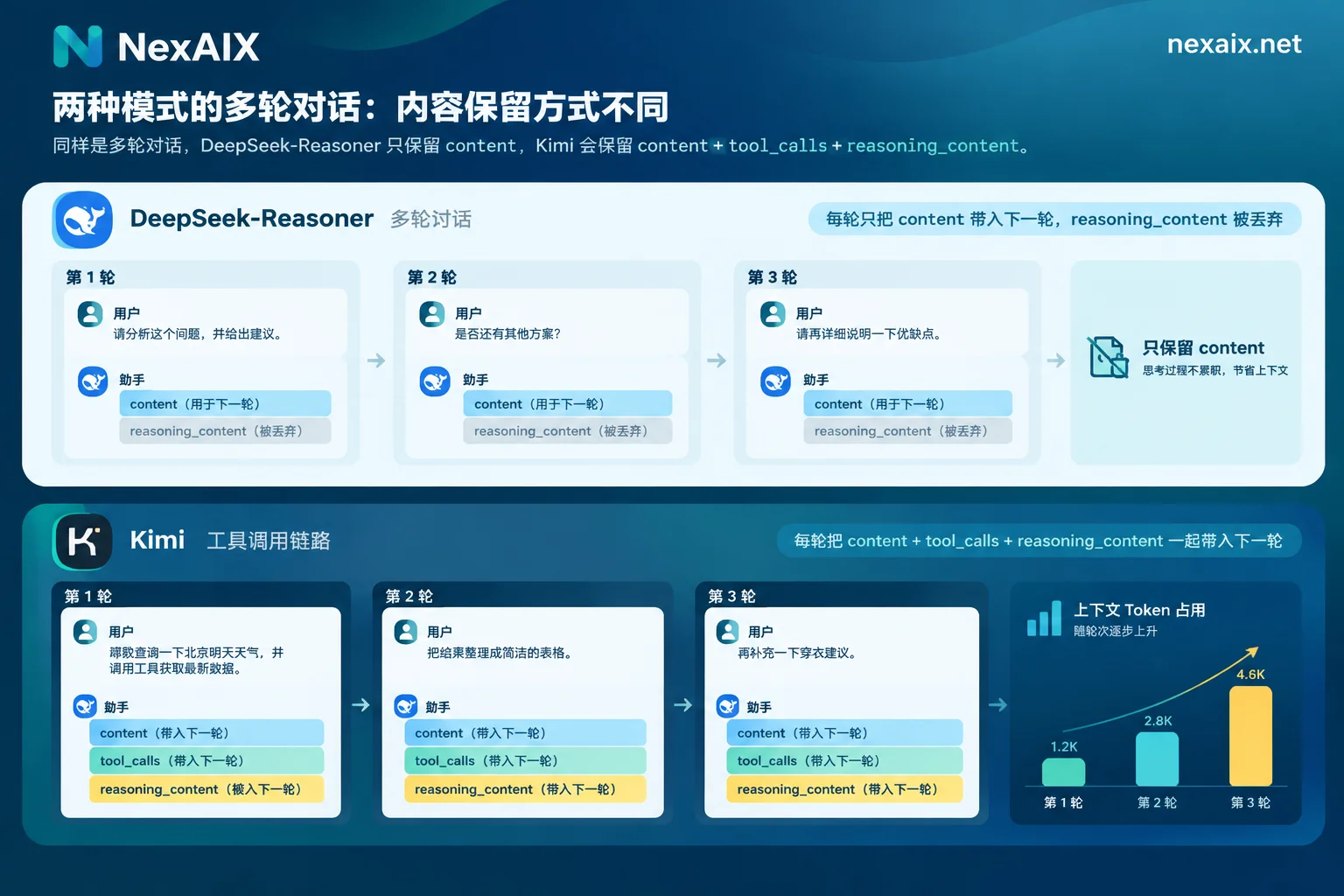
There are two practical impacts:
- When migrating from DeepSeek to Kimi for an agent, if you keep the "discard thinking content" approach, the coherence of multi-step tool calls may decrease.
- Conversely, if you always retain thinking content on Kimi, the context will grow faster than expected, making long conversations more likely to approach the window limit and increasing costs.
4. Sampling parameters do not take effect in thinking mode
In thinking mode, DeepSeek does not support or ignores temperature, presence_penalty, and frequency_penalty; top_p only takes effect between 0.95 and 1.0. Kimi's reasoning models also primarily use preset sampling strategies; for specific restrictions, refer to Kimi's documentation.
When migrating from a general conversation model to a reasoning model, if the original code relies on lowering temperature to stabilize output, this strategy likely no longer works. You need to control output in other ways, such as clearer prompts, structured output constraints, or program-side validation.
Choose by task
| Your task | Try first | Reason |
|---|---|---|
| Code generation, math and logical reasoning | DeepSeek | Mature pure-text reasoning, well-structured reasoning |
| Ultra-long pure text (contracts, logs, codebases) | Either, decide after testing window and cost | Both DeepSeek and Kimi have 1M-level options |
| Image or video understanding | Kimi (kimi-k3) | Native multimodal input |
| Agent with multi-step tool calls | Kimi, while watching context growth | Supports Preserved Thinking, strong tool closure |
| Specialized models for coding scenarios | Either | Kimi has kimi-k2.7-code; DeepSeek is also strong in code reasoning |
The table is only a starting suggestion. The final choice should be made after running your own 20 to 50 real samples for comparison.
Use the same code to access both providers
Both are compatible with the OpenAI SDK. When switching, you usually change three things: base_url, api_key, and model. The only part that needs separate code is the logic for assembling historical messages:
from openai import OpenAI

client = OpenAI(base_url=BASE_URL, api_key=API_KEY)

def append_assistant(history, msg, keep_reasoning: bool):
    item = {"role": "assistant", "content": msg.content}
    if getattr(msg, "tool_calls", None):
        item["tool_calls"] = msg.tool_calls
    # Kimi 多步推理/工具调用:保留思考内容;DeepSeek-Reasoner:不回传
    rc = getattr(msg, "reasoning_content", None)
    if keep_reasoning and rc:
        item["reasoning_content"] = rc
    history.append(item)

resp = client.chat.completions.create(
    model=MODEL,
    messages=history,
    reasoning_effort="high",
)
append_assistant(history, resp.choices[0].message,
                 keep_reasoning=MODEL.startswith("kimi"))
It is recommended to make keep_reasoning a per-model configuration switch rather than hardcoding it in the code. When you change models or adjust strategies later, you only need to modify the configuration.
If you want to compare both providers with one endpoint and one set of code, you can replace base_url with NexAIX's OpenAI-compatible endpoint https://api.nexaix.net/v1, and the rest of the code does not need to change. One thing worth noting when choosing models: for the same open-weight model, who deploys it and whether the context has been trimmed directly affects comparison results. Each NexAIX model page indicates the supply method: open-weight models are deployed on their own compute, closed-source models go through the vendor's official authorized channels, and it promises not to swap in smaller models, reduce precision, or cut context. You can see which DeepSeek and Kimi models are currently listed and their context specifications in the Model List. For A/B testing, create separate keys for the two experiment groups; each key's quota and usage billing are independent, so cost statistics won't be mixed up.
Verify these before going live
- Thinking deltas in streaming output: When
stream=True, howreasoning_contentappears in each chunk may be handled differently by different client versions. Especially for Kimi, run a test with the SDK version you actually use to confirm that SSE parsing can separate thinking content from the main text. For parsing details, refer to How to Integrate Streaming Output API. - Token growth curve: After enabling Preserved Thinking on Kimi, run a real conversation of more than 10 turns and record
prompt_tokensfor each turn to confirm that truncation or summarization strategies are already in place before reaching the window limit. - Whether sampling parameters take effect: In reasoning mode, change parameters such as
temperatureand compare outputs. If there is no change, these parameters are being ignored and should be removed from the configuration to avoid misleading future maintainers. - Actual context length: Use input close to the nominal limit to do a "bury information at the beginning and ask at the end" test to confirm that the actual usable context length matches the claim.
- Latency: There is currently a lack of public horizontal data on first-token latency under high concurrency for both providers, so you need to test with your own concurrency level.
For more detailed parameter settings for individual models, continue to Kimi K3 API Integration Guide. For how to verify tool calls in agent scenarios, see How to Integrate Agent API.




Comments(0)