 NexAIX-官方博客
If you already have an application running on the OpenAI protocol, switching to GPT-5.6 Terra requires very little code change—modify model, change base_url, and prompts and function definitions stay mostly untouched. What actually takes time are three things: whether this task should use Terra at all, which level to set for reasoning.effort, and how to confirm after launch that you're really getting Terra and not a smaller model swapped in quietly.
First, decide: is this task a fit for Terra?
GPT-5.6 is OpenAI's generation released in July 2026, split into three tiers: Sol, Terra, and Luna. Terra sits in the middle, positioned officially as the workhorse for production environments: task execution capability on par with or better than the previous GPT-5.5, but it consumes noticeably fewer tokens on average to complete the same task, bringing overall cost down to roughly half of the prior generation.
A rough judgment by task type:
- Multi-step agent workflows, code generation and modification, extracting structured fields from unstructured text — this is Terra's home turf. These tasks demand more than chit-chat but don't warrant the flagship model every time.
- Intent classification, short Q&A, log tagging, batch summarization — high call volume, low per-call difficulty, Luna's tier fits better; save Terra's budget for steps that truly need reasoning.
- Extremely hard math proofs, large-scale codebase refactoring plans, research tasks needing the strongest reasoning chains — if Terra still makes stable errors at
highand above, then consider Sol, rather than defaulting to Sol first.
For a side-by-side comparison and trade-offs among the three tiers, I previously wrote GPT-5.6 API Integration: Sol, Terra, Luna Selection and Reasoning Parameter Configuration; I won't repeat it here.
A few specs that directly affect your architecture design:
- Model identifier
gpt-5.6-terra - Context window 1,050,000 tokens (about 1M)
- Max output per request 128,000 tokens
- Input supports text and images
- Knowledge cutoff February 16, 2026
The last point is easily overlooked: for library versions, API changes, pricing policies, personnel, and regulations after that date, the model doesn't know, so you must inject via retrieval or tool calls; otherwise it will confidently answer wrong using pre-cutoff knowledge.
Migration: changes concentrated in two lines
Terra supports the standard Chat Completions protocol and also the Responses API. Migrating from the official API to an OpenAI-compatible endpoint like NexAIX means changing the client initialization part:
from openai import OpenAI

client = OpenAI(
    api_key="你的 Key",
    base_url="https://api.nexaix.net/v1",   # 改这行
)

resp = client.chat.completions.create(
    model="gpt-5.6-terra",                   # 和这行
    messages=[{"role": "user", "content": "..."}],
    stream=True,
)
Same for Node, new OpenAI({ baseURL, apiKey }); LangChain, LlamaIndex, Cline, and various clients generally have a corresponding base URL configuration—just fill in the same address. Tool definitions (tools / function_call), response_format, and messages structures don't need rewriting—that's the point of a compatible endpoint.
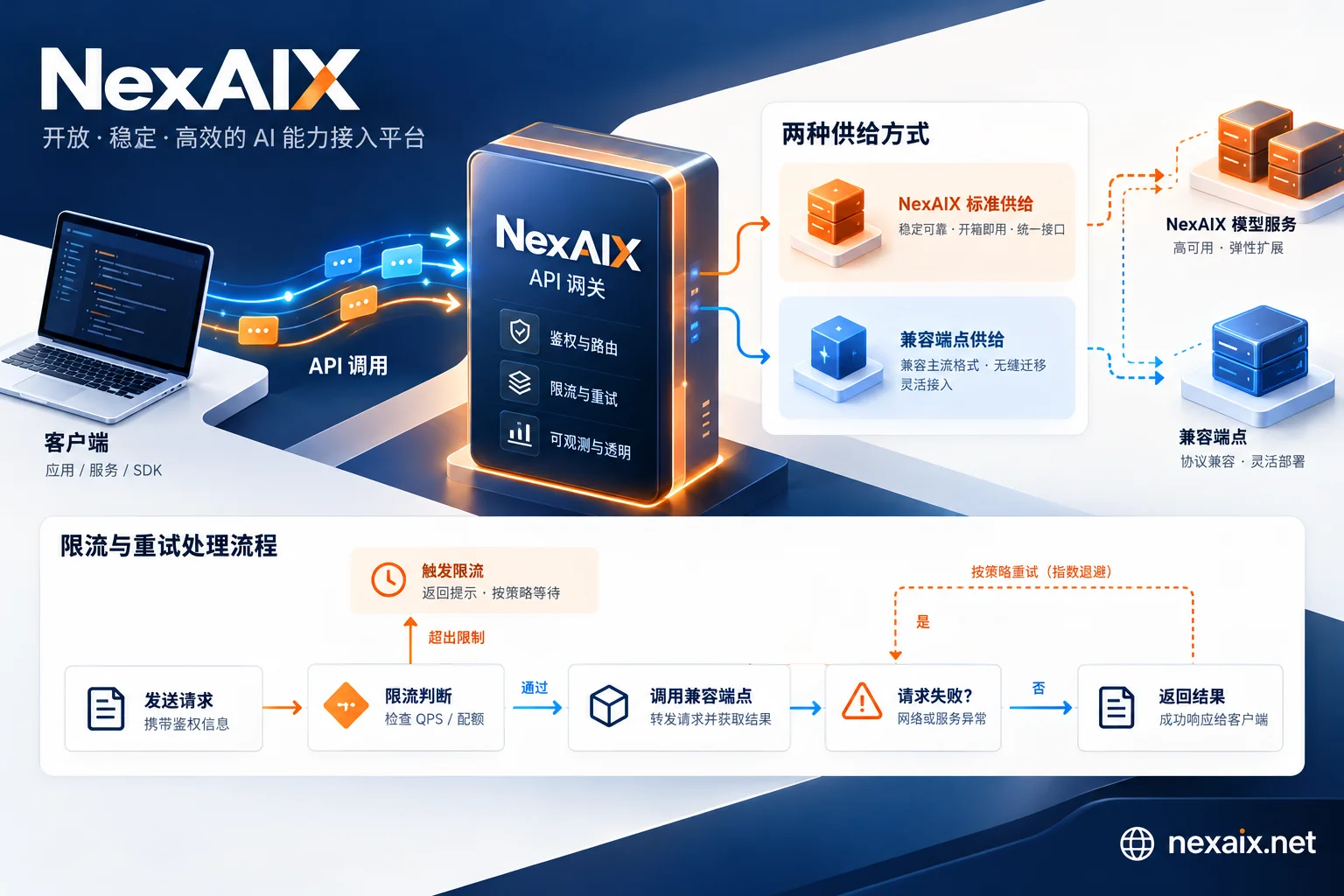
Before choosing a model, it's worth confirming one thing: how the model you're calling is supplied. NexAIX has only two modes—open-weight models deployed on its own compute cluster, and closed-source models through official vendor-authorized channels. Each model page states which one it is; gpt-5.6-terra belongs to the latter. To see the current available model list and each one's supply mode, context, and quotas, go to the model page; access docs and key acquisition are in the site navigation. Model lists and specs change with vendor updates, so refer to the official page.
reasoning.effort: how to choose from six levels, and the cost
Terra supports tiered reasoning control, with values none, low, medium (default), high, xhigh, max.
{
  "model": "gpt-5.6-terra",
  "reasoning": { "effort": "high" },
  "messages": [...]
}
The choice isn't based on "how important the task is," but on how many steps this task needs to get right, and who bears the cost of getting it wrong:
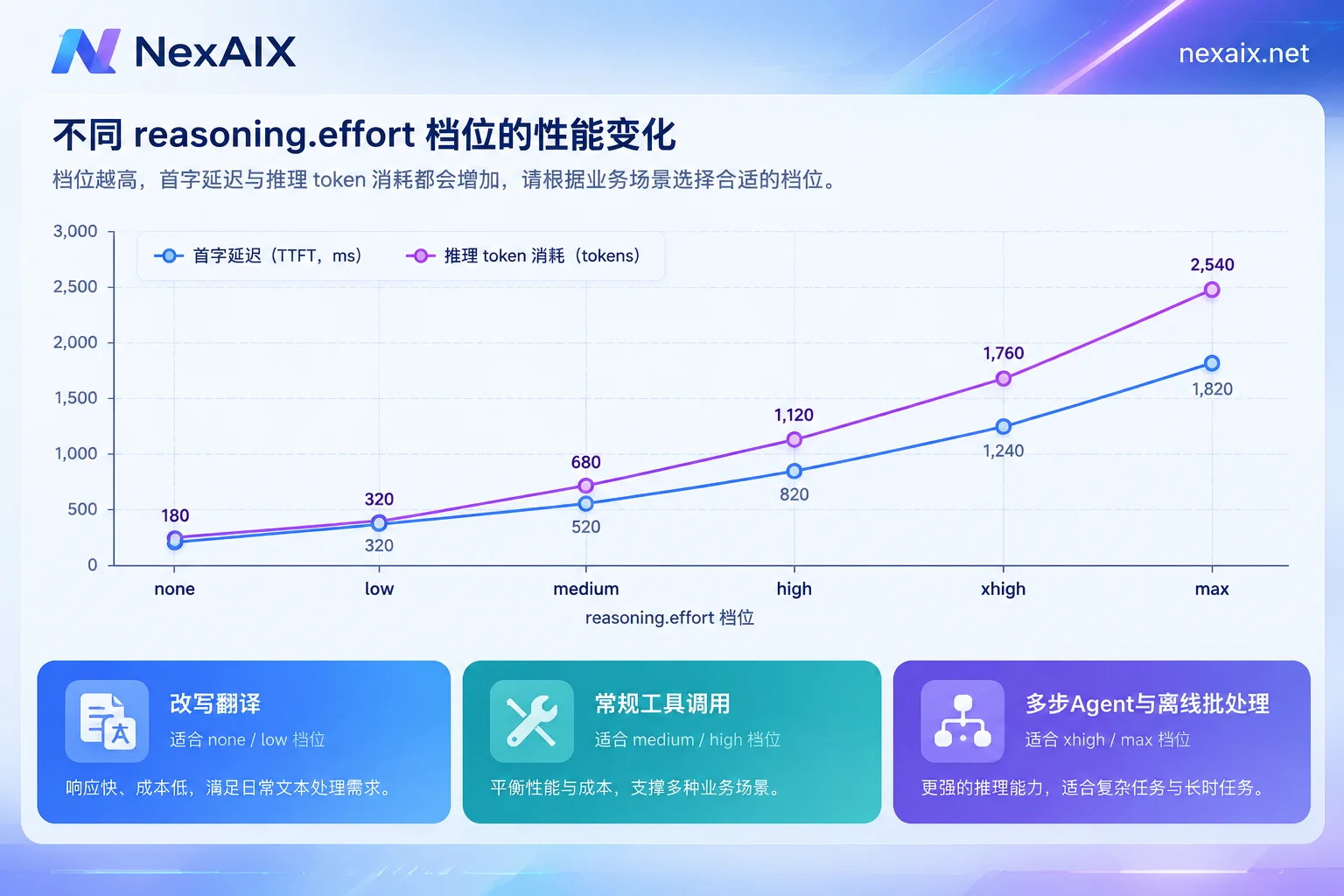
none/low: rewriting, translation, format conversion, single-turn Q&A. The answer is basically determined by the input; more thinking doesn't help.medium(default): routine tool calls, medium-complexity code completion, field extraction. Most online traffic stops at this level.highand above: agents needing multi-step planning, cross-file code changes, structured extraction with implicit constraints. medium and above show clear improvements on these types.xhigh/max: reserve for offline batch processing, evaluation regression, and critical decisions where manual fallback is costly—not suitable for synchronous interactive paths.
There are two costs, both hitting production metrics. First, reasoning tokens generated in the reasoning phase count toward output-side consumption, so the higher the level, the bigger the bill. Second, time to first token (TTFT) is stretched—the model may think for a long time before producing the first visible token. If your frontend has a "report error if no response in 3 seconds" logic, or your gateway sets a short read timeout, high levels will produce many failures that look like timeouts but the model is actually still working.
The pragmatic approach is routing: within the same application, send simple and complex requests with different efforts rather than setting one global value.
Engineering around long context and 128k output
A million-token window doesn't mean you should fill it. Dumping an 800k-token document in wholesale will send latency and cost out of control, and the model's recall of mid-section information isn't necessarily better than retrieving first and feeding snippets. The reasonable order remains: retrieve if you can, expand the window if retrieval is inaccurate, and only then consider stuffing everything in.
The 128k output side is where you really need to change configuration:
Enable streaming. With non-streaming requests, a long output may take minutes to return the full response body; any gateway layer in between (Nginx, Cloudflare, cloud load balancer) hitting its read timeout will cut the connection, and the tokens are already consumed. stream: true keeps data flowing continuously, and increase Nginx's proxy_read_timeout and the SDK's timeout accordingly. For specifics on SSE parsing and proxy-layer stalls, see How to Integrate Streaming Output APIs.
Explicitly set max_output_tokens and check finish_reason. Not setting a limit means an unexpected long output could burn tens of times the expected quota. Once set, the client must check finish_reason == "length" and trigger continuation or notify the user, rather than passing a truncated half-JSON directly to downstream parsing.
Leverage prompt caching. Multi-turn conversations and agent state maintenance repeatedly send the same system prompts and tool definitions. Keep these stable contents fixed at the front of the message sequence, and don't insert variable fields in between—only then does cache hit rate go up, and both repeated billing for long prompts and TTFT drop.
Watch the combined effect of reasoning level and streaming. At high effort, after streaming starts there may be a long period with only heartbeats and no content tokens. The client's "no data timeout" must be set for the worst case, not the average.
Four verifications: confirm the model isn't downgraded
The three things most to guard against with third-party endpoints are swapping to a smaller model, reducing precision, and cutting context. These can't be seen from a single response; you must actively test.
First, echo verification. Check whether the model field in each response matches the request. If you request gpt-5.6-terra but the echo is a different identifier, or simply an internal alias, ask exactly where it's routed. This layer only rules out the crudest substitution; passing doesn't mean there's no problem.
Second, long-context boundary test (NIAH). Construct inputs at the 200k and 500k token levels, plant a fact that can't be inferred (like a random code) at the beginning, middle, and near the end, then ask. If markers near the end or middle can't be recalled at all, while the input length should be within the window, it suggests context may be truncated early or compressed. Run this test once at initial integration, then spot-check monthly.
Third, reasoning token verification. For the same set of prompts, send with low and high/max separately, observe whether the reasoning token count in the returned usage rises noticeably with the level, and whether answer quality on complex logic questions improves correspondingly. If higher levels neither spend more reasoning tokens nor change answers, the effort parameter may not be truly passed upstream.
Fourth, fixed regression set. Pick 20–50 samples covering your actual business, record the output and usage baseline at initial integration, then rerun periodically for comparison. Randomness in single outputs can't hide systematic downgrading; overall shifts across many samples will expose it.
NexAIX's public commitments are written against these items: no swapping to smaller models, no precision reduction, no context cutting, no recording of conversation content (released at request end), public quotas and rate limits, and independent isolation of quotas, permissions, and usage billing by API key. Commitments themselves can't replace verification; the corresponding self-check methods are listed on the platform advantages page. It's advisable to run through them before switching traffic over. For a more general risk checklist for relay endpoints, see Three Major Engineering Risks in Selecting API Relay Stations.
Two more things to handle before launch
First, rate limiting. Terra's long requests occupy time for a while; at the same RPM, concurrency pressure is completely different from short requests. Before integration, calculate from the public quotas and rate limits whether your peak can pass. For interpreting 429 headers and backoff strategies, see How to Handle AI API Rate Limiting.
Second, retry boundaries. When a long streaming output request disconnects midway, blindly retrying the whole thing will spend the already-generated tokens again; which errors to retry, and how to continue after a stream interruption, are covered in How to Design AI API Retries.
Before actually going live, use test credits to run the above verifications—registration gives you credits, no enterprise qualification needed. Keep records of the NIAH, reasoning level comparison, and regression set results; for any future suspicion that "the model seems dumber," you'll have a baseline to compare against.



Comments(0)