 NexAIX-官方博客
Making the decision to migrate to OpenAI's Responses API can be narrowed down to five conditions: request entry, message & state, tool calling, streaming events, and errors & usage. These five areas show the most significant differences between the two protocol forms and are the primary sources of refactoring effort and risk. According to OpenAI's official migration guide (updated August 2026), the Responses API is positioned as an evolution for Agent and multimodal scenarios, but Chat Completions remains supported with no deprecation timeline. Microsoft Azure OpenAI updated its Responses integration specs on August 18, 2026, and DeepSeek-V4-Pro also added native support in late August, confirming that protocol duality is now a reality. This article walks through these five conditions and offers a conservative migration path.
Conclusion First: When to Migrate and When to Stick with Chat Completions
Deciding whether to follow OpenAI's API migration isn't about which protocol is more advanced; it's about whether your business matches the built-in capabilities of Responses. Projects that require multi-step agentic tool loops, server-side session management, and built-in tools (web search, file search, computer use) are worth migrating, while pure single-turn Q&A, seamless switching across multiple providers, and audit replay or caching chains are better served by continuing with Chat Completions. OpenAI has explicitly stated that Chat Completions remains supported with no deprecation timeline, so migration isn't a forced upgrade but an engineering decision based on your scenario.
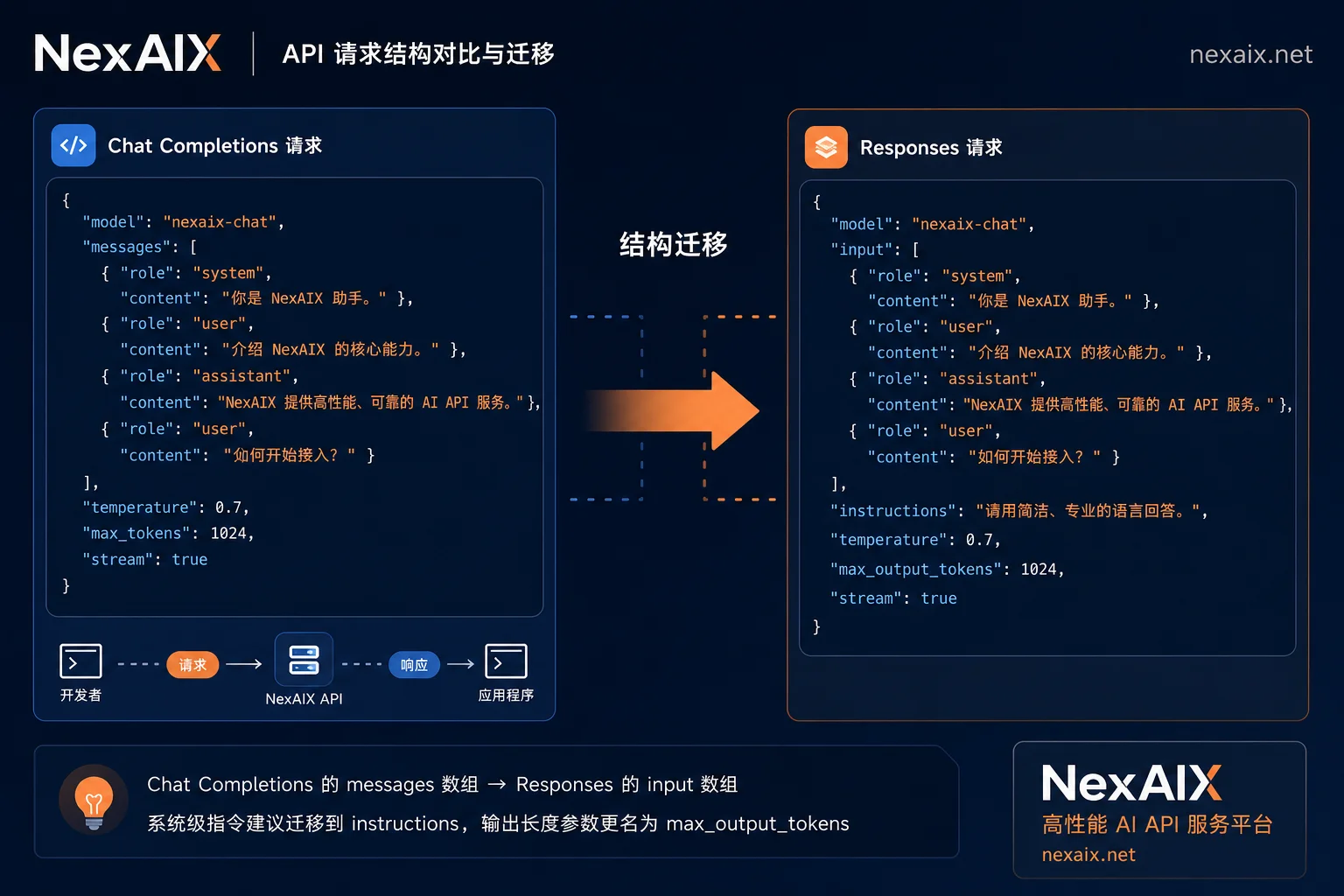
Difference 1: Request Endpoint and Input Fields—The First Lines to Change in OpenAI API Migration
The endpoint changes from /v1/chat/completions to /v1/responses, the most obvious change in migration. On input parameters, the messages array is replaced by the input field; input can accept a single string or a structured list of items; and system-level instructions are split into a separate instructions field. These three areas are where entry-layer changes are most concentrated. It's recommended to keep the function signatures unchanged and only change the construction logic, encapsulating the messages assembly and instructions extraction in an adapter layer. Note: any field not verified in OpenAI's official documentation should be marked for verification; don't guess based on experience.
| Comparison Item | Chat Completions | Responses API |
|---|---|---|
| Endpoint | POST /v1/chat/completions | POST /v1/responses |
| Message Input | messages array | input string or items list |
| System Instructions | system role in messages | separate instructions field |
| State Management | Stateless, client sends full state | Server-side store with previous_response_id |
| Streaming Events | choices.delta | SSE typed event stream |
Difference 2: Multi-turn History—Client Assembly or Server Continuation
The Responses API natively supports server-side session state persistence through store: true and previous_response_id, automatically continuing history without resending full messages each turn. This reduces request body size for long conversations. However, stateless full submissions are better for reproducibility, auditability, and cache control. Migration recommendation: start by keeping client-side assembly, then try server-side state for specific scenarios. If you need to replay requests for audit or caching, continue with full submissions.
Difference 3: Mapping Tool Call Declarations and Result Feedback
The Responses API has a built-in agentic loop, supporting web search, file search, computer use, and custom function calls in a single request. In contrast, Chat Completions requires a hand-written tool loop. For teams with existing tool loops on Chat Completions, the migration requires normalizing both tool result structures in the adapter layer into a unified internal data model. Specifically, define an internal tool call/result abstraction with separate mappings for Chat Completions and Responses, so the business layer doesn't depend on either proprietary form. If your primary scenario is only custom functions, the minimal change is to stay with Chat Completions, avoiding unnecessary migration.
Difference 4: Streaming Changes from Delta to Event Stream—How to Modify Consumer Code
The Responses API streaming output shifts from Chat Completions' flat choices[0].delta structure to a typed SSE event stream. The client must listen to response.created, response.output_item.added, response.output_text.delta, response.output_text.done, and response.completed events. The consumer should change from “concatenating strings” to “dispatching by event type.” It's recommended to unify both streams into an internal token-stream event, with unknown event types ignored for fault tolerance. Refer to official documentation for exact event names; these need verification.
Difference 5: Error Body and Usage Semantics—Will Billing and Monitoring Align?
During migration, verify the error structure and usage field naming semantics. If the two sides differ, billing statistics and alert dashboards will break. It's recommended to double-write statistics for the same requests before and after migration, comparing fields field-by-field. Specific field names should be based on official documentation; this article does not fabricate them. A 404 response from the Responses API often means the endpoint path hasn't been updated or the provider hasn't enabled that form. Distinguish between path errors and unavailable capabilities.
Conservative Migration Path: Abstract a Protocol Adapter to Coexist Both Forms
The safest OpenAI API migration path is not a full rewrite but abstracting a protocol adapter. The business layer only relies on internal message/tool/streaming abstractions, with two backend implementations (Chat Completions and Responses) selected via configuration switch. Refactoring steps: 1) Define internal protocol abstractions; 2) Implement a Chat Completions adapter (encapsulate existing code); 3) Implement a Responses adapter; 4) Set the config switch to default to Chat Completions; 5) Gradually migrate traffic to Responses with rollback capability. Don't reference any proprietary form directly in business code—this is key to maintaining flexibility.
What If a Provider Supports Only One Form: Capability Detection and Automatic Fallback
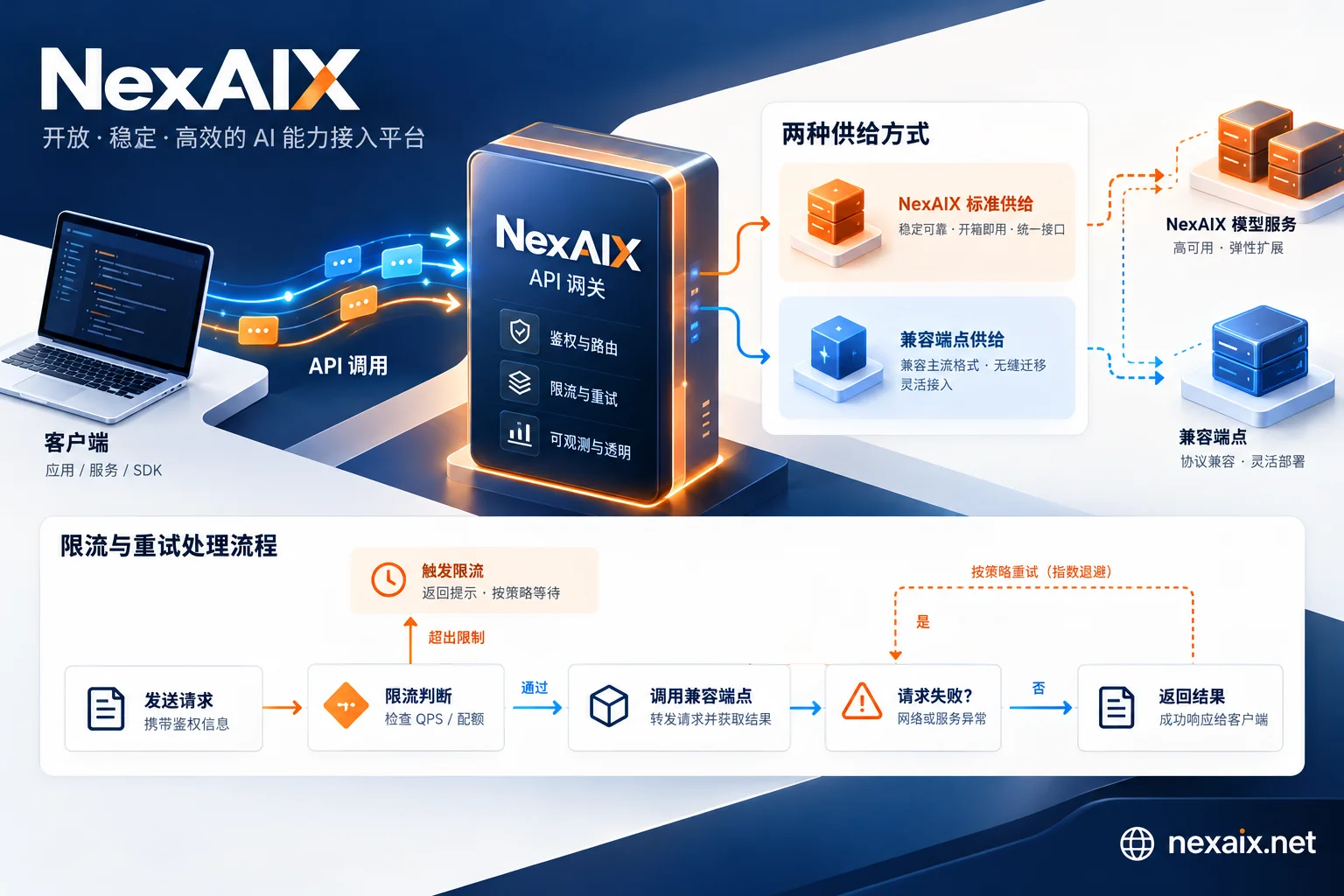
In the cross-provider ecosystem, Chat Completions remains the most compatible common denominator. Azure OpenAI and DeepSeek-V4-Pro have gradually added Responses support, but coverage varies. It's recommended to do a one-time capability probe at startup and automatically fall back to Chat Completions if unsupported. NexAIX provides an OpenAI Chat Completions-compatible interface (base_url https://api.nexaix.net/v1),支持流式输出、函数/工具调用与多轮对话,可作为多模型统一入口。这样协议试验只在适配层进行,主链路代码不动。返回体model字段对应实际执行模型;模型满载时返回标准429而非静默降级,便于迁移期做同一套回归eval。具体模型规格与可用性以NexAIX模型页和更新日志为准。如果你还在评估多模型接入,可参考OpenAI). For setup details, see [how to change base_url and how to send multi-turn conversations with OpenAI SDK.
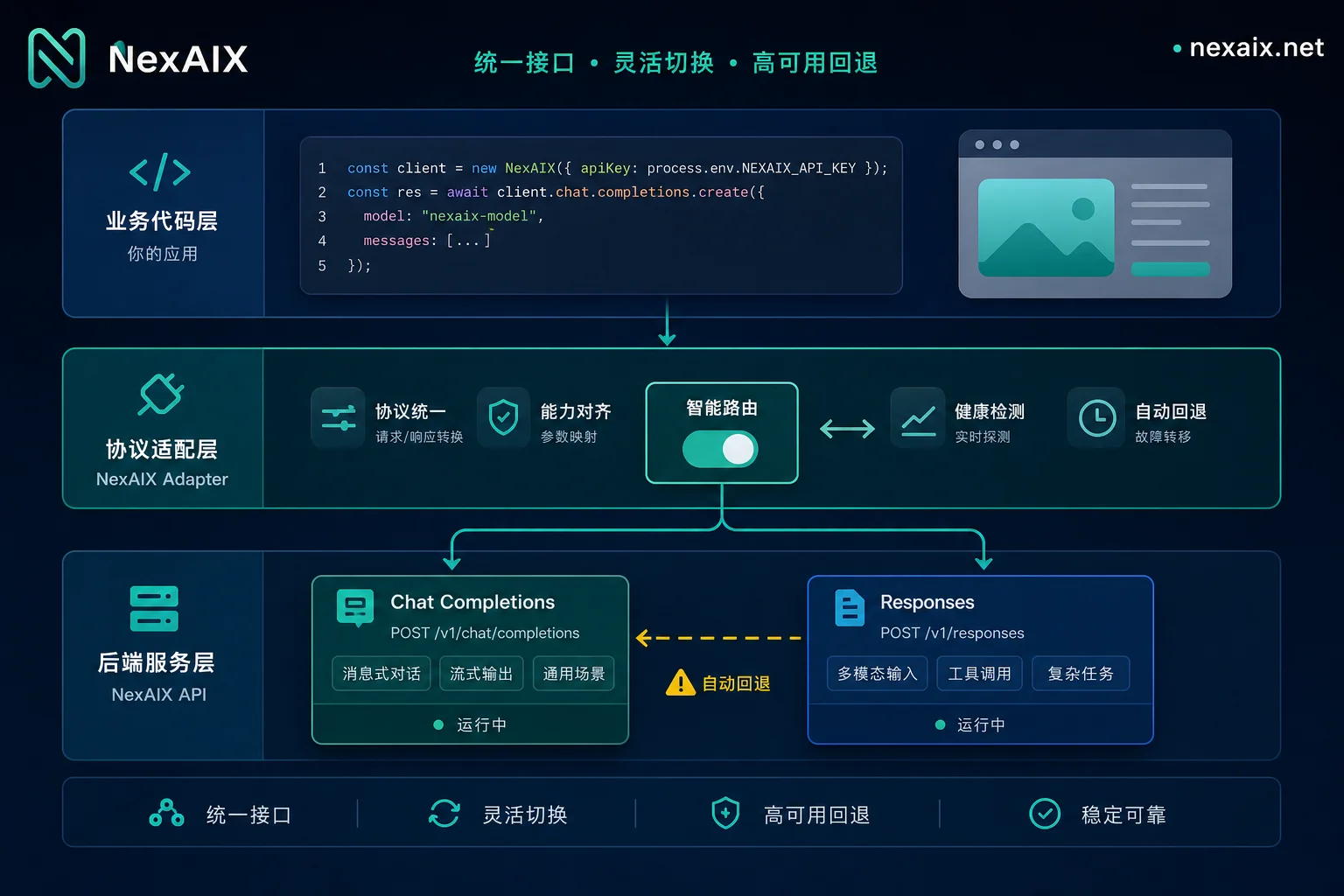
Post-Migration Regression Checklist: Tool Calling Chains, Long Context, Stream Interruptions, Timeouts, and Retries
After completing the adapter layer, run a regression checklist using a real production pipeline, and verify each item per the table below:
| Regression Item | Check Point | Acceptance Criteria |
|---|---|---|
| Multi-turn context consistency | Whether the conversation remembers prior context | Consistent with Chat Completions results |
| Tool call parameters and result structure | Parameter serialization and response parsing | No field loss in the internal model |
| Stream interruption and reconnection | No duplicate events after reconnection | State recoverable, no ordering issues |
| Timeout and 429 backoff | Proper rate-limit handling | No silent degradation, standard 429 |
| Usage statistics alignment | Compare field semantics via dual writes | Numeric values match or mapping is clear |
| model field check | Whether returned model matches expectations | Consistent with documentation |
Frequently Asked Questions
What fields need to change when migrating to the Responses API?
Mainly three: the endpoint from /v1/chat/completions to /v1/responses; the messages array replaced by input field (string or items); and system instructions moved to instructions. Other aspects like tools, streaming, and usage require additional adaptation; refer to official documentation.
What is the difference between Responses API and Chat Completions?
The core differences are in five areas: endpoint, input structure, state management (server-side store), tool loop (built-in agentic loop), and streaming events (typed SSE). Responses leans toward Agent scenarios, while Chat Completions is more general and stateless.
How do I send multi-turn history in the Responses API?
Two ways: pass all input (including history) as in Chat Completions, or enable store: true and use previous_response_id for continuation. The former is reproducible and auditable, the latter saves request size; choose based on scenario.
How do I parse streaming events in the Responses API?
Listen to SSE events: response.created, response.output_item.added, response.output_text.delta, response.output_text.done, response.completed, and dispatch by event type—don't treat events as plain text.
How do I write tool calls in the Responses API?
Declare tool definitions in input; Responses automatically executes the tool loop. For custom functions, the adapter layer must map results back to the internal model. If you have an existing Chat Completions tool loop, you can postpone migration.
Why do I get a 404 when calling the Responses API?
Usually three reasons: the endpoint path still uses /v1/chat/completions, the provider doesn't support Responses, or account permissions are insufficient. First verify the request URL and provider documentation.
Does the usage field remain the same after migrating to Responses?
Not necessarily—field naming and semantics may change. It's recommended to double-write statistics before and after migration and compare fields. For unverified fields, rely on official documentation.


Comments(0)