 NexAIX-官方博客
Many assume that calculating the monthly cost of usage-based AI APIs only requires summing up input and output token counts, but budgets derived this way often miss the actual bill by a wide margin. The true monthly cost formula for usage-based AI APIs involves at least four dimensions: input cache miss, input cache hit, output, and the timing of calls—the first three determine the baseline unit price, while the fourth dimension can cause the final cost of the same batch of requests to differ by up to two times. Taking DeepSeek's V4 series time-tiered pricing, effective from August 16, 2026, 16:00 UTC, time windows have become a reality that must be included in calculations.
How to Read the Unit Price Table for Usage-Based AI APIs: How the Four Dimensions Combine
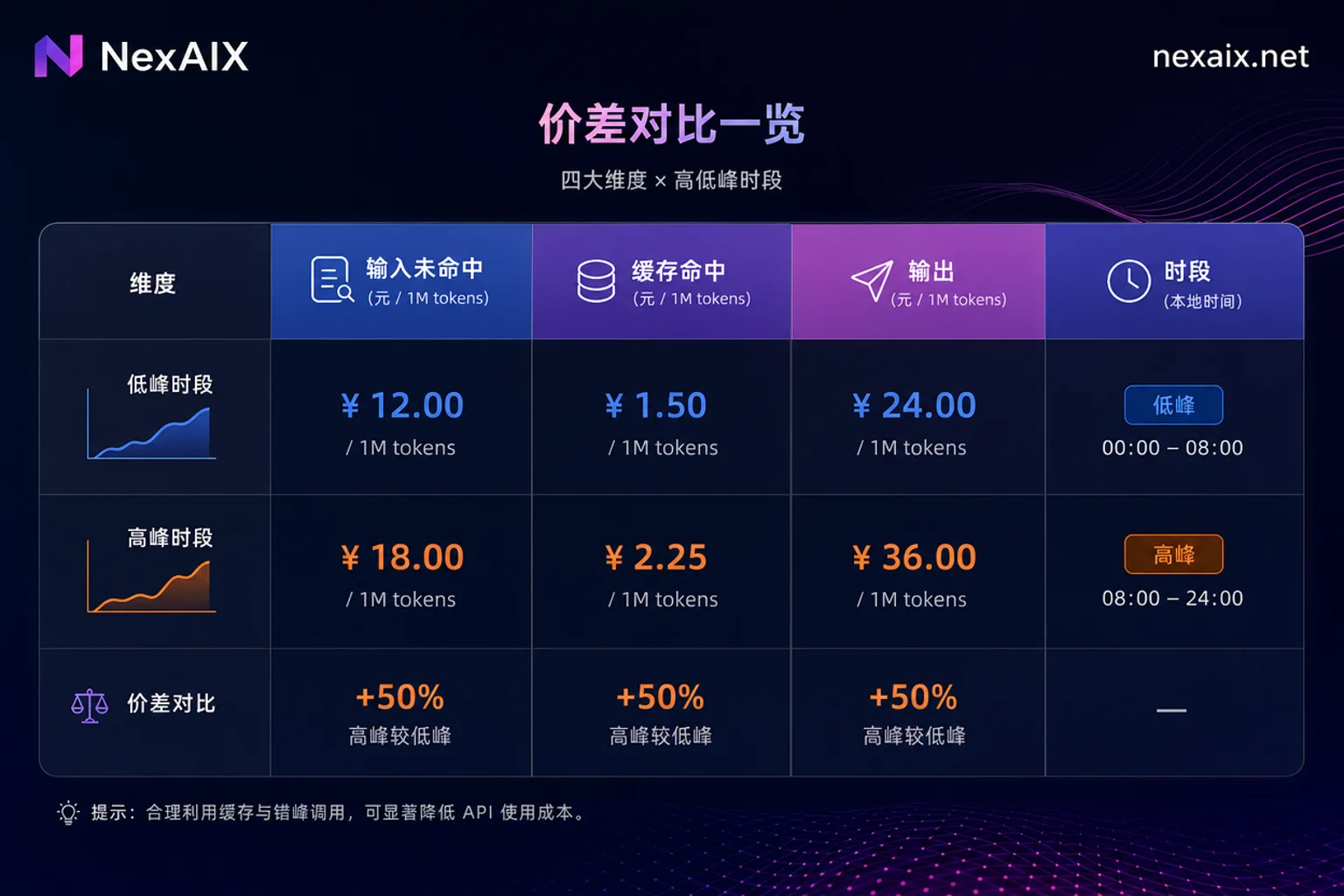
A pricing page for a usage-based AI API often contains not a single number but a four-dimensional matrix. Taking DeepSeek's official pricing as an example, you need to read four columns simultaneously: cache-miss input, cache-hit input, output, and their respective values during peak and off-peak hours. The unit price for cache hits vs. misses typically differs by an order of magnitude, while peak vs. off-peak prices differ by a factor of two; these are multiplicative, not alternative, factors.
Fill any vendor's pricing page into the following general template to get the per-request cost:
单位成本 = 输入未命中token数 × 未命中单价 + 输入命中token数 × 命中单价 + 输出token数 × 输出单价, multiplied by the corresponding time period coefficient.
A Magnitude Calculation Using DeepSeek-V4 Series Time-Tiered Pricing
On August 13, 2026, DeepSeek officially released V4-Pro GA and announced time-tiered billing rules: starting from August 16, 2026, 16:00 UTC, peak hours are 01:00-04:00 and 06:00-10:00 UTC (7 hours total), while the remaining 17 hours are off-peak. The above time periods and unit prices are from the DeepSeek API official pricing documentation (version 2026-08-14).
| Model | Time Period | Cache Miss Input ($/1M) | Output ($/1M) | Cache Hit Input ($/1M) |
|---|---|---|---|---|
| deepseek-v4-pro | Peak | 1.32 | 3.96 | 0.044 (estimated as off-peak ×2, official not listed, refer to pricing page) |
| deepseek-v4-pro | Off-peak | 0.66 | 1.98 | 0.022 |
| deepseek-v4-flash | Peak | 0.44 | 1.32 | 0.014 (estimated as off-peak ×2, official not listed, refer to pricing page) |
| deepseek-v4-flash | Off-peak | 0.22 | 0.66 | 0.007 |
Note: The official pricing documentation only publishes off-peak prices for cache hit (pro $0.022/1M, flash $0.007/1M); the peak hit prices in the table above are estimated examples as off-peak ×2, actual values should refer to the official pricing page.
Assume a team generates 100M input tokens (50% cache hit, 50% miss) and 50M output tokens per month, all using v4-pro. Compare three scheduling scenarios (these are example assumptions, not official data):
| Scheduling Scenario | Input Miss Cost | Cache Hit Cost (estimated as off-peak ×2) | Output Cost | Monthly Total |
|---|---|---|---|---|
| All during peak | $66 | $2.2 (estimated) | $198 | $266.2 |
| All during off-peak | $33 | $1.1 | $99 | $133.1 |
| Mixed (approximately 1/3 peak) | $44 | $1.47 (estimated) | $132 | $177.47 |
It is evident that by simply adjusting scheduling, you can save 30%-50% of costs. Here, it is necessary to clarify a propagation error: some media summarized this as "prices increased 3-4 times all day," but in reality, the increase is concentrated only in the UTC windows listed above; off-peak prices are 50% of peak, and cache hit discounts remain. Under these example assumptions, moving all schedulable requests from peak to off-peak gives a theoretical maximum savings of 50%; the actual savings percentage depends on the proportion of delayable requests in total call volume, and most production pipelines will be significantly below that maximum.
Classify Requests into Three Categories: Real-time, Delayable, and Batch
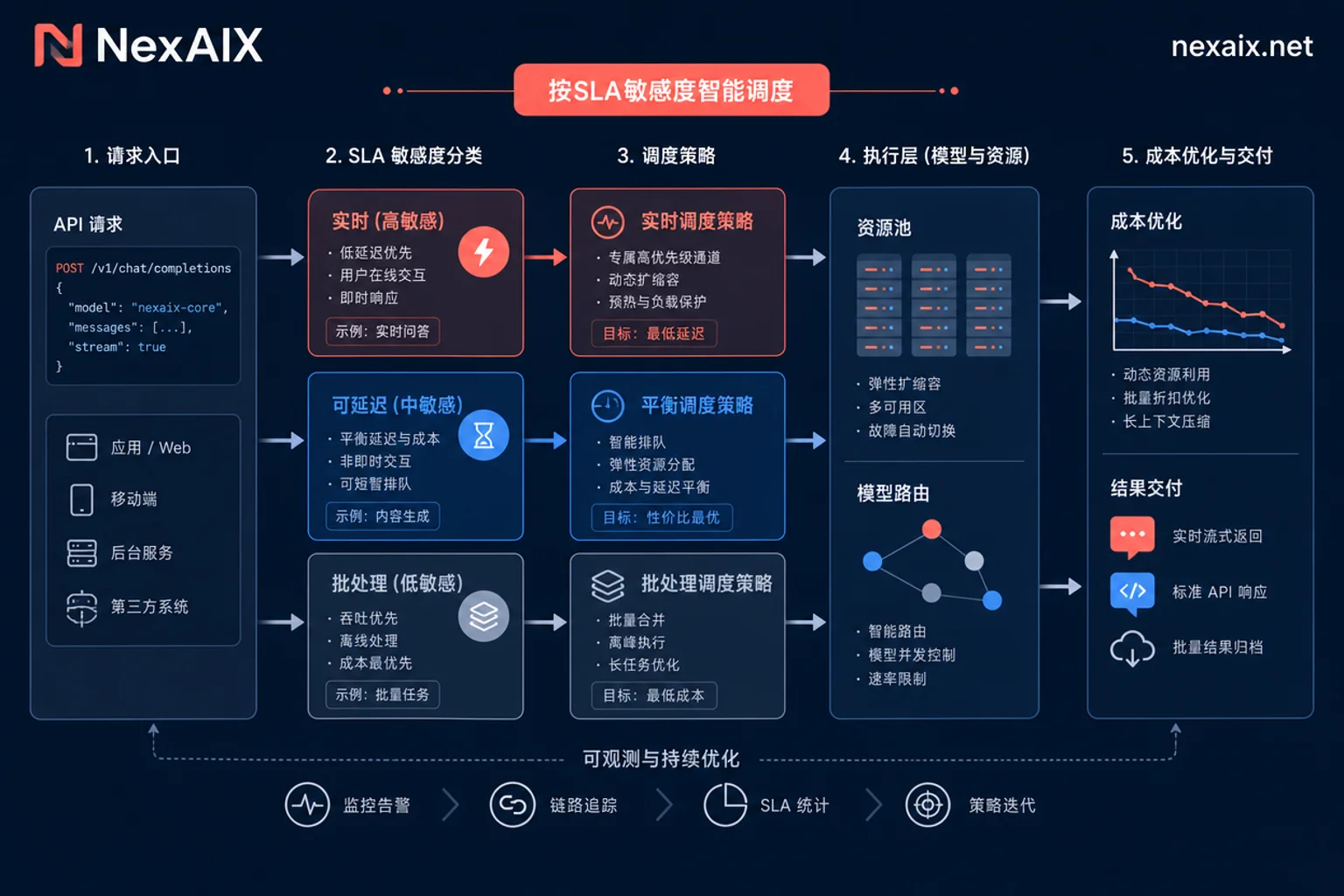
The scheduling benefits of usage-based AI APIs apply only to certain types of requests; first, layer them by SLA sensitivity:
- Real-time links: Users are waiting, must return synchronously, such as chatbots, code completion. Criterion: Is there a user waiting synchronously?
- Delayable links: Tolerable delays from minutes to hours, such as asynchronous summarization, offline annotation reruns. Criterion: Is there a contractual SLA?
- Batch links: Tolerable delays up to 24 hours, such as knowledge base vectorization, evaluation set regression. Criterion: Can the task be idempotently replayed?
Only the latter two categories are eligible for time scheduling. Batch links may also be eligible for additional vendor Batch API discounts (e.g., OpenAI offers a standard 50% discount with a 24-hour delivery window), which is an additional cost reduction opportunity. However, the 50% Batch discount requires a 24-hour delivery window and is parallel to the off-peak half price; they cannot be assumed to combine.
Time Zone Trap: Pricing Windows Defined in UTC, Business Peaks in Local Time Zones
The most common pitfall is that pricing windows are defined in UTC, while business load curves follow local time zones. DeepSeek's peak windows 01:00-04:00 and 06:00-10:00 UTC correspond to Beijing time 09:00-12:00 and 14:00-18:00—which happen to be business peaks for many domestic enterprises. If the scheduler uses the server's local time to determine pricing tiers, it is easy to place requests in the most expensive time slots.
Implementation recommendation: Uniformly use UTC timestamps to determine pricing tiers, not relying on the server's local time zone; for long tasks spanning windows, the request initiation time and billing attribution should be confirmed according to official standards, and in case of uncertainty, refer to official documentation.
How to Implement Delayable Links: Queues, Retry Budgets, and Deadline Constraints
In engineering implementation, when tasks are enqueued, they should include a deadline and pricing tier preference; the scheduler releases consumption during off-peak windows. Each task needs a retry budget, otherwise a single retry could push the task out of the off-peak window, making it more expensive. Asynchronous Batch channels have a 24-hour delivery constraint; if the queue accumulates too deeply, the hidden latency cost may offset the savings.
How Cache Hit Discounts and Time Period Discounts Stack
Conclusion: They take effect simultaneously. The official pricing documentation states that both cache hit billing and time period billing apply simultaneously. During off-peak, the unit price for cache hit input can be as low as $0.022/1M for v4-pro and $0.007/1M for v4-flash. In terms of optimization priority, frequently reused system prompts should first aim to improve cache hit rates, as the benefit is an order of magnitude; time scheduling is the second layer of benefit, about a factor of two. They do not conflict, but optimize cache first, then consider time scheduling.
When Should You Not Move Time Slots to Save Money
Real-time interactive links, critical jumps in Agent multi-turn tool calls, and external interfaces with contractual SLAs should not participate in scheduling. Concentrating requests into off-peak windows can increase concurrency, trigger rate limits and retry amplification, and the actual cost may not decrease. Also, factor in engineering complexity and on-call costs—if saving 30% of costs requires significant development and operational effort, it may not be worth it.
Switching Model Tier vs. Changing Call Time
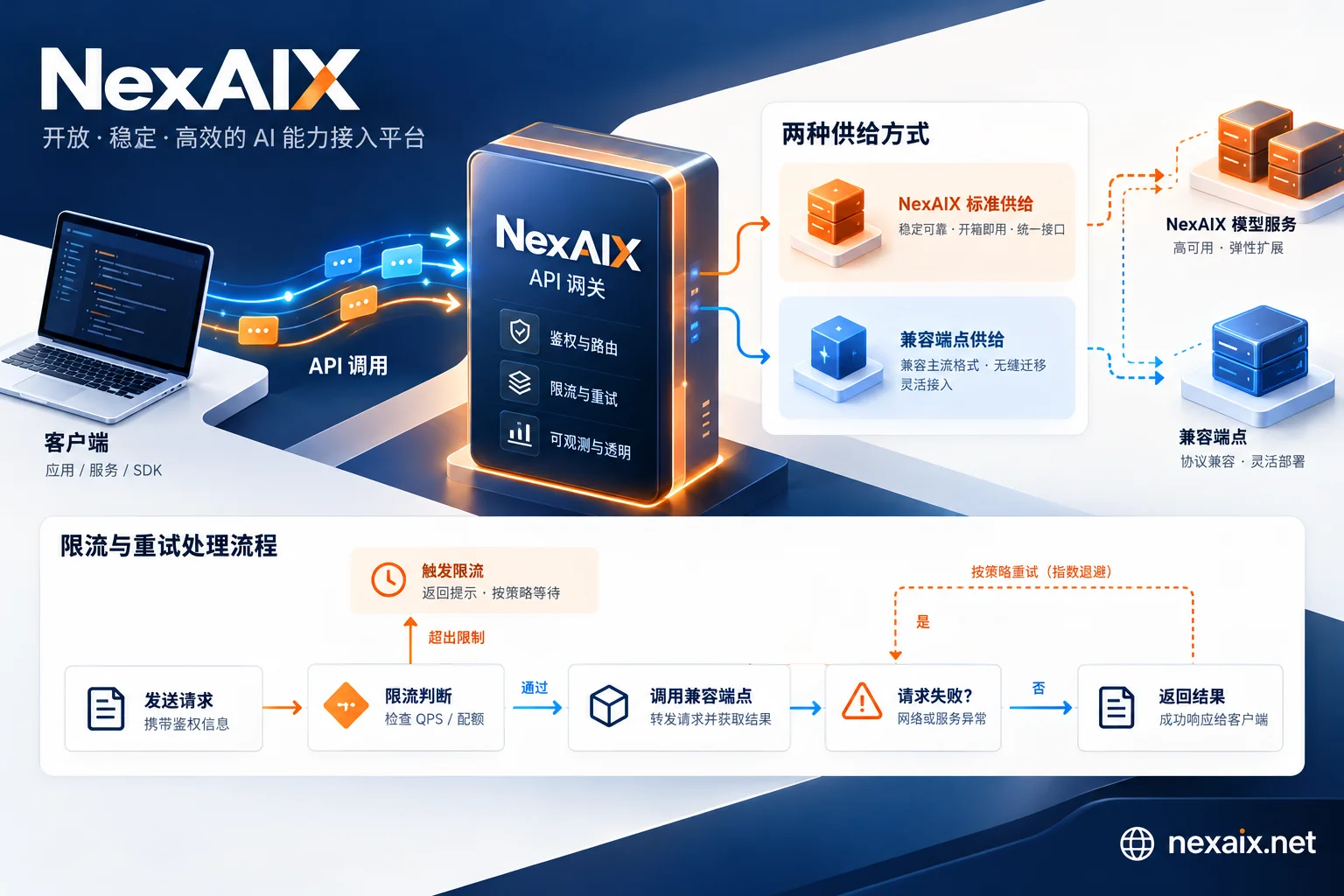
The two cost reduction paths apply to different scenarios: switching tiers (e.g., from v4-pro to v4-flash) changes the output quality ceiling and requires eval validation; changing time slots does not change quality, only delivery time. It is recommended to first use eval to confirm if a task can be downgraded, and if not, then consider moving time slots. To do cross-model time and cost comparisons, the prerequisite is that the same code can switch between multiple providers and models, such as the OpenAI Chat Completions compatible interface provided by NexAIX (base_url: https://api.nexaix.net/v1),可以用同一份 eval scripts to test across different tiers. AI API Pricing and AI API Cost Optimization can be further reading.
Usage-Based AI API Monthly Cost Recalculation Checklist: 8 Items to Verify This Week
The following 8 items are used to recalculate the monthly bill for usage-based AI APIs.
- Export usage details, bucketed by UTC hour.
- Verify the correspondence between request ID, model name, token count, timestamp, and billing entries.
- Confirm that the model field in the response body matches the expected model to prevent silent downgrades causing billing discrepancies. Verifying required fields depends on the billing metadata retained by the service provider; for example, NexAIX publicly only retains request ID, model name, token count, timestamp, and status code, which can be used to trace billing entries to specific call times; when overloaded, it returns standard 429 without silently switching models, and the model field in the response body matches the actual executing model.
- Mark cache hit rate to assess optimization potential.
- Identify the proportion of delayable links to estimate the schedulable range.
- Set call alerts for peak windows.
- Review retry amplification factor to avoid retries increasing costs.
- Document SLA and tier assignment for each link.
For issues where the bill and usage do not match, refer to AI API 429 to troubleshoot retries and rate limiting, and OpenAI Compatible API to understand model field consistency.
Frequently Asked Questions
How much is the price difference between peak and off-peak hours for DeepSeek API?
The output unit price during peak hours is twice that of off-peak. For example, v4-pro peak output is $3.96/1M, off-peak $1.98/1M; v4-flash peak is $1.32, off-peak $0.66. Input miss pricing is similarly halved during off-peak.
Are the time periods for time-based pricing defined in UTC or local time zones?
Defined in UTC. DeepSeek's peak windows are 01:00-04:00 and 06:00-10:00 UTC, corresponding to Beijing time 09:00-12:00 and 14:00-18:00. The scheduler must use UTC timestamps to determine pricing tiers to avoid misjudgment due to local time zones.
Can AI API calls be moved to run at night to save money?
Yes, but only effective for non-real-time links. Scheduling delayable tasks to off-peak windows (e.g., early morning Beijing time) can reduce the unit price to as low as half; the actual savings are limited by the proportion of schedulable requests.
Which model tier is more cost-effective for batch tasks?
If not sensitive to quality, prefer the flash tier; off-peak input is $0.22/1M, output $0.66/1M, about one-third the cost of pro. However, you should use eval to validate that output quality meets requirements.
How to verify when API bills and usage do not match?
Check each entry for request ID, model name, token count, and timestamp. Pay attention to confirm whether the model field in the response body matches expectations to prevent billing discrepancies due to silent downgrades; also investigate retry amplification causing extra consumption.
Can prompt cache discounts stack with time period discounts?
Yes. They take effect independently; off-peak cache hit input prices can be as low as $0.022/1M (pro) and $0.007/1M (flash). During optimization, first maximize cache hits, then consider time scheduling.


Comments(0)