 NexAIX-官方博客
On July 24, 2026, DeepSeek officially deprecated the two historical API aliases deepseek-chat and deepseek-reasoner; a week later, on July 31, the official DeepSeek-V4-Flash-0731 public beta was launched, with native support for the Responses API. For all teams that integrate production environments through the OpenAI-compatible API, this means the model parameter in the call chain must be updated synchronously, otherwise you will encounter 404 or Invalid Model errors. This article breaks down this change as a typical breaking upgrade, providing an executable OpenAI-compatible API migration path from fault location, configuration consolidation, interface form trade-offs, to regression verification.
Alias Retirement and 0731 Public Beta: Who Is Affected by This Change
First, the timeline: On July 24, the historical aliases deepseek-chat and deepseek-reasoner were officially removed from the DeepSeek API, and developers were required to replace them with deepseek-v4-flash and deepseek-v4-pro. On July 31, DeepSeek-V4-Flash-0731 public beta was launched, and the official announcement stated that it improved performance on Coding and Agent tasks, and supported both the Native Responses API and OpenAI Chat Completions dual protocols. The above timeline and capability information are based on the DeepSeek official API Change Log (2026-07-31) and the migration report from Developers Digest (2026-07-25). The factual scope of this article is as of July 2026, and pricing, context length, rate limits, and benchmark values are not provided in the text.
The most directly affected are three types of call paths:
- Code that uses the OpenAI SDK (e.g.,
openaiPython package) and hardcodesmodelin thedeepseek-chatparameter; - Task configurations in agent orchestration frameworks (such as LangChain, LlamaIndex, or self-developed frameworks) where
deepseek-reasoneris bound to the inference model; - Teams that rely on a unified gateway or relay layer (such as self-built One-API, Nginx proxy) to rewrite model names; if the gateway still maps to the old alias, it will also be interrupted.
Regardless of the path, the essence is that model string has become invalid, not that the call format is entirely incompatible. Below, we start from troubleshooting and complete the migration step by step.
Locate First, Then Act: Determine the Fault Layer from Error Codes and Response Bodies
When you receive an online alert, don't rush to change the code. Based on the type of error returned, quickly locate the fault layer:
- 404 / Invalid Model: Most likely, the
modelname has not been updated. For example, if you requestdeepseek-chat, the response body typically includes error type and error message fields; the specific field names and values should follow the DeepSeek official documentation (general engineering judgment). In this case, simply changemodeltodeepseek-v4-flash(ordeepseek-v4-pro), keepingbase_urlunchanged. - Behavior changes but request succeeds: If the original
deepseek-reasonerwas mapped todeepseek-v4-flashand reasoning parameters were not configured, the response may no longer include the thinking process. You need to explicitly set parameters such asreasoning_effort(specific values per official documentation) to enable the chain of thought. - Request format incompatibility: For example, sending Responses API-specific structures to the Chat Completions endpoint, or vice versa. Such issues generally return 4xx with a message indicating unrecognized request parameters; the specific wording depends on the actual response body.
A practical tip is to check the model field in the response body: the echoed string can directly confirm which model actually executed. This is more reliable than relying on request parameters in logs.
Step 1 Consolidation: Turn Hardcoded Model Strings into a Single Swappable Configuration
In most teams, model strings may be scattered in multiple places: specifying deepseek-v4-flash in business code, another deepseek-chat in the agent framework's tool call nodes, and old mappings hidden in the gateway configuration. This dispersion is a hidden bomb for migration.
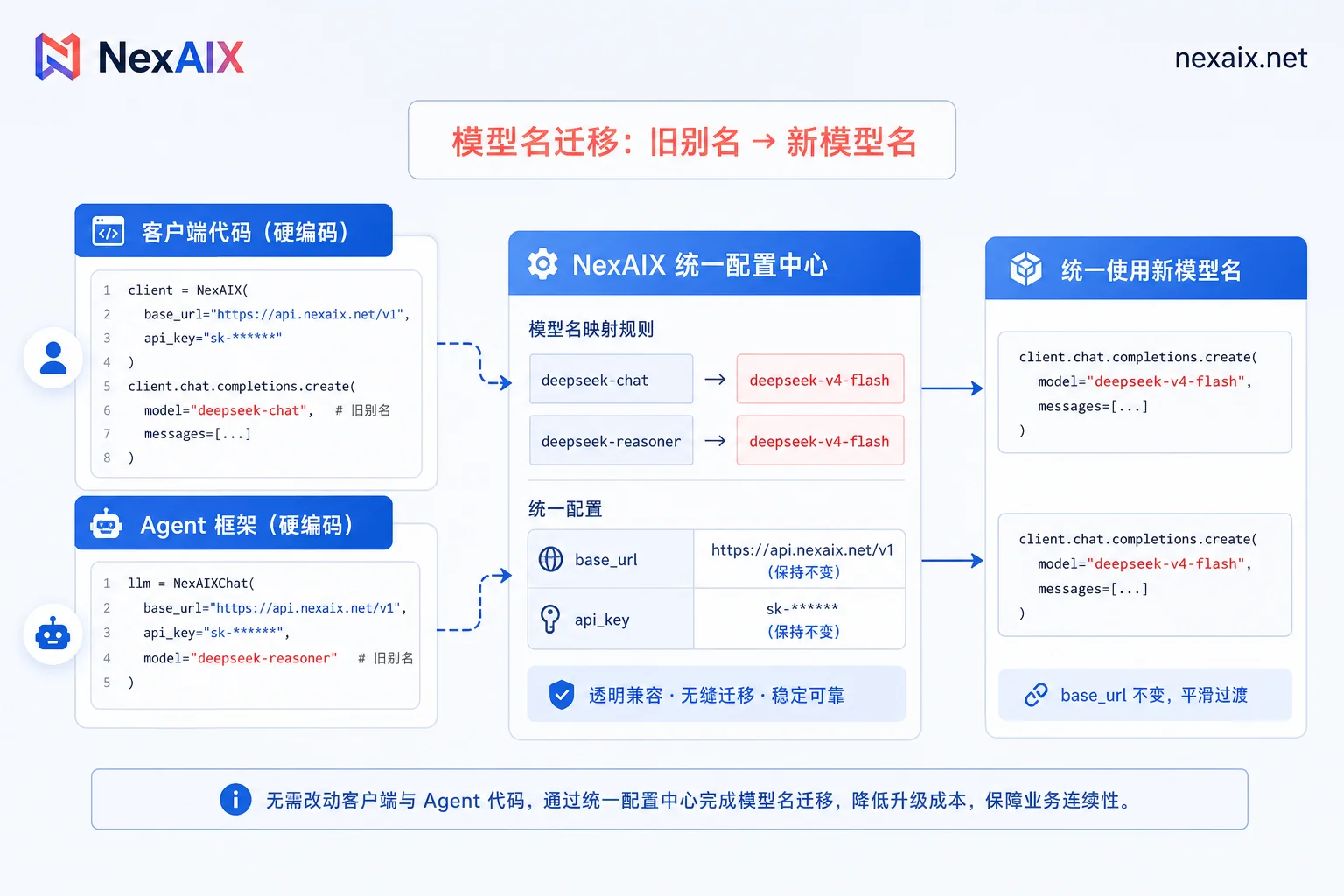
Consolidation is simple: replace all model names with a single variable read from environment variables or a configuration center, for example, DEEPSEEK_MODEL. In Python, with the OpenAI SDK, the usage is roughly as follows:
from openai import OpenAI
client = OpenAI(
    base_url=os.getenv("DEEPSEEK_BASE_URL", "https://api.deepseek.com"),  # 实际 base_url 以官方文档为准
    api_key=os.getenv("DEEPSEEK_API_KEY"),
)

response = client.chat.completions.create(
    model=os.getenv("DEEPSEEK_MODEL", "deepseek-v4-flash"),
    messages=[{"role": "user", "content": "Hello"}],
    stream=True,  # 根据需求开启流式
)
When such an alias retirement occurs, you only need to modify DEEPSEEK_MODEL in the configuration center, and all nodes depending on that variable will take effect synchronously.
Chat Completions vs. Native Responses API: Interface Form Trade-offs and a Conservative Migration Path
DeepSeek officially stated that V4-Flash-0731 natively supports the Responses API while also being compatible with OpenAI Chat Completions. Apart from this, the rest of this section is general engineering judgment. The two differ in message structure, streaming output, and how tool calls are organized.
- Chat Completions: Messages are an array of
messages, each containingroleandcontent; tool calls are declared via thetoolsparameter, and thetool_callsfield in the response triggers subsequent actions. - Responses API: Designed for more structured multi-turn and tool call state organization, the request body structure differs from Chat Completions; for specific field names, parameters, and limitations, refer to the official DeepSeek documentation. This article does not provide field-level comparisons.
It is recommended to take a conservative strategy: First use OpenAI Chat Completions to complete the model name migration and stabilize the online business, then separately evaluate switching to the Native Responses API in a separate branch. The reason: changing both model and the interface protocol simultaneously makes fault localization difficult—if something goes wrong, is it a model behavior change or a protocol mismatch? Migrating separately gives each phase a clear verification boundary.
Post-Migration Regression Checklist: Tool Calling, Long Context, Latency, and Cost Delta
After migration, you cannot just test a 'hello world'. The following regression items must use your own real traffic samples, not official examples. The thresholds in the table are example baselines, representing general engineering practice; replace them according to your own business tolerance, not as official recommendations.
| Regression Item | Acceptance Criteria | Rollback Trigger |
|---|---|---|
| Model name effectiveness | The model field in the response equals the configured value | Returns old model name or error |
| Tool calling success rate | No significant drop compared to pre-migration baseline | Success rate drops more than 5% or frequent parameter structure errors |
| Reasoning switch | reasoning_effort parameter works | Thinking process missing or not as expected |
| Long context handling | No degradation in truncation length and recall | Obvious truncation, loss of key information |
| P50/P95 latency | Increase within acceptable range compared to pre-migration | P95 timeout rate rises |
| 429 and retry behavior | Standard 429 response, normal backoff strategy | Silent request drops or infinite retries |
| Cost delta | No obvious anomaly in token consumption per task | Abnormal cost increase |
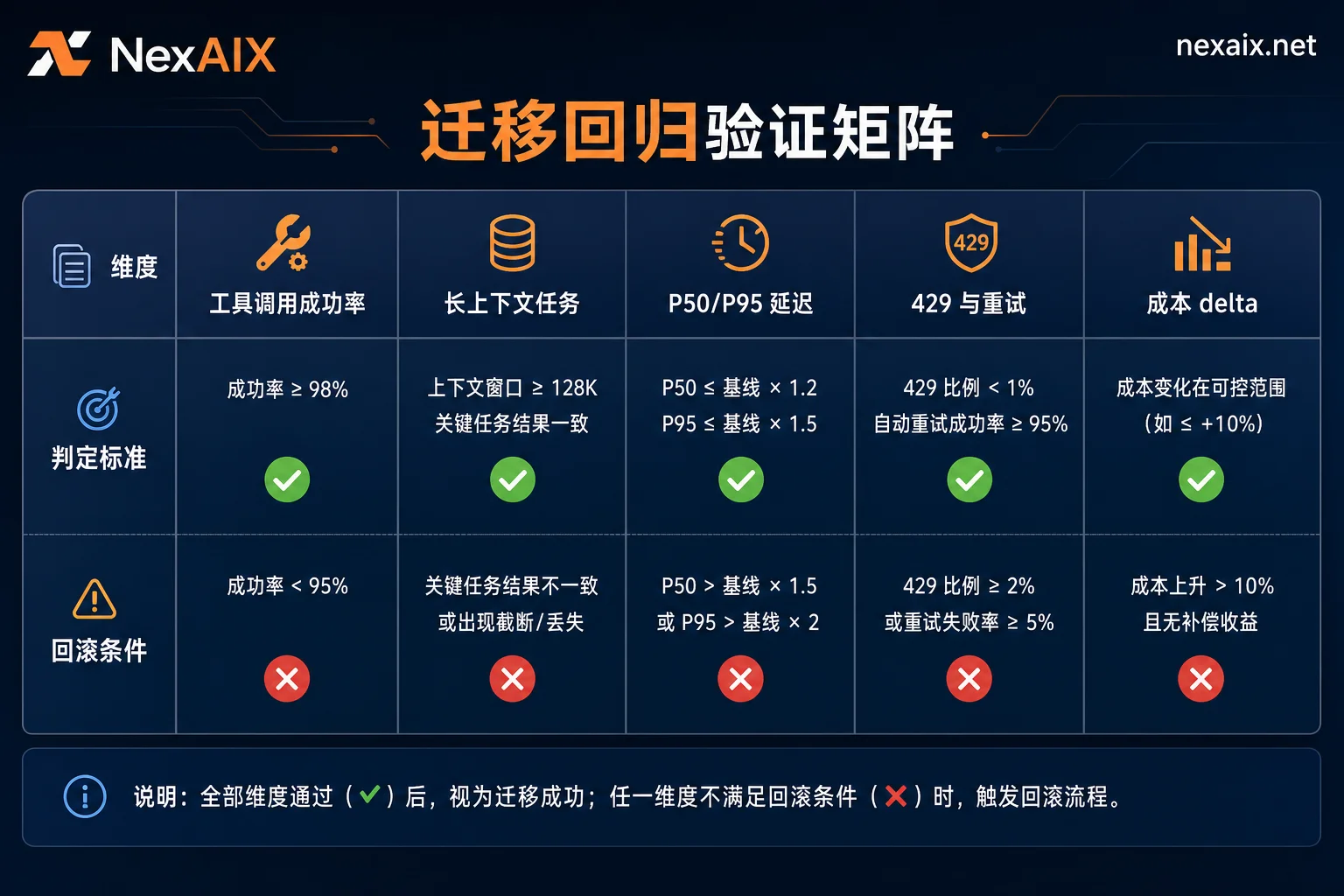
When running regression, pay attention to 429 responses: if the gateway silently switches to a cheaper or slower model under load, your latency and cost data will be distorted. Choose an integration method that can clearly echo the actual executed model, so the regression conclusions are trustworthy.
Using the Same OpenAI-Compatible API Code for Old/New Version A/B Evaluation
Once you consolidate the migration action into 'changing only one model parameter', comparing old and new versions becomes extremely easy: the same eval script only needs to switch the model value. This is also the practical benefit of retaining the OpenAI Chat Completions compatibility: mature ecosystem, reusable scripts.
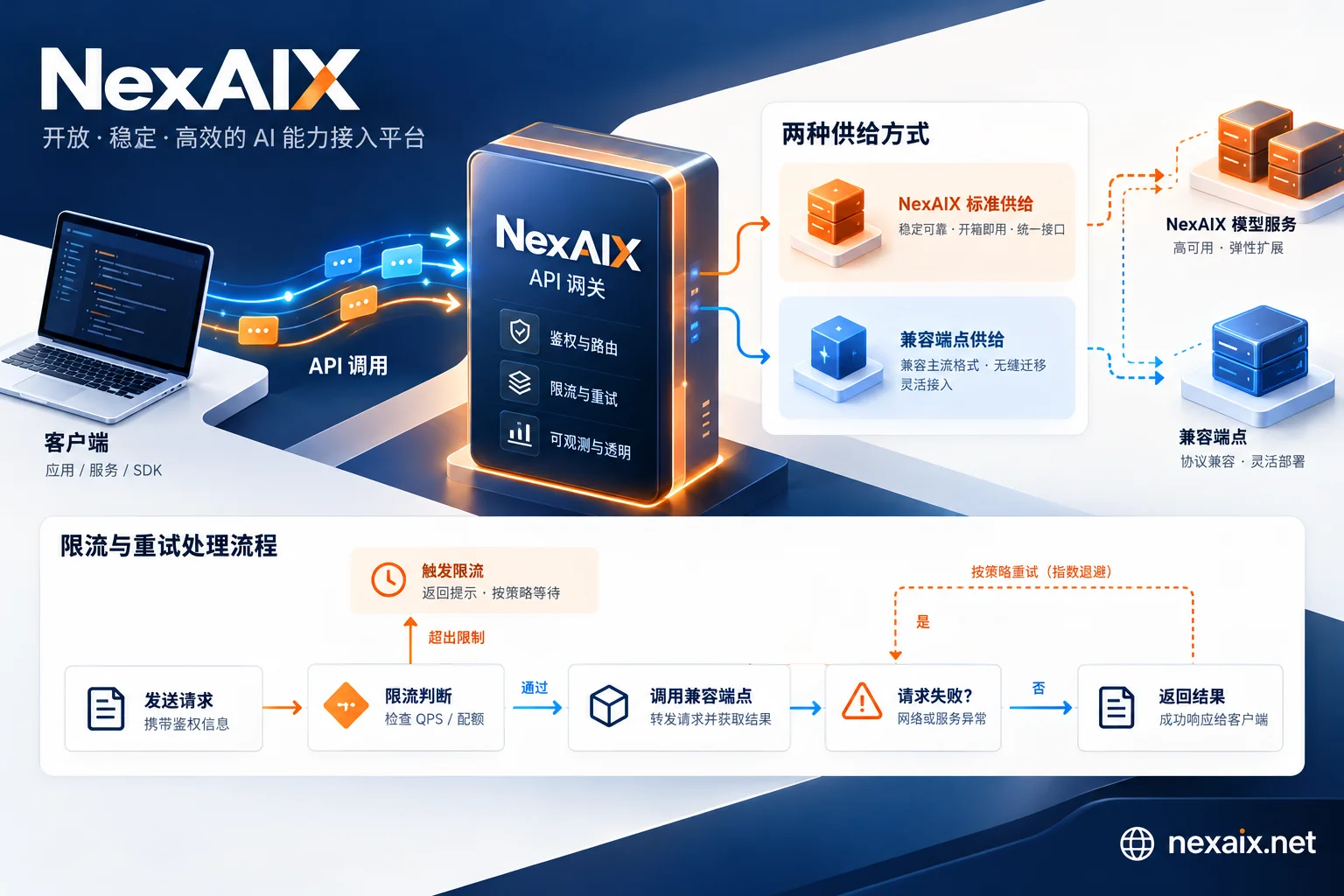
Here you can leverage NexAIX's OpenAI Chat Completions compatible interface (base_url is https://api.nexaix.net/v1). It supports streaming output and function/tool calling, and can echo the actual executed model name in the response body, avoiding the trap of 'thinking you are calling A but actually B'; under load, it returns standard 429 responses and does not silently degrade to other models, making your retry logic regression conclusions credible. For specific available models and specifications, refer to NexAIX's official website's model page, pricing page, and change log.
When to Switch to the Public Beta, and When to Wait
Facing the V4-Flash-0731 public beta, the decision framework is as follows:
- Suitable to switch: Your scenario involves Coding or Agent tasks, and the public beta shows significant advantages in offline evals; you can set a 1-2 week observation period (example parameter, adjust based on your business risk), starting with a 5% gradual rollout.
- Wait longer: If your application is extremely sensitive to latency and stability, or you do not have enough traffic for a gradual sample, it is recommended to wait for the GA version before upgrading.
In any case, set clear rollback conditions: decline in tool calling success rate, increase in P95 timeout, or abnormal cost, and switch back to the migration baseline version (the official model name you verified before the public beta). Note that since deepseek-chat / deepseek-reasoner was retired on 2026-07-24, the rollback target is not the old alias but the baseline version; before rollback, confirm that the baseline model has retained results in your eval. For GA status and future deprecation plans, keep following the official Changelog and do not make production decisions based on rumors.
Finally, here are two concrete action suggestions: First, consolidate the model name into one configuration and run the regression checklist above; second, if you want to compare old and new versions with the same script, go to the NexAIX documentation and model page to check currently available models and integration methods, run a round of offline eval with test credits, and then decide whether to gradually roll out.


Comments(0)