 NexAIX-官方博客
BF16 and FP8 are both floating-point formats, and the difference lies in how many bits each number uses.
- BF16: 16 bits (2 bytes) per number, with the same value range as FP32, so overflow is rare. Most open-source large models release their weights in BF16.
- FP8: 8 bits (1 byte) per number. VRAM usage for weights and KV cache is roughly halved. On GPUs with native FP8 compute units, throughput can increase significantly at the cost of some numerical precision.
The impact on quality depends on the task. For everyday conversation and knowledge Q&A, the evaluation gap between FP8 and BF16 is typically within 0.5%–1%. In code generation, long-chain mathematical reasoning, and deep models with many activation outliers, FP8 is more prone to slight degradation or unstable results.
For selection, there are two scenarios:
- Self-deploying models: First check whether the hardware supports FP8, then whether the task can tolerate the precision loss.
- Calling APIs: Precision is determined by the service provider and you cannot choose it. You need to confirm what precision the provider uses and have a way to verify it yourself.
Bit Width: How Exponent and Mantissa Are Split
A floating-point number consists of three parts: sign bit, exponent bits, and mantissa bits. The exponent determines how large or small a number can be, and the mantissa determines how finely values within the same order of magnitude can be distinguished.
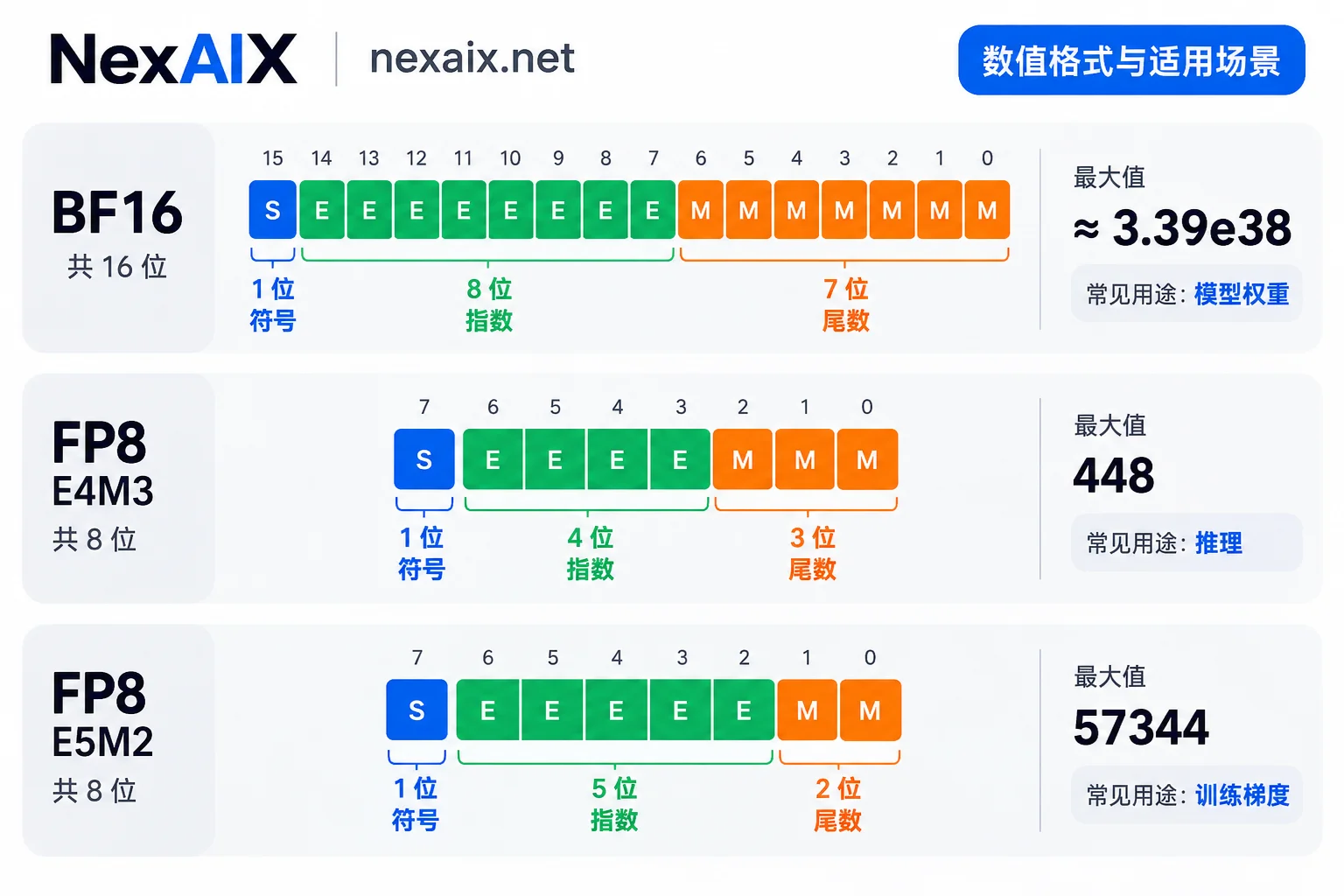
- BF16: 1 sign bit, 8 exponent bits, 7 mantissa bits. The exponent bits match FP32, so the maximum value is about ±3.39×10³⁸, and overflow is rarely a concern during inference.
- FP8 E4M3: 1 sign bit, 4 exponent bits, 3 mantissa bits. The maximum absolute value is about 448, a narrower range, but with one extra mantissa bit for finer values. Weights and activations during inference mostly use this format.
- FP8 E5M2: 1 sign bit, 5 exponent bits, 2 mantissa bits. The maximum absolute value is about 57344, a wider range but coarser, mostly used for gradient computation in training.
So when you see “FP8 inference,” it usually means E4M3. Its numerical range is very narrow, and quantization requires scaling to map original values into this range.
Why is FP8 more popular than integer quantization like INT8 when both are 8-bit? Integer formats have uniformly distributed steps. Floating-point formats have denser steps near zero and sparser steps further out. Transformer weights and activations are mostly concentrated near zero in a bell-shaped distribution, which falls exactly in FP8's finest region. This is the main reason FP8 suffers less loss on general tasks.
VRAM: Weights and KV Cache Roughly Halved
BF16 uses 2 bytes per parameter, FP8 uses 1 byte per parameter. For a 70B parameter model, weights alone drop from about 140 GB to about 70 GB. Other parts like activations and framework overhead may not shrink proportionally, but weights are usually the bulk of VRAM usage.
In long-context scenarios, the KV cache often takes more VRAM than weights. When the KV cache is also stored in FP8, its usage is similarly nearly halved. The direct benefits are twofold:
- The same VRAM can hold a larger batch or more concurrent requests.
- Faster decoding. When large models generate tokens one by one, the bottleneck is usually memory bandwidth, not compute. Moving half the data per step benefits generation speed.
Speed: Gains Only with Native Hardware Support
Whether FP8 can accelerate depends on whether the GPU has native FP8 Tensor Cores.
- NVIDIA Hopper (H100, H200), Ada Lovelace (e.g., L40S), Blackwell architectures: FP8 Tensor Core theoretical throughput is 2x that of BF16. In real deployments, end-to-end throughput typically reaches 1.3–1.8x that of BF16.
- Ampere architecture (e.g., A100) and earlier cards: No native FP8 compute units, so no speedup. Converting data back and forth between FP8 and compute formats may add overhead.
If you have an A100, the main value of FP8 is saving VRAM so the model fits, not speed.
Quality: Which Tasks Show No Difference, Which Need Caution
Public evaluations generally conclude the following.
Tasks with minimal gap: Knowledge evaluations like MMLU-Pro, reading comprehension, everyday conversation. The gap between FP8 and BF16 is typically within 0.5%–1%, hardly noticeable in practice.
Tasks more prone to issues:
- Code generation: Represented by evaluations like HumanEval that require executing unit tests.
- Rigorous symbolic mathematical reasoning.
- Deep models with many activation outliers.
These tasks are more sensitive to errors for two reasons:
- The longer the reasoning chain, the more small numerical errors can accumulate.
- A single wrong symbol in code fails the test; there is no room for “almost correct.”
So on such tasks, FP8 may occasionally degrade or fluctuate, while BF16 remains a more reliable quality baseline.
How to Choose: Match by Scenario
Self-hosted inference service, GPU is Hopper, Ada, or Blackwell, tasks mainly conversation, customer service, summarization, retrieval Q&A
FP8 is well-suited, offering higher throughput and lower cost per token. Before launch, compare with the BF16 version using your own business samples.
Self-hosted inference service, GPU is A100 or other cards without native FP8 support
Consider FP8 only when VRAM cannot fit the BF16 version; there is essentially no speed gain.
Code generation, mathematical reasoning, or alignment with papers and official evaluation results
Prioritize running at the model's official release precision. Most open-source models have a native precision of BF16. Some models are officially released in FP8, in which case FP8 is their native precision and not a degradation. To judge whether precision is reduced, compare with the official release, not always against BF16.
Calling models via API
You cannot see or change the server's runtime precision. The question to ask is: does the provider run this model below its official precision?
How to Confirm Precision Is Not Reduced When Using an API
Step 1: Understand how the model is supplied.
- Closed-source models: Providers like OpenAI and Anthropic do not disclose the actual runtime precision in the cloud, and external verification is impossible. The only thing you can confirm is whether the call goes through the provider's official channel.
- Open-weight models: Deployed by various providers. The same model may run in BF16, FP8, or even lower-precision quantized versions across providers, and price and speed differences often stem from this.
Step 2: Run your own comparative test. No complex evaluation framework is needed; a small fixed set of cases can reveal systematic differences:
- Pick 20–50 cases from real business. Focus on code problems (with unit tests) and multi-step reasoning, as these are most likely to expose precision issues.
- Set temperature to 0 and fix other parameters. Even so, some non-determinism may remain server-side, so do not run only once.
- Prepare a reference group, either the model's official API or your own deployment at official precision. Run the same cases against both the reference and the endpoint under test.
- Compare overall metrics such as unit test pass rate and final answer accuracy, not wording differences in individual responses. If code and math problems show a consistent score drop while casual chat shows no difference, that matches typical low-precision behavior and is worth confirming with the provider.
This method provides only a signal, not direct proof of what precision the server uses. But for judging whether an endpoint is usable for your tasks, it is sufficient.
If the endpoint is OpenAI-compatible, switching between reference and test groups only requires changing base_url and model name. For details, see “How to Use OpenAI-Compatible APIs: Change One Line of base_url to Connect Your Existing App to a New Endpoint”.
Taking NexAIX as an example:
- Open-weight models: Deployed on own compute clusters, with a commitment to no precision reduction, no model swapping, and no context truncation.
- Closed-source models: Through official vendor-authorized channels.
- Which supply method each model uses: Indicated in the model list and on each model's page.
- How to verify the four commitments: Described on the service commitment page, and you can check them yourself using the test steps above.
The test credits after registration are enough to run a round of small-scale comparison.




Comments(0)