 NexAIX-官方博客
How to conduct AI API performance testing? First fix five variables: prompt length, max_tokens, concurrency gradient, sampling time period, and model identifier. Then use offline benchmarks and online gray-scale comparisons to answer different questions. Start with the first step: write down the question you want to answer. The first step of AI API performance testing is not writing a load test script, but determining whether you are dealing with capability regression, performance baseline, or online gray-scale—these three types of questions correspond to completely different testing forms. If you switch models to verify answer quality, that's capability regression; if you want to confirm whether latency has worsened in a new version, that's a performance baseline; if you want to evaluate performance under real traffic, you need gray-scale. Using a load test script to answer capability questions will only yield a pile of meaningless numbers.
Distinguish Three Question Types: Capability Regression, Performance Baseline, Online Gray-Scale
Before proceeding, use the table below to identify your scenario and avoid using the wrong tools.
| Question Type | Typical Scenario | Suitable Test Method |
|---|---|---|
| Capability Regression | Does answer quality drop after model/version change? | Offline evaluation set, human evaluation |
| Performance Baseline | Are latency and throughput within acceptable limits? | Offline benchmark (with fixed variables) |
| Online Gray-Scale | Stability and long-tail performance under real traffic | Small-traffic A/B comparison |
Switching versions mainly requires performance baseline + capability regression; switching models requires all three; switching vendors additionally requires online gray-scale because routing and queuing behaviors are only exposed by real traffic. If you only care about latency and throughput differences when switching models or vendors, go directly to the performance baseline step. But be aware: good offline benchmark results do not guarantee seamless online performance; gray-scale validation is ultimately necessary.
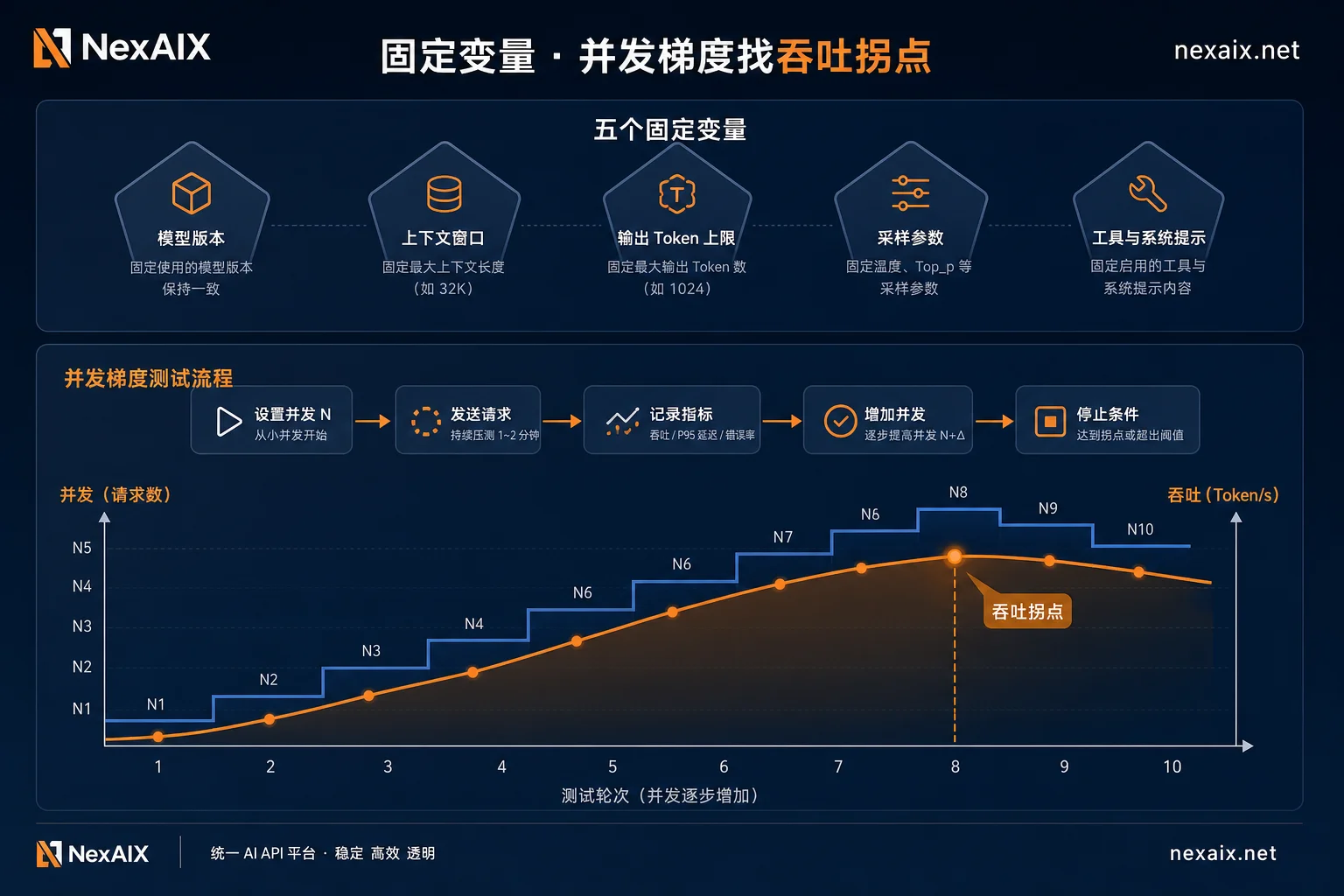
Five Variables That Must Be Fixed: Prompt Length, max_tokens, Concurrency Gradient, Sampling Time Period, Model Identifier
The most easily overlooked aspect of AI API performance testing is variable control. Without fixing these five variables, results cannot be reproduced.
| Variable | Why It Matters | Recommended Fixing Method | Typical Symptom if Not Fixed |
|---|---|---|---|
| Prompt Length | Input token count directly affects TTFT (time to first token) | Use a business prompt template with fixed length | TTFT varies greatly each run, difficult to compare |
| max_tokens | Determines output cap, affects throughput measurement | Set to a fixed value (e.g., 1024) | Inconsistent output length, distorted throughput |
| Concurrency Gradient | Different concurrency levels yield different latency and throughput | Increase stepwise from 1 to 2→5→10→20 | Unaware of the level where degradation begins |
| Sampling Time Period | Peak and off-peak performance differ significantly | Record the specific time period of the test, avoid peak hours when possible | Same script produces vastly different results |
| Model Identifier | Ensures you are testing the same model version | Record model name, version, vendor | Model silently downgraded without your knowledge |
Offline Benchmark: Fix Input and Output Length, Use Concurrency Gradient to Find Throughput Collapse Point
Offline benchmarks answer: “What are the latency and throughput ceilings of this model under ideal conditions?” Procedure:
- TTFT: From sending request to receiving first streaming chunk, measure the difference between client send time and arrival time of the first chunk.
- Output throughput: Divide the number of generated tokens by the duration after the first token, unit is tokens/s.
- E2E: Total time from request start to completion, recorded separately.
Start with concurrency of 1, increase in gradients (1, 2, 5, 10, 20), and record P50/P95 latency and error rate at each level. When throughput plateaus and latency spikes, that point is the throughput collapse point.
Offline benchmarks cannot answer real-traffic questions, such as real prompt length distribution or performance under burst traffic. These require online gray-scale testing.
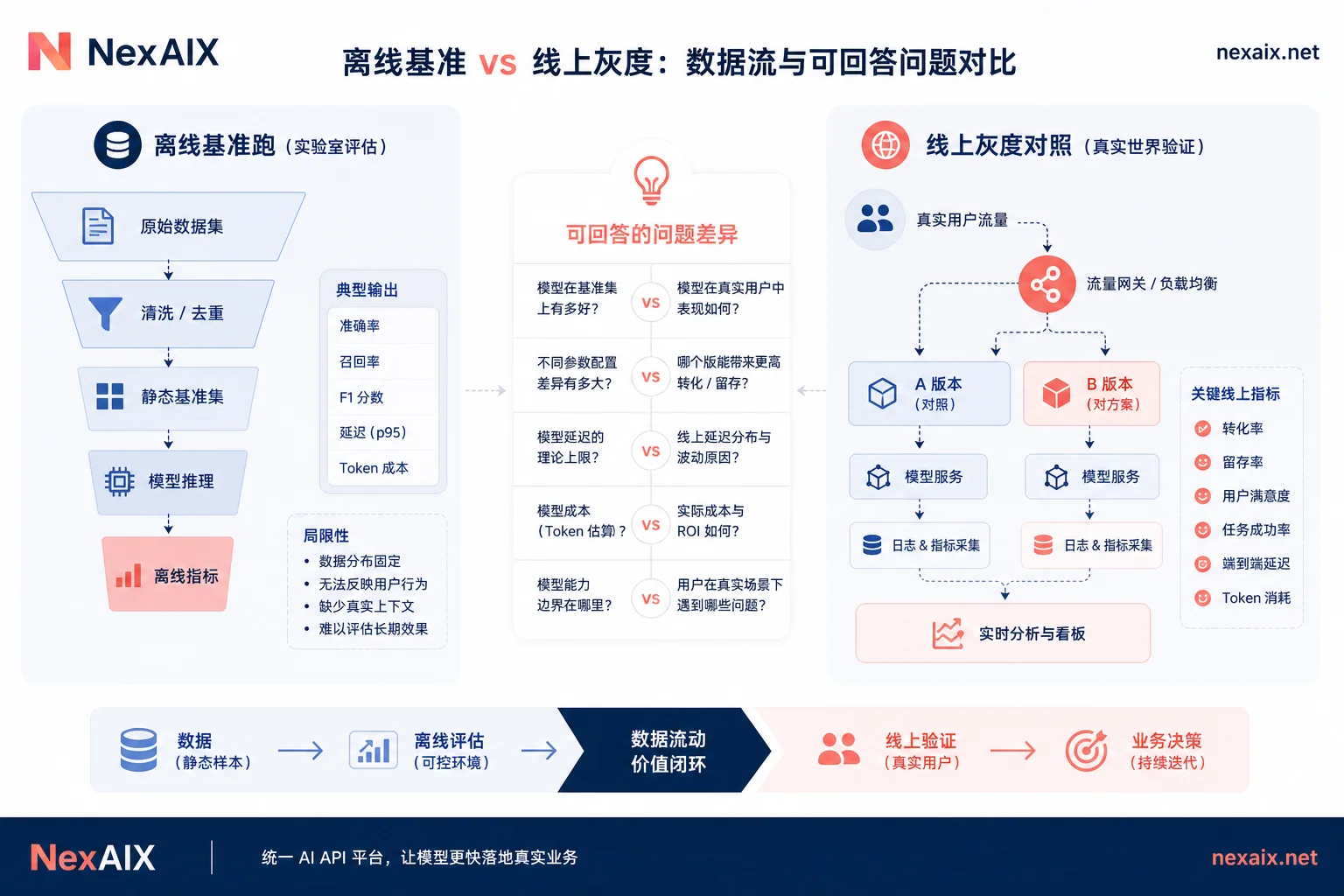
Online Gray-Scale Comparison: What Can Endpoint-Level A/B Traffic Splitting Reveal That Offline Tests Cannot?
In August 2026, Together AI introduced endpoint A/B gray-scale testing on their inference platform, supporting parallel business validation of multiple models and weight versions. This indicates that gray-scale capabilities are moving from the application layer down to the endpoint layer, allowing you to route a portion of requests to a new model without writing routing code, and compare real performance.
Online gray-scale can expose three things that offline tests cannot: real prompt length distribution, real concurrency patterns, and long-tail requests (e.g., extra-long inputs or special formats). There is no standard ratio for traffic splitting; start with a small fraction far below the main traffic, run until a statistically meaningful observation window is complete, and only increase gradually after confirming stable sample size and error rates. Do not arbitrarily decide a fixed number.
The premise of gray-scale testing is that the two traffic groups must be comparable; otherwise conclusions are invalid. For example, if a vendor silently switches to a cheaper model under high load, the differences you measure reflect routing behavior, not model capability.
Interpreting AI API Performance Test Results: Look at Percentiles, Not Averages
Interpretation rules: Focus on P50/P95/P99, treat averages as reference only. A single run is not a conclusion; repeat sampling and re-test across time periods. Compare differences against the magnitude of fluctuation within the same group. If the overlapping intervals of P95 between two groups are large, you cannot conclude a difference. Also record error rate and 429 ratio, otherwise you may mistake rate limiting for latency advantages.
Result table template fields:
| Model Version | Service Tier | Concurrency | P50 Latency | P95 Latency | P99 Latency | Output Throughput | Error Rate | 429 Ratio |
|---|---|---|---|---|---|---|---|---|
| (fill in) | (fill in) | (fill in) | (fill in) | (fill in) | (fill in) | (fill in) | (fill in) | (fill in) |
Toolchain Downgrade: How Strongly Typed SDKs and Service Tiers Change Testing Metrics
The method to measure latency and throughput differences before switching models also depends on your SDK version and service tier. In August 2026, Together AI released a strongly typed OpenAPI-generated Python SDK v2.0. SDK version and parameter type changes affect the request body, so lock the SDK version before testing.
Also, service tier is a variable that must be recorded. DeepInfra offers an OpenAI-compatible Batch API (JSONL asynchronous submission, 20% cost discount), as well as Flex, Standard, and Priority real-time tiers. Latency targets for different tiers vary significantly; real-time conversations and offline batch processing should not be compared in the same table. The test report must specify the service tier.
Premise of Gray-Scale: Trustworthy Model Identification and No Silent Downgrade
To conduct effective AI API performance testing, you must confirm that you are testing the claimed model. If the platform silently downgrades under full load, your control group becomes invalid. NexAIX provides a unified OpenAI-compatible interface (base_url https://api.nexaix.net/v1),返回体, model field corresponds to the actual executing model, returns standard 429 with retry suggestions under full load instead of silent switching, thus ensuring comparability between A/B groups). For related practices, refer to discussions on self-owned compute AI API and AI API latency.
Checklist for Performance Regression When Switching Models or Vendors
- [ ] Fix five variables: prompt length, max_tokens, concurrency gradient, sampling time period, model identifier
- [ ] Run offline benchmark: use concurrency gradient to find throughput collapse point
- [ ] Record service tier (e.g., Flex/Standard/Priority)
- [ ] Run online gray-scale: start with low ratio, scale up based on observation window
- [ ] Verify model identifier: confirm no silent downgrade
- [ ] Record error rate and 429 ratio
- [ ] Compare using percentiles, not just averages
- [ ] Re-test across time periods to confirm stable results
Apply this checklist to your own business prompt in a benchmark run, then decide whether to proceed with gray-scale. For cross-model comparisons, you can check available models and specifications on the NexAIX model page and use the test quota for initial runs. For further discussion on concurrency and evaluation methods, see AI API concurrency and AI model evaluation.
Frequently Asked Questions
Why do performance test results vary each time?
Usually because variables are not fixed: input length differences, concurrency fluctuations, time-of-day variations, service tier changes. Also, retries caused by upstream rate limiting can be included in latency measurements. Strictly fix the five variables and record the time period and tier to significantly reduce randomness.
How to measure TTFT and output throughput separately?
TTFT is the milliseconds from request sent to first token arrival; record the difference between client send time and first chunk arrival time. Output throughput is generated tokens divided by duration after the first token (token/s). Measure them separately because TTFT is primarily affected by network and queueing, while throughput is mainly influenced by model decoding speed.
Do batch tasks require separate performance testing?
Yes. Batch tasks typically use asynchronous interfaces with different latency metrics and may enjoy separate cost discounts (e.g., DeepInfra Batch API 20% discount). Test throughput and completion rate separately; do not mix with real-time interfaces.
What parameters should be fixed when comparing the same prompt across vendors?
At minimum, fix prompt length, max_tokens, temperature, concurrency, and service tier. Additionally, confirm model versions are identical and record the testing time period. Also note in the report if the vendor has gray-scale or caching mechanisms; otherwise, comparison results may be distorted.




Comments(0)